What Minecraft App Is Free? A Practical Guide for 2026
Discover which Minecraft apps are actually free, including browser classics, demos, and education editions. Learn how to download safely, compare features, and decide when to upgrade.


Short answer: the official Minecraft app is not free on most platforms, but you can access free options such as Minecraft Classic in the browser, the Minecraft Demo trial on PC, and free educational or trial editions offered by partners. These options let you explore core mechanics and builds without paying, though feature sets and limits vary by platform.
Why understanding free Minecraft options matters
According to Craft Guide, the question "what minecraft app is free" often boils down to how the term free is defined across platforms. The official Minecraft app—the one most players want to buy for full access—typically isn’t free. However, there are legitimate, free routes that let you test the game’s core ideas, experiment with builds, and learn mechanics without committing to a purchase. This section clarifies what to expect from free options, how they fit into your goals (creative vs. survival play, learning, or modding), and how to avoid common pitfalls when searching for a no-cost entry point.
Free options you can actually use today
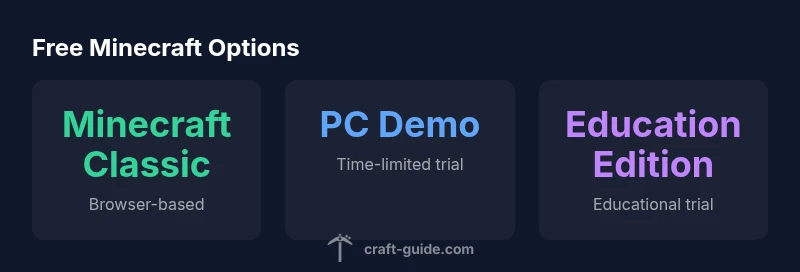
There are several legitimate, no-cost paths to explore Minecraft concepts without paying for the full product. The classic browser-based Minecraft Classic gives instant access with no login and is ideal for short creative sessions. The PC Demo provides a time- or feature-limited trial of the desktop edition, useful for evaluating controls, world-building, and performance. Some educational programs offer free trials or teacher licenses, letting students and curious players experience Minecraft in a classroom-friendly environment. Always download from official sources or recognized partners to avoid counterfeit apps that promise free access but install malware or trackers.
For the broader Minecraft ecosystem, consider free, officially sanctioned learning resources and community-created demonstrations that run in parallel with paid editions. While these options won’t replace a full purchase for most players, they’re excellent entry points for beginners seeking to learn the basics, test builds, or explore what the game has to offer before investing.
How these options differ from the paid Minecraft apps
Free options typically differ from the paid editions in several key areas: saved world features, progression systems, and access to multiplayer servers. Minecraft Classic focuses on simple creative modes with no persisted profiles, not the same as modern, cross-platform multiplayer worlds. The Minecraft Demo often omits long-term saves and some advanced blocks or items found in the full game. Educational editions emphasize classroom use and lesson plans rather than personal exploration. In short, free options are great for learning and quick experiments, but they aren’t substitutes for the full survival or creative experiences that come with a paid license.
How to verify legitimate free Minecraft apps
To avoid scams, always verify that a free Minecraft option comes from reputable sources: Mojang or official partners (such as school programs or recognized educational platforms). Check app store developer names, read user reviews, and compare feature lists to the official product. Be cautious of third-party download sites that promise “free” access to modern Minecraft worlds; these are often phishing attempts or carry malware. Craft Guide recommends starting from the official Minecraft site and the platform’s own app store listing before exploring classroom programs or sanctioned demos.
Step-by-step: trying free options in 15 minutes
- Open your browser and navigate to the official Minecraft Classic page. 2) Play a quick creative session to gauge controls and performance. 3) If you’re on PC, install the Minecraft Demo from the official launcher or store page and run a short test world. 4) If you’re curious about education features, request a teacher or district access to a trial edition through approved channels. 5) Compare what you experienced with paid features you’d like to have (multiplayer, cross-platform play, and mod support) to decide your next step.
Limitations you should expect from free options
Free options usually limit multiplayer access, world saving, and long-term progression. Browser-based Classic cannot import modern worlds or mods, and the PC Demo often restricts time or feature sets. Education editions appear primarily in an institutional context and may not be usable for personal projects outside classrooms. Expect fewer updates and fewer customization options than the paid editions. If your goal is large-scale survival servers, complex redstone builds, or intense modding, plan to upgrade to a paid edition.
Next steps: when to consider upgrading to paid editions
If you find yourself repeatedly returning to Minecraft for recurring play sessions, server-building, or if you want the full creative toolkit (including all blocks, textures, and mod support), upgrading to the paid Minecraft app is worth it. Paid editions provide full access across platforms, robust multiplayer, frequent updates, and official support. You can often save money by purchasing during sale events or bundling with related products (such as Java or Bedrock platforms) through authorized retailers.
Practical building ideas with free options
Free options are perfect for practicing basic building, testing new redstone ideas, and prototyping small-scale projects. Use Classic for quick scenic builds or seed explorations, and try the Demo to test basic crafting layouts. For education, leverage ready-made lesson templates to practice collaborative planning and project management in a school-friendly environment. Treat these options as stepping stones toward a paid edition if your goals scale or if you want stronger cross-platform collaboration.
Free Minecraft options comparison
| Option | Access | Limitations | Best For |
|---|---|---|---|
| Minecraft Classic (browser) | Free | No modern-world imports; no persistent saves | Casual exploration, quick demos |
| Minecraft Demo (PC) | Free with account | Time/feature limitations | Trying before buying |
| Education Edition (Trial) | Free through schools/educators | Licensing required, education-focused | Educational use |
| Free Minecraft-inspired apps (clones) | Free to download | Not official; safety concerns possible | Creative building without purchase |
People Also Ask
Is Minecraft Classic still available for free?
Yes, Minecraft Classic remains a free browser option that lets you explore basic building and creativity without purchasing the game. It’s a good entry-point but lacks modern features and long-term saves.
Yes, you can try Minecraft Classic for free in your browser, but it’s a simplified version.
Are there legal free Minecraft apps besides Classic?
Beyond Classic, you’ll find official demos and education editions offered by Mojang or partners. These are legitimate, but they come with limitations focused on testing or classroom use rather than full gameplay.
There are official demos and education editions, but they have limits compared to the full game.
Can I play multiplayer on free Minecraft options?
Multiplayer access is usually restricted or unavailable on free options like Classic and the PC Demo. For full cross-play multiplayer, you’ll typically need a paid edition.
Most free options don’t support full multiplayer; the paid edition is usually required for that.
What should I watch out for when downloading free Minecraft apps?
Always download from official stores or the official Minecraft site. Be wary of third-party sites that promise free access, as they may contain malware or fake versions.
Stick to official sources to avoid malware and scams.
If I only want to learn, is Education Edition free?
Education Edition often offers free trials or classroom licenses for educators. It’s designed for learning environments rather than personal play.
Education Edition is intended for schools and teachers, with trials available.
“Free options are valuable for testing core ideas and learning the basics, but they won’t replace the full experience offered by paid editions.”
The Essentials
- Know that not all free apps are official; verify sources first
- Use Minecraft Classic for quick, browser-based testing
- Try the PC Demo to evaluate controls and performance
- Education Edition trials suit classrooms, not casual play
- Upgrade to paid editions if you want full features and cross-platform play