How to Play Minecraft for Free: Legit Paths and Tips
Learn legitimate ways to play Minecraft for free, including browser classics, official demos, and free trials. Step-by-step guidance, safety tips, and practical advice for beginners to advanced players.


Goal: Play Minecraft for free using legitimate options. You can access Minecraft Classic in your browser, try the official Java Edition demo, or use a Bedrock free trial where available. To start, visit the official Minecraft site, select a free option, and follow on-screen prompts to launch a timed demo or browser version. Craft Guide highlights these safe paths to protect accounts and devices.
Why plays minecraft for free? Legit options explained
According to Craft Guide, the interest in plays minecraft for free exists, but players should pursue legitimate routes rather than risky third-party downloads. This guide helps you understand safe, official ways to explore the game without immediately purchasing a full license. You’ll learn how browser-based classics, official demos, and occasional free trials let you sample Minecraft’s core mechanics—blending creativity with a gentle learning curve. By starting with these options, you reduce the risk of malware, account compromises, or unsupported device configurations. If you’re new to Minecraft, this approach keeps your early experiences positive and under your control while you decide what edition to buy later.
Free browser options: Minecraft Classic and browser demos
Minecraft Classic is a browser-based edition from the game’s early days, offering a simplified, nostalgia-focused snapshot of gameplay. It runs directly in most modern browsers without a purchase, making it a safe entry point for players curious about mechanics like building with basic blocks and exploring simple biomes. Browser demos and lightweight versions typically purposefully limit features (no modern blocks, limited worlds, or restricted multiplayer), but they’re excellent for learning controls, crafting basics, and general strategy before committing to a full purchase.
Free trials and demos for Java and Bedrock editions
For many players, official demos and trials provide a legitimate way to experience the full game’s feel before buying. The Java Edition demo and Bedrock Edition trials (where offered) typically allow limited playtime, a capped world size, or feature-limited access. These trials are designed to let you test performance on your hardware, experiment with redstone and building, and gauge whether the game meets your expectations. Availability varies by platform and region, so always start at the official site and read the terms of the trial closely to know what’s included and for how long.
Safety and legality: avoid piracy and scams
Pirated copies, cracked launchers, or unverified installers are illegal and dangerous. They often come with malware, data-collection risks, and the potential to compromise your personal information. Stick to official sources (the Minecraft website or authorized app stores) and be wary of third-party sites promising “free full game.” If something feels off—unreasonably aggressive ads, requests for your login credentials outside official portals, or executable files from unknown sources—back away and report or close the page. Responsible browsing protects both you and the broader Minecraft community.
Step-by-step: starting with a free option
Starting with a free option is straightforward: choose the browser Classic or an official demo, ensure your device meets basic requirements, and follow on-screen prompts to launch. If you’re using the Java Edition demo, you’ll typically sign in with a Microsoft/Xbox account or create one if needed. For browser-based play, you’ll navigate to the official site and select the Classic option. You can then immediately begin placing blocks, building, and exploring at a pace that matches your curiosity. Pro tip: record your initial experiences so you can compare early impressions with the full game later.
Common myths and realities
Myth: Free options are always behind paywalls or are permanently limited. Reality: Official demos and browser versions exist precisely to let you try the game, with some limits for fairness and performance. Myth: Free options are unsafe. Reality: When sourced from official channels, they’re generally safe if you avoid downloading anything. Myth: Progress carries over from a free demo to the full game. Reality: If progress carries over, it’s tied to the account and the edition you ultimately purchase. Real players treat these options as onboarding tools rather than substitutes for purchase.
Craft Guide verdict: final recommendations
The Craft Guide team recommends starting with the browser-based Classic or the official Java/Bedrock demos to assess your interest and hardware compatibility before a purchase decision. These paths minimize risk, keep your devices secure, and align with Minecraft’s terms of service. If you decide the game suits you, consider acquiring the full edition to unlock the full creative and survival experience. Craft Guide’s guidance focuses on safe, legitimate access that respects the game’s licensing.
References and additional resources
For further context, you can explore official and reputable outlets that discuss free-demo options and safe play practices. Primary source: Minecraft official site. Secondary context: major gaming publications that cover free trials and browser-based experiences. Always verify the source before proceeding to install or log in, and avoid any site asking for sensitive credentials outside official pages.
Tools & Materials
- Official Minecraft website access(Visit the official site to access free options and demos)
- Modern web browser (Chrome/Edge/Firefox/Safari)(Ensure it is up to date for browser-based play)
- Microsoft/Xbox account (if prompted by demo or login)(Needed for some Java/Bedrock demos or future purchases)
- Stable internet connection(Minimum reliable bandwidth for smooth loading)
- Optional Minecraft launcher (for Java Edition demos)(Launcher may be used if you’re testing Java Edition)
Steps
Estimated time: 25-60 minutes
- 1
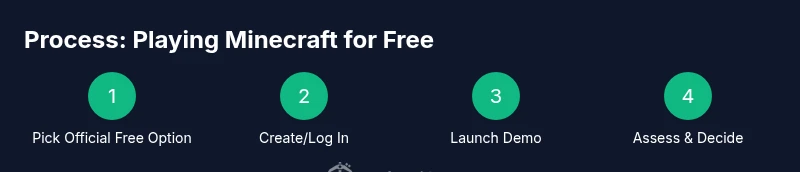
Choose a legitimate free option
Open the official Minecraft site and locate the free options such as Minecraft Classic or the Java/Bedrock demo. Confirm the option is offered by Mojang/Microsoft and not a third-party site. This is the essential first step to ensure safety and compliance.
Tip: Bookmark the official page to avoid phishing sites that imitate Minecraft offers. - 2
Create or log in to the required account
If prompted, sign in with a Microsoft/Xbox account or create one if you don’t have one. Some demos require login to save progress or access additional features.
Tip: Use a strong, unique password and enable two-factor authentication where available. - 3
Launch the free option
Click the free option (Demo or Classic) and allow the page to load the game in your browser or through the launcher. You’ll start with a minimal world to test controls and basic crafting.
Tip: Disable extensions that could interfere with browser-based games (ad blockers sometimes block essential scripts). - 4
Adjust settings for performance
In the settings menu, reduce render distance, graphics, and resolution to improve performance on older devices. This helps you get a smoother experience during the trial.
Tip: Test a few configurations and keep a baseline that works across sessions. - 5
Play and explore safely
Use the demo to explore building, survival basics, and world generation. Take notes on what you enjoy most and what features you’d like to see in the full game.
Tip: Keep a separate account or profile for demos to avoid cluttering your main game saves. - 6
Decide on a full purchase plan
If the free option meets your expectations, consider purchasing the edition that best suits your play style. Free demos often pave the way for a confident buying decision.
Tip: Compare Java vs Bedrock features and cross-play options before buying. - 7
Stay aware of safety and licensing
Only use official channels for demos, and avoid pirated copies or third-party downloaders. This protects your device and your account integrity.
Tip: If something asks for private credentials outside the official pages, close the tab and report it.
People Also Ask
Can I play Minecraft for free on PC?
Yes, through official free options like Minecraft Classic browser edition or Java/Bedrock demos. These provide a safe, limited experience before purchase. Always use official channels to avoid scams.
Yes. You can start with the official browser Classic or a Java/Bedrock demo to try Minecraft for free, using official sites to stay safe.
Is Minecraft truly free or are there hidden costs?
Minecraft offers legitimate free options, but the full game generally requires a purchase. Demos and browser versions have feature and time limitations that don’t apply to the full game.
There are legitimate free options, but the complete experience usually costs money. Demos are time-limited or feature-limited.
What is Minecraft Classic?
Minecraft Classic is a browser-based edition from the game's early days, offering a simplified experience at no cost. It’s a safe way to learn the basics and see how the game feels on your device.
Minecraft Classic is a free browser version with limited features—great for trying out basic gameplay.
How long do free demos last?
Demo durations vary by option and platform. Check the official page for exact time limits and what features are available during the trial.
Demo durations depend on the option and platform; verify limits on the official site.
Are free options safe from scams?
Yes, when you use official sources and avoid third-party downloaders. Stick to the official Minecraft site or sanctioned stores to protect your device and data.
Yes, stick to official sources to stay safe and avoid scams.
Can I transfer progress from a free demo to the full game?
Progress is typically tied to your account and edition purchased. Demos rarely carry progress into the full game unless you buy and unlock the full version.
Progress from a demo usually doesn’t transfer to the full game unless you purchase.
Watch Video
The Essentials
- Choose an official free option first.
- Verify source authenticity to avoid scams.
- Expect feature limitations in demos and classics.
- Protect your accounts with strong passwords and two-factor authentication.
- Upgrade to full game when you’re ready for a complete experience.