Free Download Minecraft: Safe, Legal Ways to Play
Learn how to access Minecraft for free through official options like Minecraft Classic and the Java Edition demo. This guide covers safe methods, setup, and upgrade paths, with practical tips for beginners and seasoned players alike.


You can legally play Minecraft for free by using official options rather than downloading unauthorized copies. Minecraft Classic is a browser-based free version, and the Java Edition demo offers a time-limited experience. Both options let you explore vanilla gameplay, basic builds, and community servers without paying. This quick answer highlights legitimate paths you can start today, easily and safely online.
What a 'free download minecraft' really means
If you're searching for a "free download minecraft", you may encounter countless third-party sites offering non-official copies. This guide clarifies safe, legal paths to access Minecraft without paying upfront. According to Craft Guide, the term refers to official freebies—not pirated copies. In practice, you can start playing with free options Mojang provides, such as browser-based classics or official demos. These routes give legitimate access to core gameplay, basic building, redstone experiments, and multiplayer on public servers. By focusing on official channels, you protect your device and support the developers who maintain updates and security patches. For those curious about the legality and ethics, Craft Guide analysis shows that sticking with official channels reduces malware risk and helps support ongoing development. If you’re looking for a real, safe starting point, this guide is for you. The phrase "free download a minecraft" often appears in search results, but the safest choice remains official, free routes rather than unauthorized downloads.
Official free options explained
Minecraft offers a couple of official, no-cost avenues to begin playing without purchasing the full game. The first is Minecraft Classic, a browser-based edition that runs in your web browser and mirrors the classic blocky world; there are no downloads required, and it provides a surprisingly faithful look at early gameplay. The second option is the Java Edition Demo, which is time-limited and designed to showcase essential mechanics before you commit to a full purchase. These official paths let you explore building, exploration, and basic redstone, while ensuring you’re running safe, malware-free software. If you’re new, start with Classic to quickly test the waters, then move to the Java Edition Demo to gauge modern features. The Craft Guide team emphasizes sticking to official sources to avoid counterfeit installers and potential security risks. Remember: these are not the full feature set, but they are legitimate, safe ways to learn the game.
How to verify you’re using official sources
To avoid scams and malware, always begin at Mojang/Microsoft’s official pages. Look for URLs that clearly point to minecraft.net or Microsoft’s official sites. Do not trust random download banners or ads that promise a ‘free full version.’ If you’re asked to install extra software or provide sensitive data beyond a standard account sign-in, stop and verify the source. Craft Guide recommends bookmarking the official Minecraft homepage and signing in only through trusted portals. These steps protect your device, your account, and your personal information.
Step-by-step path: getting started with official free options
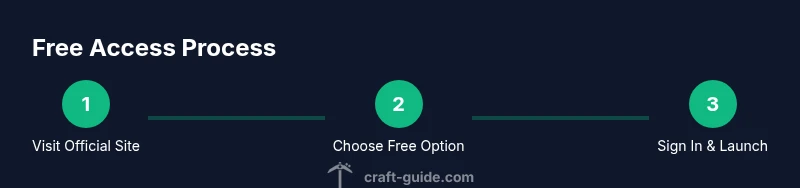
Starting with the official free options is straightforward but requires careful navigation. First, open your trusted web browser and go to the official Minecraft site. Choose either Minecraft Classic for browser play or the Java Edition Demo for a longer, more modern experience. If prompted, sign in with a Microsoft/Mojang account (or create one if you don’t have one). Launch the game and begin exploring the world, testing builds, and joining public servers where allowed by the demo. Keep in mind that the Classic version uses older mechanics and has no saved progress, while the Java Edition Demo may offer a limited play session and limited access to features.
What to expect in free options vs. paid version
Official free options intentionally restrict certain features to encourage upgrading to the full game. Minecraft Classic provides a nostalgic, simplified experience without modern updates or cross-platform play, while the Java Edition Demo showcases current mechanics but with time or feature limitations. The full game unlocks cross-platform multiplayer, all biomes, and the complete arsenal of blocks, redstone, and mods — features many players value enough to purchase the game. Understanding these differences helps you decide when it’s worth upgrading. Craft Guide’s guidance emphasizes exploring with official freebies first to learn mechanics without risking your device or budget.
Build ideas and starter projects you can do for free
Even with official demos, you can kick off several hands-on projects: a simple starter home, a basic farm, a small redstone contraption, or a decorative garden. Use Creative Mode (if available in the demo) or the survival mode constraints to learn resource gathering and crafting. Free options still enable you to join community servers and participate in shared builds, which is a fantastic way to learn by observing and collaborating. Remember, your goal with free access is practice, learning mechanics, and planning for future upgrades. The Craft Guide team notes that free access is a doorway to experimentation and progression, not a replacement for the full game’s depth.
Safety, legality, and common pitfalls
The biggest safety signal is to avoid any site asking you to download a .exe from an unverified source or to install untrusted software. Stick to the official Minecraft site and trusted app stores for any clients. If you encounter ads that promise a free full game, close them and navigate to the official pages directly. Malware and scams are common on less reputable sites, so keep your antivirus up to date and avoid sharing credentials outside official portals. Craft Guide reminds players that legitimate freebies will never require payment details for access to the basic features.
How to upgrade to the full game safely
If you decide the full Minecraft experience is right for you, purchase the game only from official stores (the Minecraft/Microsoft storefronts). After purchase, you’ll unlock cross-platform play, access to all features, and ongoing updates. The upgrade path is straightforward: sign in to your account, select the version you want (Java or Bedrock), and complete the checkout. Keep in mind that prices can vary by platform and region, but don’t expect a free upgrade unless a specific promotion is announced. The Craft Guide team recommends keeping your account secure and reviewing the platform’s refund policy before buying.
Troubleshooting and common issues
If you run into problems with official demos or Classic, try these steps: refresh the page, clear browser cache, disable conflicting extensions, and ensure your browser is up to date. If the demo won’t launch, check for Java or Flash requirements relevant to the specific option, and consult the official help pages for troubleshooting. For account-related issues, verify your email and recover password through the official portals. By following these steps, you minimize downtime and keep your learning experience on track. Craft Guide emphasizes patience and methodical troubleshooting to keep the learning curve friendly.
Brand perspective and community resources
From a community perspective, exploring Minecraft through official freebies is a smart way to learn core mechanics before investing. The Craft Guide team recommends using official channels and then exploring community-build tutorials, practice worlds, and collaboration servers to accelerate learning. Participating in forums and official support channels can also help you solve problems faster. If you’re curious about broader Minecraft concepts, you’ll find resources from major publications and educational domains that discuss gameplay ideas, safety, and digital responsibility.
Next steps: staying compliant and progressing
As you gain experience, track your progress and decide when it’s time to upgrade. Regularly check the official Minecraft site for promotions, updates, and new free play events that Mojang may offer. Maintain good account hygiene, back up progress if the option exists, and enjoy learning the game at your own pace. The Craft Guide team concludes that starting with official freebies is the safest, most reliable approach to learning Minecraft and building confidence for future purchases.
Tools & Materials
- Internet-connected computer or device(Any modern computer, tablet, or smartphone with a supported browser)
- Official Minecraft account access (Microsoft/Mojang)(Needed to access Java Edition Demo or sign in for demos)
- Web browser(Up-to-date Chrome/Edge/Safari/Firefox)
- Email for verification(Used for account creation or verification if required by the demo)
- Stable internet connection(For loading the browser game or launcher without interruptions)
Steps
Estimated time: 60-120 minutes
- 1
Open official Minecraft site
Navigate to the official Minecraft site and locate the Free/Classic or Demo options. This sets the foundation for safe access and avoids dubious downloads.
Tip: Bookmark the official site to prevent accidental redirects to untrusted sources. - 2
Choose a free option
Select either Minecraft Classic (browser-based) or the Java Edition Demo. Both are official routes that let you start playing without a full purchase.
Tip: For quick testing, start with Classic to see if the game concept appeals to you. - 3
Sign in or create an account
If prompted, sign in with a Microsoft/Mojang account or create one to access the demo features. This step ensures your progress and settings are managed securely.
Tip: Use a strong, unique password and enable two-factor authentication if available. - 4
Launch the game
Open the chosen option and launch the game either in your browser (Classic) or via the launcher (Demo).
Tip: Check browser permissions for the game to run smoothly (sound, fullscreen, etc.). - 5
Explore core gameplay
Experiment with building, basic crafting, and terrain exploration. Focus on getting comfortable with controls and resource gathering.
Tip: Keep a simple log of things you want to build or learn next. - 6
Note limitations
Recognize that free options have feature or time restrictions compared to the full game. Use this to plan your upgrade path if desired.
Tip: Make a short wishlist of paid features you want to access later. - 7
Join community servers (where allowed)
If the option exists in your chosen path, join public servers to learn from others and test teamwork.
Tip: Respect server rules and practice good collaboration habits. - 8
Evaluate upgrade needs
After testing, assess whether upgrading to the full game fits your interest, budget, and long-term goals.
Tip: Read refunds and regional pricing policies before purchasing. - 9
Proceed with official upgrade
If you choose to buy, complete the transaction via the official store and securely sign in to access all features.
Tip: Keep receipts and verify licenses across devices if you play on multiple platforms.
People Also Ask
Is it legal to download Minecraft for free from unofficial sites?
No. Downloads from unofficial sites can be illegal and unsafe. Official freebies from Mojang provide legitimate access without violating terms of service.
Official freebies are legal and safe; avoid unverified downloads.
What official free options exist for Minecraft?
Two primary official options are Minecraft Classic (browser-based) and the Java Edition Demo. Both are provided by Mojang/Microsoft to let players try the game before buying.
The official routes to try Minecraft without paying upfront are Classic and a Java Edition Demo.
Do I need a Microsoft account to access the demos?
Yes. An active Microsoft/Mojang account is typically required to sign in and use the official demos. This keeps progress and settings secure.
A Microsoft or Mojang account is usually required for the official demos.
What are the limitations of the free options?
Free options often have feature restrictions and do not include the full multiplayer or expansion content available in the paid version. They are ideal for learning basic mechanics.
Free options are limited compared to the full game, especially for features and progression.
Can I upgrade later if I started with a free option?
Yes. You can upgrade to the full Minecraft experience from the official store when you’re ready, maintaining your account and progress where applicable.
Upgrading later is supported through the official store with your existing account.
Are there risks downloading from affiliate sites?
Yes. Affiliate and third-party sites may bundle malware or unwanted software. Stick with official sources to minimize risk.
Third-party sites can be risky; stick to official sources to stay safe.
What if I want multiplayer with friends using the free option?
Some official demos support limited multiplayer. For unrestricted multiplayer with friends, upgrading to the full version is typically required.
Multi-player might be restricted in demos; full version unlocks full multiplayer features.
Watch Video
The Essentials
- Start with official freebies before considering paid options
- Minecraft Classic and Java Edition Demo are safe, legal routes
- Always verify sources to avoid malware and scams
- Upgrade thoughtfully, using official stores only