Minecraft Invitations Birthday: Easy Party Invite Guide
Learn to craft memorable Minecraft birthday invitations using in-game items, printable cards, and digital invites. This step-by-step guide covers themes, templates, delivery options, and RSVP tips for a smooth party.


Learn how to design and send Minecraft invitations for a birthday party, combining in-game visuals with printable or digital formats. This guide covers themes, templates, delivery options, and RSVP tips to keep the party organized.
The Core Idea Behind Minecraft Invitations Birthday
Invitations set the mood for any party, and in Minecraft, they carry extra meaning by blending the game's voxel world with real-world celebration cues. A well-designed invite helps players understand the date, time, and how to join your server or realm, while also capturing the theme of the party. According to Craft Guide, the most effective invites balance game-friendly visuals with clear, actionable details. Start by choosing a theme that fits your party—a cozy canyon cabin, a royal castle, or a neon arcade scene. Then decide whether you want in-game artifacts, printable cards, or a simple digital message. We’ll explore all formats so you can pick what works best for your group and budget. For younger players or family gatherings, printable or digital invites might be easiest, while a server-based invitation still works beautifully for friends who spend most of their time in-game. Whichever route you choose, plan a short, friendly message that includes the party date, start time, location (in-game or real world), and RSVP instructions. A strong invite also hints at activities, like a scavenger hunt, a redstone challenge, or a team build contest, to generate excitement before day one.
Templates and Customization: Crafting Your Message
Your invite's text is the core, but visuals drive the initial appeal. Create a few interchangeable templates you can reuse for different audiences and sizes (digital banner, printable card, or chat badge). Start with a consistent header, such as 'You’re invited to a Minecraft birthday adventure!' Then fill in essential fields: Date, Time, Server or real-world location, RSVP method, and any required items or rules (e.g., bring a compass, wear purple armor). Use tone appropriate for your audience; for younger players, keep the language playful and simple; for teens or adults, lean toward witty or thematic lines. Include a call to action, such as 'RSVP by Friday to secure your place' or 'Comment in the event chat to confirm.' If you’re crafting in-game invites, consider iconography—spawners, swords, and cake icons are instantly recognizable. For printable cards, create a consistent layout with a Minecraft-styled border, bold headings, and a QR code linking to a server invite or Google form. For digital invites, you can embed a link, a small map image, or a short video trailer to boost engagement.
Design Options: In-Game, Printable, and Digital Invites
In-game invites honor Minecraft culture by using banners, signs, and in-world items as delivery vehicles. Printable invites bring the physical party vibe into a kid’s desk or adult’s kitchen corkboard, while digital invites offer instant distribution across devices. For in-game invites, craft a banner with your party theme colors and a cake icon, then place it at the spawn or a visible location. Printable invites allow you to invite guests at home, with a simple layout that mirrors the in-game aesthetic and includes a map or server details. Digital invites can leverage chat messages with a compact image or a short video preview. No single format fits every group; you can combine formats—send a banner in-game and share printable or digital copies via chat or email. When selecting formats, consider accessibility, the age range of players, and whether guests are primarily Java Edition, Bedrock, or console. By aligning format with audience, you’ll maximize engagement and RSVP rates.
From Theme to Text: Building Your Invite
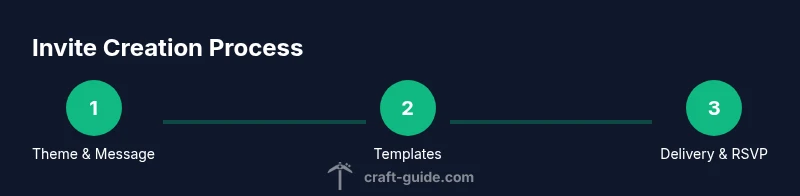
A practical approach starts with a theme, then translates into text and visuals. Step one: decide on a theme that fits the birthday party—adventure, sci-fi, or medieval. Step two: draft concise copy that answers the five W's (who, what, when, where, why) and keeps the tone playful. Step three: assemble assets—images, banners, borders, and fonts that match the Minecraft vibe. Step four: prototype your invite in one format first, then adapt it to other formats if needed. Step five: proofread for clarity and test readability on screens and paper. If you’re short on time, reuse a template and swap date, time, and RSVP details to save effort. Finally, gather feedback from a friend or family member to catch phrasing issues or layout problems before distribution.
Sending Invites and Tracking RSVPs
Distribute invites using the chosen formats: post a banner in your server, send printable cards to players’ homes, and share a digital invite link in chat. Include clear RSVP instructions and a deadline. To track responses, maintain a simple checklist or spreadsheet with columns for name, RSVP status, number of guests, and any special accommodations. Encourage early responses by offering a small in-game perk for those who RSVP by a certain date. After invitations go out, monitor server activity and adjust the party plan—food, games, and build challenges—based on the number of attendees. Remember to protect privacy: avoid sharing real-world addresses in public chats and use server-level settings for private events.
Common Mistakes and How to Avoid Them
The biggest missteps are vague details, late distribution, and mixed formats that confuse guests. Avoid missing date/time information or the RSVP method. Don’t overstuff messages with trivia that distracts from the essentials. If you’re using printables, ensure the text is legible and the QR code links work. Finally, balance in-game and real-world delivery to suit guests who don’t regularly play Minecraft; provide a non-game alternative when needed.
Tools & Materials
- Printable invitation templates(Digital or printable formats)
- Printer(Color printer preferred)
- Card stock or thick paper(At least 100 lb weight if printable)
- In-game assets (banners, signs, maps)(Digital assets or in‑game items)
- Scissors or paper cutter(For trimming printable cards)
- Glue, tape, or corners(Assemble printables if needed)
- Digital design software (optional)(Can be Canva, Figma, or similar)
- RSVP tracking sheet or app(Spreadsheet or form for responses)
Steps
Estimated time: 60-90 minutes
- 1
Brainstorm Theme and Message
Choose a party theme that fits the birthday and group. Draft a short host message that clearly states the date, time, venue, and RSVP instructions. Keep the tone fun and aligned with Minecraft aesthetics.
Tip: Have 2–3 theme options ready before you commit to a format. - 2
Choose Invite Format
Decide between in-game invites, printable cards, or digital messages. Select one primary format and consider a secondary backup for guests who don’t play regularly.
Tip: Match format to guest preferences and accessibility. - 3
Create Templates
Build reusable templates for header, body, and footer with placeholders for date, time, server, RSVP, and theme assets.
Tip: Use consistent fonts and Minecraft-style borders. - 4
Assemble Assets
Collect images, icons, and borders that match the chosen Minecraft theme. Prepare printable files or in-game banner designs.
Tip: Test assets in both print and screen formats. - 5
Prototype and Test
Create a draft invite in your chosen format and have a friend review it for clarity and appeal. Make adjustments based on feedback.
Tip: Check readability and ensure QR codes work if used. - 6
Distribute and Track RSVP
Send invites to all guests and monitor responses in a simple spreadsheet. Update the party plan as RSVPs come in.
Tip: Send a reminder a few days before the RSVP deadline. - 7
Finalize Guest List
Confirm final headcount and plan activities, inventory, and space in-game or in the real world accordingly.
Tip: Double-check that all guests have access to the event location.
People Also Ask
What are the best formats for Minecraft birthday invitations?
In-game banners and signs offer immersion, printable cards work well for real-world parties, and digital invites provide quick distribution. Choose one primary format and add a backup for non-players.
In-game banners, printable cards, or digital invites depending on your guests.
How far in advance should I send invites?
Aim to send invitations two to three weeks before the party. This gives guests time to RSVP and arrange schedules.
Two to three weeks ahead is ideal.
Can I reuse templates for multiple parties?
Yes. Save a base template and swap the date, time, and RSVP details for future events. It saves time and keeps branding consistent.
Yes, reuse and modify templates.
What if some guests don’t play Minecraft?
Provide printable or digital options that include server or event details. Keep instructions simple and clear.
Offer printable or digital delivery for non-players.
How do I track RSVPs effectively?
Use a simple spreadsheet or online form to collect yes/no and the number of attendees. Update it regularly.
Keep a guest list with RSVP status.
Are there safety considerations for online invites?
Set clear chat rules, avoid sharing personal data, and verify invitees if server access is involved.
Protect privacy and set guidelines for online invites.
Watch Video
The Essentials
- Define a clear theme and format for invites
- Include essential details: date, time, location, RSVP
- Test invites across formats before sending
- Track RSVPs and adjust party planning accordingly