Is Minecraft Original Free? Licensing Guide for 2026
Explore whether Minecraft is truly free, the licensing options available, and how to access legitimate versions. This Craft Guide analysis covers paid editions, legacy free options, and practical guidance for players in 2026.


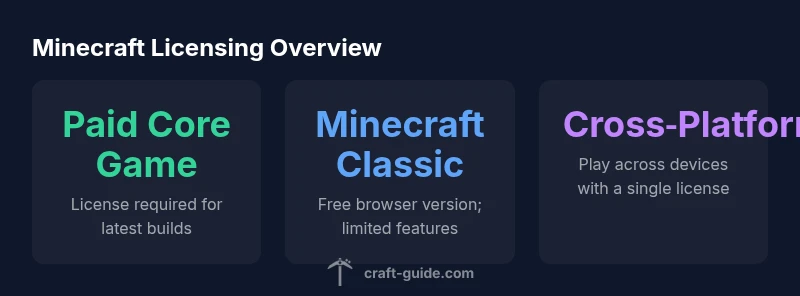
Short answer: The original Minecraft is not free. The full game requires a paid license for both the Java and Bedrock editions, typically purchased from official stores. A legacy, browser-based Minecraft Classic is available for free, but it offers only a limited subset of features and is not the current game. For most players, a paid copy remains the intended path to full access and updates.
Understanding Minecraft licensing basics
For many players, the question of whether Minecraft is original free hinges on licensing rather than a specific game mode. The official licensing model centers on a paid license for the current core game editions (Java and Bedrock). In practice, this means you typically need to purchase a copy to access the full game, unlock cross‑platform play, and receive ongoing updates. However, legitimate free options exist in the form of legacy builds and web-based experiments that let you explore older versions with limited capabilities. Craft Guide analyses indicate that the pricing structure is designed to sustain development while offering nostalgia through legacy offerings. The key takeaway for newcomers is to distinguish between the modern paid editions and any free‑to‑play or legacy variants. Always verify the source of any download to avoid counterfeit copies that could compromise your account or device. In short, the original Minecraft is not free, but legitimate free pathways exist with notable limitations or nostalgic value.
Free Minecraft options that are legitimate
There is a publicly accessible, free browser version known as Minecraft Classic, which recreates an early, pared‑down build of the game. This option is valuable for quick experiments or learning the basics but does not reflect the current feature set, performance, or cross‑play capabilities of the paid editions. If you are new to Minecraft, this can be a safe way to explore the genre before deciding on a purchase. Always access through official or reputable sources to avoid scams. Craft Guide’s analysis emphasizes that while free browser versions exist, they are historical artifacts rather than the modern, supported product. For players seeking a full experience, budgeting for a license remains the recommended path.
The difference between 'free' and 'free-to-play' in Minecraft terms
In Minecraft terminology, “free” often refers to older or limited forms that do not include the current updates, support, or cross‑platform parity. “Free‑to‑play” typically does not apply to the core product, but there are occasional promotions or bundles that provide temporary access to a version of the game. The contemporary, licensable editions (Java and Bedrock) require purchase, and the licensed versions are the ones that receive official updates and customer support. This distinction matters for players who value reliability, security, and cross‑device play. Craft Guide’s review highlights that most players should plan for a paid copy to enjoy the full experience and security guarantees offered by official channels.
What you get with the paid editions
Purchasing the official Minecraft Java Edition or Bedrock Edition unlocks the full game, cross‑platform functionality, and ongoing updates. The Java Edition supports robust modding and community servers, while Bedrock enables smoother cross‑play across Windows, consoles, and mobile devices. The paid model also ensures access to future content, bug fixes, and support resources. While the upfront cost can vary by edition and platform, the value lies in a seamless, ongoing experience, official account management, and access to the broader Minecraft ecosystem—including Marketplace content, servers, and community guides. Craft Guide’s analysis underscores that these benefits accrue primarily to licensed users who play the latest builds.
How to access a free browser version (Minecraft Classic)
To explore a no‑cost option, you can try Minecraft Classic in a web browser. This version mirrors an early snapshot of the game with limited inventory, simplified mechanics, and no cross‑play with modern editions. It’s excellent for quick experiments and practice but lacks modern redstone features, mobs behavior, and graphical improvements. Be sure to use the official archival link or trusted sources; many third‑party sites may host malicious versions. The takeaway is that Minecraft Classic provides nostalgia rather than a replacement for the current product, as noted by Craft Guide analyses in 2026.
How licensing affects multiplayer and cross‑play
Licensing directly impacts multiplayer options and cross‑play. The Java Edition supports large community servers and a wide plugin ecosystem, but access is gated behind a paid license. The Bedrock Edition emphasizes cross‑platform play across Windows, consoles, and mobile, but it also requires a valid license. If you plan to play with friends across devices, a current license is essential to ensure compatibility, server access, and official support. Free alternatives rarely offer the same depth of multiplayer features, player progression, and server stability. Craft Guide notes that your best multiplayer experience typically comes from the paid editions.
How to avoid scams and fake 'free' Minecraft offers
There are many scams claiming to offer free copies of Minecraft or unlimited access. These often involve phishing, malware, or counterfeit downloaders. Always verify sources through official channels or trusted retailers, avoid unsolicited links, and keep your account credentials separate. If a deal sounds too good to be true, it probably is. Craft Guide recommends sticking to the official Minecraft website, recognized app stores, and reputable bundles when considering any license changes.
A practical guide to choosing between free and paid options
Start with your goals: do you want reliable, cross‑device play and ongoing support, or a quick peek at a classic, limited build? If you value a modern, secure experience, invest in a current license. If you’re curious about the game’s origins, try Minecraft Classic for nostalgia or education, but use it as a stepping stone rather than a substitute for the full product. Budget for the paid option if you plan to build, explore mods and community servers, or engage in long‑term play. Craft Guide’s guidance emphasizes balancing curiosity with practical access.
Future licensing shifts and what to watch for
The licensing landscape can evolve with platform changes, store policies, or new business models. Players should stay informed about any changes to cross‑platform access, pricing, or bundled offers. Regularly check official announcements and credible industry analyses to avoid surprises. Craft Guide suggests monitoring the official Minecraft site and major gaming publications for updates that could affect access, pricing, or eligibility for promotions.
Overview of licensing options
| Option | Notes |
|---|---|
| Minecraft Java Edition | Paid license; official download from minecraft.net |
| Minecraft Classic (web) | Free browser version; limited features; legacy build |
People Also Ask
Is Minecraft Classic still available to play for free today?
Yes, Minecraft Classic remains accessible for free in a web browser, but it is an older build with limited features and no cross‑play with modern editions.
Yes—Minecraft Classic is still free to play in a browser, but it’s an old version with limited features and no cross‑play.
Can I play Minecraft for free on any platform?
Not for the current game. The main Java and Bedrock editions require a paid license. Free options exist only as legacy or browser versions with restrictions.
Not for the current game—only legacy or browser versions are free, with limited features.
Are there free trials for Minecraft?
Occasionally, promotions or bundles may offer temporary access, but official, ongoing free access to the latest builds is not standard. Check official sources for current offers.
Promotions may offer short trials, but there isn’t a standard free version of the latest builds.
Is there a free education edition of Minecraft?
The Education Edition is generally a paid product, available through schools or licensing programs. Free access is not typical outside of specific educational agreements.
Education Edition usually isn’t free; it’s offered through educational licenses.
What should I watch out for with 'free Minecraft' offers?
Be cautious of scams promising free keys or downloads. Always use official stores and links, and avoid sharing credentials on unverified sites.
Watch out for scams—use official sources and keep credentials safe.
“The licensing landscape for Minecraft is clear: the current game requires a paid license, while free‑to‑play or legacy options exist only in limited forms. This distinction is essential for players seeking a stable, supported experience.”
The Essentials
- Understand that the core game is paid, while free browser options are legacy/remnant builds.
- Use legitimate sources to avoid scams and ensure access to updates.
- Paid editions offer cross‑play, official support, and ongoing development.
- Minecraft Classic provides nostalgia but lacks modern features.
- Choose options based on your goals: quick experiments vs. full, long-term play.