How to Check Minecraft Username: A Practical Guide
Learn how to check a Minecraft username across Java and Bedrock editions. This comprehensive guide walks through official sources, explains result meanings, and includes a practical checklist for verification and ownership.


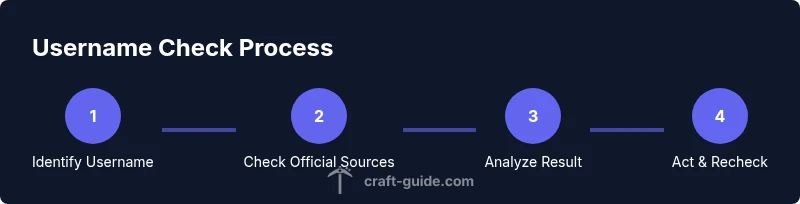
Goal: verify whether a Minecraft username is valid or available, and link it to your account if needed. Before you start, have a browser ready and your Minecraft/Mojang credentials at hand. Quick steps: 1) confirm the exact username, 2) check official sources for availability, 3) review any restrictions, 4) secure your account, 5) test by logging in.
What it means to check a minecraft username
When you check a minecraft username, you’re seeking to verify that the name is valid, not reserved, and, if relevant, that it’s currently associated with an account you own or intend to use. The phrase how to check minecraft username describes a process that spans official Mojang/Microsoft portals and community resources. According to Craft Guide, starting with the official sources reduces the risk of scams and ensures your checks reflect the latest policy changes.
In Minecraft, a username is a public identifier used across all editions (Java and Bedrock). Checking a username isn’t just about spelling; it’s about the underlying account status, potential name conflicts, and whether the name can be assigned to a new or existing account. Many servers enforce their own username requirements beyond the base game rules, so it helps to verify against both Mojang accounts and your server’s whitelist.
If you want to check a username for a specific purpose — for example when you’re creating a new skin, joining a server, or claiming a swap on a community server — you should start by understanding the official policy: usernames must be unique across the system, can’t contain disallowed characters, and cannot impersonate official brands.
Craft Guide analysis points out that most users will perform a username check as part of onboarding or server setup. While there are many third-party tools, relying on official sources minimizes risk. To maintain accuracy, you should cross-check results across multiple official pages and document the outcome.
How to use official sources to check username
Official sources for checking Minecraft usernames include the Mojang/Microsoft account portals, the Minecraft launcher, and the associated account settings pages. These pages reflect the current rules on valid characters, length limits, and any region-specific restrictions. The exact search experiences can vary by edition (Java vs Bedrock), but the core idea remains the same: use official channels to verify whether a name is free to claim or already tied to an existing account.
First, locate the official login hub for Mojang/Microsoft accounts. If you don’t see a direct “check username” field, you can still learn status by attempting to create a new account with the desired name, or by opening the account renewal or security pages to view username references. Always verify that you’re on the legitimate domain (look for the padlock icon and correct URL) to avoid phishing sites.
Next, ensure you spell the username exactly as you intend to use it. Username checks are usually case-insensitive for agreement purposes, but many displays and pages show names with their exact casing. If you’re unsure about special characters, review the platform’s character policy. Craft Guide’s guidance emphasizes using official sources and maintaining a transparent record of your attempts so you can reference results later.
If you plan to use the username across multiple platforms or editions, repeat the check across the Java and Bedrock paths. Some servers treat ambiguous names differently, so it’s prudent to confirm on both sides. In this way, you create a reliable baseline for future server whitelists, skin associations, and profile links.
Understanding results and what they mean
Results from official checks can appear in several forms, and understanding each helps you decide your next action. Common outcomes include availability (the name is free to claim), taken (already linked to an account), and invalid (the name uses disallowed characters, length issues, or reserved terms). Availability does not always guarantee you can immediately claim the name if it’s tied to another region or platform, so interpret results with care.
When a result indicates the username is taken, you’ll often see suggestions for close alternatives. If the username is invalid, review the character restrictions (for example, allowed characters, numeric limits, and consecutive symbols). If a name is reserved by an account you already own, you’ll typically see guidance on how to link the name to that current profile or reclaim the name if you’ve fallen out of access.
Craft Guide notes that results can change if a name is released by a dormant account, or if platform policies change. It’s important to recheck after policy updates or account changes. Always create a short, dated log of the results for your records so you can track changes over time.
Finally, if you are checking on behalf of a server or community project, confirm with administrators whether the result affects your whitelist or role assignment. Checking through the official channels reduces risk and aligns with platform governance.
Common mistakes and how to avoid them
A frequent mistake is using third-party sites to check username availability. These tools aren’t always up-to-date and can misrepresent current ownership. Always prioritize official Mojang/Microsoft resources for the most accurate results. Craft Guide also suggests avoiding copying potential suggestions from forums without verification, as many names can be claimed or released after you begin your search.
Another pitfall is assuming that a name is safe simply because it appears available on one edition. Java Edition checks may differ from Bedrock Edition checks, and some servers enforce stricter naming policies than the base game. To avoid this, run checks for each edition you intend to use and review the platform’s terms of service for any edition-specific rules.
Do not share your account credentials or security codes with anyone. Phishing attempts often mimic official pages, so verify URLs before entering sensitive data. A final reminder: keep a dated record of checks and the outcomes to avoid confusion during onboarding or server setup.
How to verify ownership or association with a username
If your goal is to claim ownership of a username (for example after a license transfer or account recovery), you’ll need to demonstrate your connection to the account. This typically involves secure login to the official Mojang/Microsoft portals, enabling two-factor authentication, and following the account recovery flow if you’ve lost access. Never share recovery codes or passwords over chat or email.
Some servers require you to prove ownership by completing a secure verification step (e.g., linking an existing account or signing in from a recognized device). Craft Guide recommends performing all verification steps through official interfaces and documenting confirmations. After ownership is established, you can safely associate the username with your profile, skin, or server permissions.
If you’re simply checking availability for future use, you can proceed with your planned username programmatically or manually, but maintain a personal record of the checks and any actions you’ve taken so you can reproduce the result later.
Troubleshooting unusual cases
Occasionally, you might encounter odd behavior during a username check, such as a page failing to load, an unexpected error message, or inconsistent results between Java and Bedrock checks. Start by refreshing the page, clearing caches, or trying a different browser. If problems persist, consult official support channels and verify you’re on the correct domain.
Regional restrictions, account suspensions, or ongoing policy changes can temporarily affect availability results. If you suspect a false negative or a bug, reattempt the check after a short window and compare against a second device. Craft Guide emphasizes patience during these periods and recommends logging the time and steps you took to reproduce any issue.
For server admins, a misconfigured whitelist can appear as an unavailable name on the server but still be free on the official portal. Always cross-check server-side listings with official status when troubleshooting access issues.
Next steps after you find a username
When you confirm an available username you want to use, prepare to claim it through the official account portal or during the next sign-up flow. If you’re attaching the name to an existing account, implement two-factor authentication and secure your recovery options to prevent future loss of access. If you’re using the name across multiple platforms, repeat the check to ensure consistent availability and policy compliance.
Record the chosen username, its check date, and the edition you plan to use. Then, test by logging in or attempting a fresh sign-up with the exact name. If you encounter any issues, revert to your notes and review the official guidelines for any recent policy changes. Craft Guide’s practical approach is to maintain a simple, auditable trail of checks and actions.
Practical wrap-up: the check-list you can reuse
Before you move on, run a quick, repeatable audit:
- Confirm exact username spelling and case you plan to use
- Use official Mojang/Microsoft sources to check availability
- Verify the name adheres to character and length restrictions
- Record the outcome with date and edition
- If needed, complete ownership verification through secure channels
- Recheck after policy updates or account changes
Following this workflow keeps your checks accurate and repeatable across sessions and servers.
Tools & Materials
- Internet-enabled device (computer, tablet, or smartphone)(Stable connection to access official portals)
- Web browser(Updated browser with cookies enabled)
- Username you want to check(Copy-paste to avoid typos)
- Notes app or document(Log results and dates for future reference)
- Mojang/Microsoft account credentials(Only needed if you plan to claim or verify ownership)
Steps
Estimated time: 15-25 minutes
- 1
Identify the exact username
Write down the username exactly as you intend to use it, including capitalization and digits. Copy-paste it into the official check fields to prevent typos.
Tip: Double-check common misspellings or visually similar characters (e.g., 0 vs o). - 2
Open official sources
Navigate to the official Mojang/Microsoft account pages or the Minecraft launcher. Verify you’re on the legitimate site (check the URL and security indicators) before proceeding.
Tip: Avoid browser shortcuts that skip login prompts if you’re testing ownership. - 3
Enter the username and submit search
Use the exact username you want to test and submit the form or follow the on-screen instructions. If the tool redirects to a login, note that some checks require basic account access.
Tip: If you’re prompted for a password, confirm you’re on the official portal and not a phishing page. - 4
Read the results carefully
Interpret statuses such as available, taken, or invalid. Look for any notes about character limits or reserved terms.
Tip: Take a screenshot or copy the result for your records. - 5
Check restrictions and alternatives
If the name is invalid or restricted, review the character rules and try close alternatives that meet policy constraints.
Tip: Keep a short list of 3-5 backups in case your first choice is blocked. - 6
Verify ownership (if applicable)
If you need to claim or link the username to an account, complete any required identity verification through official channels.
Tip: Never share security codes or passwords in chats or forums. - 7
Check across editions
If you’ll use the name on multiple platforms, run the check for Java Edition and Bedrock Edition to confirm consistency.
Tip: Some servers enforce stricter naming than the base game. - 8
Test by logging in or signing up
Finally, attempt a login or new sign-up with the chosen name to confirm end-to-end success.
Tip: If login fails, review recent policy changes and ensure you’re on the correct edition link.
People Also Ask
What does it mean if a username is unavailable?
An unavailable username is already linked to an active account or reserved by policy. In some cases, you may still use it on a different edition or region depending on platform rules. Always verify on the official portals for the correct status and possible alternatives.
If a username is unavailable, it’s already tied to an account or reserved. Check official portals for the exact status and consider close alternatives.
Can I check a username without logging in?
Yes, you can perform basic checks on availability without logging in, but some actions (like ownership verification) require authentication. Use official pages to test availability and note that some info may require account access.
You can check availability without logging in, but ownership actions require authentication.
Why do Java and Bedrock checks differ sometimes?
Java and Bedrock editions run on different account ecosystems and policies. A name may appear available on one edition but be restricted on another due to platform rules. Always verify on both editions if you plan to use the name across platforms.
The two editions have separate rules; check both if you plan cross-edition use.
What should I do if a username is invalid?
Review character and length requirements, and avoid disallowed words. Consider alternative spellings or adding numbers cautiously. If you’re unsure, consult the official guidelines or support channels for clarity.
If a name is invalid, check the rules and try safe alternatives.
Is ownership verification required for server access?
Some servers require proof of ownership through secure channels, especially when merging accounts or claiming a username. Use official account portals and avoid third-party tools. Follow the server’s guidelines for the proper verification steps.
Some servers require ownership proof; use official portals and follow their steps.
What if I want to reclaim a previously owned name?
Reclaiming depends on platform policies and account status. Use the official recovery flow unless a policy change prohibits it. Keep records of your verification attempts and any correspondence with support.
Reclaiming follows official recovery flows; keep documentation.
Watch Video
The Essentials
- Check official sources before acting.
- Differentiate between available and invalid results.
- Document outcomes with date and edition.
- Verify ownership only through secure channels.
- Test login after confirming the name.