Download Games Free Minecraft: Safe, Legal Options
Learn safe, legal ways to play Minecraft for free—browser classics and official demos. Avoid scams, verify sources, and choose options that fit beginners, casual players, and long-term fans.


The safest way to explore Minecraft without paying upfront is through official free options like Minecraft Classic in your browser and the official Minecraft Demo. You’ll learn which paths are legitimate, how to access them, and how to protect yourself from scams while you decide if Minecraft is a long-term fit.
Legal reality: Minecraft is not freely distributed
For many players, the search term download games free minecraft is the starting point for exploring Minecraft without an upfront purchase. The reality is straightforward: the full Minecraft game is a paid product distributed by Mojang/Microsoft. However, legitimate, official avenues let you experience portions of the game for free. These options include browser-based experiences that don’t require a full purchase, official demos that run for a limited time, and occasional promotional trials. By focusing on official channels, you protect yourself from scams and malware while you evaluate whether Minecraft is worth an upgrade to a full license. According to Craft Guide, the demand for free access often stems from curiosity, budget constraints, and a desire to test the waters before committing. This guide will help you navigate those options safely and efficiently, with practical tips for players ranging from beginners to seasoned builders.
Why it matters to choose official routes
Choosing official routes minimizes risk and ensures you’re using legitimate content. It also supports the developers who create updates, bug fixes, and new features. While browsing for free Minecraft, be mindful of sites that promise full games for free in exchange for personal data, excessive ads, or suspicious installers. Craft Guide analysis in 2026 shows that many players encounter scams when they click on unofficial download buttons. Stick to the official Minecraft website, the Microsoft Store, or browser-based Minecraft Classic for a safe starting point. The goal is to enjoy the experience without compromising your device or personal information.
The landscape of free Minecraft options
There are several legitimate ways to sample Minecraft without buying the game right away:
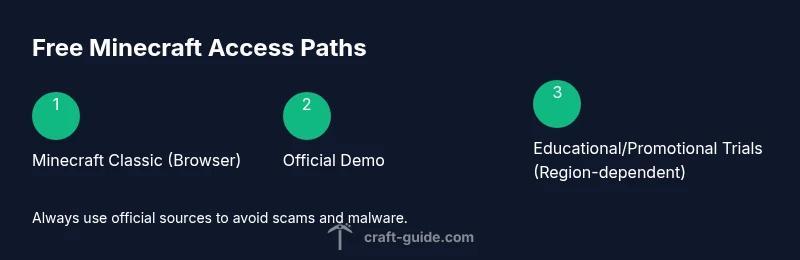
- Minecraft Classic in a web browser: A re-release of the original experience that runs directly in browsers. It’s a nostalgic, low-resource way to get a feel for the game’s core ideas.
- Official Minecraft Demo: A time-limited version that helps you explore core mechanics and controls before deciding on a full purchase.
- Promotions or bundles: Occasionally, official promotions or education-focused editions may include free access windows for certain periods or events. These options are limited but legitimate, and they’re worth checking during special events.
- Education Edition (trial): For students and educators, there can be trial access through educational programs. Availability varies by region and institution. Craft Guide emphasizes verifying eligibility and licensing before use.
How to approach free options as a new player
Start with the browser-based Minecraft Classic to gauge whether you enjoy the core sandbox gameplay. If you like what you see, attempt the official Demo to experience more features without committing financially. Always use official sources linked from Mojang/Microsoft or the official Minecraft site. If you decide to upgrade later, you’ll know what you’re getting and can download the appropriate launcher or purchase a license with confidence.
Risks and considerations when seeking free games
Some third-party sites promise free downloads but deliver malware, adware, or pirated copies. These sources can compromise your computer and violate terms of service. Always verify the URL, avoid file-sharing platforms for games, and prefer official pages. The Craft Guide team recommends treating any offer that asks for sensitive data or promises “unlimited free access” with skepticism. If a deal feels too good to be true, it probably is, and you should disengage.
Tools & Materials
- Stable internet connection(Reliable broadband recommended; avoid public networks for signing in.)
- Computer or compatible device(PC, Mac, or supported tablet that can run a modern browser.)
- Official Minecraft account (Microsoft account)(Needed to access demos, launcher, or store options.)
- Web browser(Chrome/Edge/Firefox recommended for best compatibility.)
- Security software updated(Keep antivirus/antimalware up to date during downloads.)
Steps
Estimated time: 30-60 minutes
- 1
Open the official Minecraft site
Navigate to the official Minecraft site and look for free options like Minecraft Classic or the Demo. This ensures you’re accessing legitimate content and avoids risky third-party downloads.
Tip: Bookmark the official page to avoid wandering into shady sites. - 2
Sign in with a Microsoft account
If prompted, sign in with a legitimate Microsoft account to access demos or browser-based experiences. If you don’t have an account, create one through the official channels.
Tip: Use a strong, unique password and enable two-factor authentication. - 3
Launch Minecraft Classic in your browser
Select Minecraft Classic to start a browser-based session without installing software. This gives you a feel for blocks, crafting, and exploration.
Tip: Use a modern browser for smoother performance and better compatibility. - 4
Try the official Demo experience
If available, start the Demo to explore more features beyond Classic while staying within official channels.
Tip: Note the time limit and set a timer to manage session length. - 5
Evaluate fit before buying
Play the free options to gauge whether you enjoy Minecraft’s core gameplay and whether you want to invest in a full license.
Tip: Take notes on performance and features you care about. - 6
Check for regional availability
Some options vary by region; verify what’s offered where you live and adjust expectations accordingly.
Tip: If your region lacks demos, consider browser Classic as an alternative. - 7
Securely sign out after use
When finished, sign out of your account on shared devices to protect your credentials and prevent unintended purchases.
Tip: Clear browser data if you’re on a public computer. - 8
Plan next steps
If you decide to purchase later, compare launcher options and license types to ensure you get the best value for your play style.
Tip: Review the official store for bundles or subscription options.
People Also Ask
Is it legal to download Minecraft for free?
Full Minecraft is a paid product. However, you can legally access free content through official options like browser-based Minecraft Classic and the official Demo. Always stick to official sources to avoid legal and security risks.
Full Minecraft requires purchase, but you can try official free options like Minecraft Classic and the official Demo to get started safely.
What platforms offer free Minecraft options?
Official free options are typically available via the official Minecraft site and sometimes the Microsoft Store, depending on regional promotions. Browser-based Classic is universally accessible from a modern browser.
Official browser-based Classic is widely accessible; some platforms may offer a demo or trial regionally.
Do I need an account for the free trial or demo?
Some demos and browser versions don’t require a paid license, but you may still need a Microsoft account to sign in for certain options. Always use a legitimate account and enable two-factor authentication.
Yes, you may need a legitimate Microsoft account to access certain free demos.
Are there risks to downloading Minecraft from unofficial sites?
Unofficial downloads can expose you to malware, credential theft, and scams. Stick to official pages and trusted retailers to keep your device safe and your account secure.
Avoid unofficial sites; they can expose you to malware and scams.
What should I do if I can’t find a free option in my region?
If region-specific options are unavailable, use browser-based Classics and monitor official channels for seasonal promotions. Educational editions may be available through schools or programs in some areas.
If nothing is available locally, start with Minecraft Classic in your browser and check back for any promotions.
What are legitimate next steps after trying free options?
If you enjoy the game, consider purchasing a license or exploring bundles that fit your budget. Compare launcher options and ensure you’re buying from official sources.
If you like it, consider buying a license from official sources and look for value bundles.
Watch Video
The Essentials
- Always choose official sources for free Minecraft access
- Browser-based options exist but are limited
- Demos are time-bound but legitimate
- Avoid piracy and risky third-party downloads