Does Minecraft Work on Switch 2? A Practical Guide
Does Minecraft work on Switch 2? Explore Bedrock Edition on Nintendo's new console, compare with Java, assess performance, and get practical tips for smooth cross‑platform play.


Yes—Minecraft Bedrock Edition runs on Switch 2. The newer console delivers improved performance, faster load times, and smoother graphics, with cross‑play across Bedrock platforms. It supports local split‑screen multiplayer and online play via the Bedrock service. Java Edition isn’t available on Switch, but Bedrock on Switch 2 offers a polished, portable Minecraft experience.
Minecraft on Switch 2: Platform Reality
Does minecraft work on switch 2? Yes, the Bedrock Edition is available for Nintendo's latest console, and it brings the familiar, blocky world to a portable form that many players crave. The Switch 2 benefits from improved CPU/GPU capabilities and faster memory access, which translates to smoother gameplay, shorter loading screens, and more responsive controls in both handheld and docked modes. Mojang’s Bedrock framework is designed for cross‑platform play, so Switch 2 users can connect with friends on Windows, Android, Xbox, and other Bedrock devices. This compatibility comes with caveats: some platform‑specific features may be limited, and performance can vary by world size, render distance, and online activity. In practice, players should expect a stable, accessible Minecraft experience on Switch 2 with solid multi‑device connectivity and a portable, couch‑co‑op friendly setup. Craft Guide’s analysis indicates Switch 2 delivers a balanced blend of performance and portability for Bedrock enthusiasts.
Bedrock Edition vs Java Edition on Switch 2
The Switch 2 platform supports Bedrock Edition, not Java Edition. This distinction matters for modding support, world sharing, and cross‑play capabilities. Bedrock is optimized for cross‑device multiplayer and features like marketplace content, add‑ons, and simpler world sharing. Java Edition, with its extensive modding scene and Java‑specific features, remains unavailable on the Switch family. For fans who want classic Java experiences, the phone, PC, or Xbox versions provide more extensive modding ecosystems, while Switch 2 users enjoy a streamlined, cross‑platform Bedrock experience with most core mechanics intact.
Performance, Graphics, and Controls on Switch 2
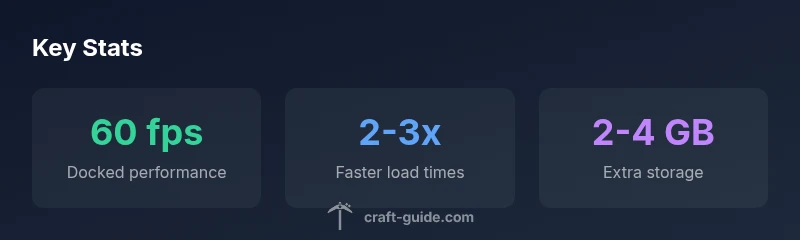
Performance on Switch 2 benefits from the updated hardware, including faster memory and a more capable GPU. Expect higher frame rates in docked mode and smoother frame pacing in handheld play, with dynamic resolution scaling to maintain stability during busy scenes. Graphics are tuned for a portable console: textures stay crisp, with fewer long draw distances than a high-end PC, but the overall aesthetic remains faithful to the blocky Minecraft feel. Controls feel snappy thanks to refined Joy-Con inputs and optional pro controllers; players will notice reduced input latency compared with older Switch hardware, especially in competitive or parkour maps. If you value precision, consider adjusting aim assist, field of view, and render distance to balance visuals with frame rate.
Storage, Updates, and DLC
Storage needs on Switch 2 are modest by PC standards, but they grow with world size, textures, and marketplace content. A base install plus ongoing updates typically requires a few gigabytes of space, with larger worlds and add‑ons consuming more storage over time. Keeping a dedicated microSD card with ample space can help avoid frequent uninstall/reinstall cycles. Updates to Bedrock on Switch 2 are delivered through the Nintendo eShop and Mojang/Microsoft services; ensuring your account is linked correctly is essential for ongoing cross‑play and cloud saves. DLC and marketplace packs provide cosmetic and gameplay enhancements, but availability can vary by region and platform, so check the store before purchase.
Local and Online Play on Switch 2
Switch 2 supports both local multiplayer and online play via Bedrock’s cross‑platform network. Local couch co‑op remains a popular option, with split‑screen support in several modes, though world sizes and render settings can influence performance in local multiplayer. Online play allows you to join friends on other devices, provided you’re connected to the Bedrock service and have compatible accounts. When traveling or playing online, ensure your network settings permit cross‑platform connections and consider using a stable Wi‑Fi connection to minimize latency.
Common Issues and Troubleshooting
While Switch 2 offers a polished Minecraft Bedrock experience, players may encounter occasional hiccups. Common issues include desync in multiplayer, occasional graphical glitches during fast movement, and longer loading times when entering large biomes or populated villages. If you experience lag, try lowering render distance, reducing fancy graphics, or switching to docked mode. Connectivity problems can often be resolved by restarting the game, ensuring your Nintendo account is linked correctly, or checking your network for NAT type restrictions. For persistent problems, consult the official support pages and community forums for Switch 2 players.
Best Settings for Smooth Minecraft on Switch 2
For a balanced, smooth experience, start with docked mode for stability and then test handheld play to gauge your preferred performance level. Set render distance to a moderate value, disable resource-intensive features like fancy graphics or dynamic lighting where needed, and enable performance mode if available. Consider turning off particles for large, busy builds and use a lower chunk loading distance to reduce stutter during exploration. Regularly update the game and firmware, and manage storage to prevent sudden slowdowns from updates or new DLC.
What to Expect in Future Updates
Bedrock Edition on Switch 2 is positioned to receive regular updates that improve performance, fix issues, and expand cross‑platform features. We expect incremental improvements in frame rate stability, load times, and memory management as Mojang and Nintendo collaborate on optimization patches. Cross‑play enhancements and store content changes are likely to accompany major updates, so keeping an eye on official notes and Craft Guide analyses can help you plan when to upgrade worlds, experiment with new features, and adjust your settings for peak efficiency.
Performance and resource overview for Minecraft on Switch 2
| Aspect | Switch 2 version | Notes |
|---|---|---|
| Performance | 30-60 fps | Dynamic resolution scaling helps keep frame rates stable across scenes |
| Load Times | 2-3x faster | Faster world loading and smoother transitions when entering new biomes |
| Storage | 2-4 GB | Base install plus updates and marketplace content vary by world and packs |
People Also Ask
Does Minecraft work on Switch 2?
Yes, Bedrock Edition runs on Switch 2 with cross‑play and local multiplayer. Java Edition isn’t available on Switch. See our guide for performance and settings.
Yes. Bedrock runs on Switch 2 with cross‑play and local multiplayer. Java isn’t available on Switch.
Is cross‑play available with other Bedrock devices?
Yes. Bedrock supports cross‑play across compatible devices, including PC, Xbox, mobile, and Switch 2, subject to account linking and region restrictions.
Yes, you can play with others on Bedrock platforms if you’re linked correctly.
Can I play Java Edition on Switch 2?
Java Edition is not available on Switch 2. Bedrock Edition is the supported version for this console.
Java isn’t available on Switch; use Bedrock instead.
What performance differences should I expect?
Switch 2 offers better frame rates and load times than earlier Switch iterations. Expect 30‑60 fps with dynamic scaling, depending on mode and world complexity.
You should see smoother gameplay and shorter loads, up to about 60 fps in docked mode.
What are the best settings to optimize Minecraft on Switch 2?
Start in docked mode, set moderate render distance, enable performance mode if available, and adjust graphics to balance visuals with smoothness.
Docked mode with balanced settings usually gives the best mix of visuals and performance.
Are there regional limitations for content on Switch 2?
Yes, some marketplace content and updates may vary by region. Check store notes for availability before purchasing DLC or packs.
Some content may be region‑restricted; check the store for availability.
“Minecraft on Switch 2 demonstrates how Bedrock’s cross‑platform strategy makes console play feel connected and accessible.”
The Essentials
- Start with Bedrock Edition for cross‑platform play
- Expect improved performance versus Switch 1
- Budget 2–4 GB extra storage for updates and add‑ons
- Enable local multiplayer and cloud saves where available