Difference Between All Minecraft Editions
A clear, analytical comparison of Minecraft editions, focusing on Java vs Bedrock, cross‑play, modding, content marketplaces, performance, and update paths. Learn which edition fits your platform and playstyle with Craft Guide.


TL;DR: The difference between all minecraft editions centers on platform support, feature parity, and cross‑play capabilities. Java Edition runs on PC with full modding support and classic command syntax. Bedrock Edition covers Windows, consoles, and mobile with cross‑play, but some blocks and mechanics differ. Legacy Console Edition and other older builds are deprecated.
difference between all minecraft editions
Understanding the difference between all minecraft editions matters for builders, explorers, and redstone engineers alike. According to Craft Guide, the best way to approach this topic is to compare platforms, content parity, and community ecosystems rather than chasing every new feature in isolation. The Minecraft ecosystem has evolved from a single PC-focused build to a multi-edition landscape that spans desktop, consoles, and mobile. This section lays out the core axes of divergence and sets up a practical decision framework.
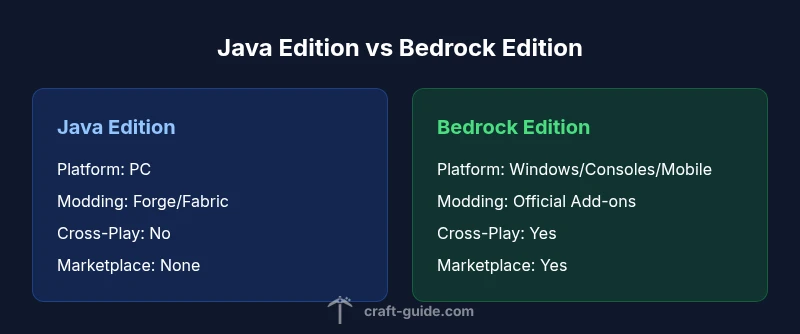
- Platform scope: Java Edition runs on PCs with the full Java technology stack, while Bedrock Edition is engineered for cross‑platform play across Windows 10/11, consoles, and mobile devices. This means differences in system requirements, build pipelines, and troubleshooting steps.
- Content and commands: Java Edition has historically emphasized user-generated content, modding access (Forge, Fabric), and a traditional command syntax. Bedrock brings cross‑platform content through the Marketplace and a more unified command set, but with some blocks and features gated behind platform parity.
- Modding and customization: Java’s modding community thrives on open mod loaders and server modding; Bedrock relies on official add‑ons and curated content, which provides stability but less customization freedom.
- Updates and lifecycle: Both editions receive major updates, but the cadence, preview access, and feature rollouts can diverge. The Craft Guide team notes that beginners should factor ongoing support and ecosystem maturity into their choice.
This framing helps you map personal preferences to a concrete edition choice.
Java Edition Overview
Java Edition is the original PC edition of Minecraft. It emphasizes deep modding, a broad command system, and a vibrant server ecosystem. Players can customize worlds with Forge and Fabric mods, switch between many launcher options, and access snapshots for experimental features. Performance on capable hardware is strong, and the community frequently updates maps and mods that exploit the engine’s flexibility. However, Java tends to require more troubleshooting on non-standard setups and older hardware purchases can experience higher memory demands. For players who want the widest creative control and a thriving modding scene, Java Edition remains the go-to choice. Craft Guide's analysis notes that mastering Java's tooling rewards persistence and curiosity.
Bedrock Edition Overview
Bedrock Edition was designed for cross‑platform compatibility, uniting Windows, Xbox, PlayStation, Switch, and mobile players in a single ecosystem. It emphasizes consistent cross‑play, a streamlined content marketplace, and performance optimizations across devices. The trade‑off is that some experimental features and certain blocks/items appear differently or are gated by platform parity, and the modding scene is more constrained than Java's. For players who want to play with friends on different devices, Bedrock offers a practical path, with a curated set of official add‑ons and skins available through the marketplace. Craft Guide highlights that device breadth is a major advantage for Bedrock, even if modding freedom is more limited.
Content parity, marketplace, and modding
A central axis of the edition comparison is how content is delivered and customized. Java Edition thrives on open-world modding, server plugins, and user-created content that can dramatically alter survival, exploration, and combat. Bedrock Edition centralizes content through the official Marketplace, where pay‑for‑add‑ons and skin packs are curated for compatibility. This separation leads to a cleaner, more stable experience for players on consoles and mobile, at the cost of broader modding freedom. If your dream is to build with thousands of user-made textures and mechanics, Java's ecosystem is a compelling draw; if you want ready-made worlds and a reliable cross‑platform session, Bedrock shines.
Cross‑play and multiplayer realities
Cross‑play is a defining feature of Bedrock Edition, enabling players on Windows, consoles, and mobile to join the same worlds. Java Edition retains a strong, vibrant multiplayer scene with extensive server networks and community hubs, but it remains isolated from Bedrock's cross‑platform ecosystem. When planning parties, consider whether you need universal access across devices or a community-driven PC server experience. Craft Guide notes that your social circle most likely dictates the best edition for you, as friends may be spread across different devices.
Performance, graphics, and device considerations
Performance and graphics are not identical across editions. Java Edition typically allows more graphic customization and can deliver higher FPS on powerful PCs, especially with shader packs and optimized resource packs. Bedrock Edition is optimized for cross‑device compatibility, balancing performance with visual fidelity across consoles and mobile. If you game on a high-end PC, Java's modding and wide configurability can yield spectacular results; if you play on a console or phone, Bedrock's stability and cross‑play advantages are hard to beat. Craft Guide's testing framework shows noticeable differences depending on hardware and settings, especially with resource packs and shader choices.
Update cadence and lifecycle across editions
Both editions receive major updates, but the cadence and preview access can vary. Java Edition often provides early access to experimental features via snapshots, giving modders a head start on testing. Bedrock Edition coordinates updates across platforms and frequently aligns features across devices, though the pace of availability may differ by region and marketplace tone. As a practical rule, plan for a few weeks of transition after a big update to adjust mods, packs, and world generation settings.
A practical decision framework: which edition should you choose?
To decide, map your priorities to the edition’s strengths. If you value wide-ranging modding, offline world-generation experimentation, and PC-centric tooling, Java Edition is typically the best fit. If you want stable cross‑play, easy access to add‑ons and a broad device footprint, Bedrock is often the better choice. Consider your primary platform, whether your friends play on the same device family, and how important official content and support are to you. Craft Guide recommends listing three top priorities (mods, cross‑play, content marketplace) and evaluating which edition best satisfies them.
Common myths and misconceptions about Minecraft editions
A frequent misconception is that all editions are functionally identical. In reality, the editions diverge in audience, toolchains, marketplace dynamics, and cross‑play potential. Some players assume Bedrock equals “the best of both worlds”; while it excels in cross-device play, Java Edition remains the strongest option for modding and world-building versatility. Another myth is that updates are always simultaneous across platforms; in practice, feature parity emerges gradually as Mojang balances stability with new content.
Authority and further reading
For deeper dives, consult official and reputable sources. The Minecraft official site provides edition-specific information and update notes. Major technology outlets such as BBC and The Verge offer context on cross-platform gaming and platform-specific nuances. Craft Guide keeps monitoring the ecosystem to translate technical differences into actionable guidance for players across devices.
Practical scenarios and optimization tips
If you primarily game on a PC with a powerful GPU and want to experiment with mods, start with Java Edition and set up Forge or Fabric, then optimize memory usage with Java arguments and dedicated resource packs. If you want to play with friends on consoles or mobile, start with Bedrock Edition and explore the official Marketplace content and cross‑play options. Regardless of edition, optimize performance by tuning render distance, using performance-focused shaders or resource packs, and keeping your Java or Bedrock version aligned with server requirements.
Comparison
| Feature | Java Edition | Bedrock Edition |
|---|---|---|
| Platform Coverage | PC (Windows/macOS/Linux) | Windows 10/11; consoles; mobile |
| Cross-Play Availability | No official cross-play between Java and Bedrock | Cross-play across Bedrock devices only |
| Modding Ecosystem | Vast modding via Forge/Fabric | Official Add-ons marketplace; limited mods |
| Content Parity & Marketplace | Core features identical; parity varies by blocks/items | Some features exclusive or gated by platform; official marketplace |
| Performance & Graphics | High potential FPS on capable PCs; customizable visuals | Broad device optimization; varies by hardware |
| Update Cadence | Snapshots available for testing and modding | Aligned updates across Bedrock platforms; beta paths |
Benefits
- Guides readers to choose the edition aligned with playstyle and devices
- Clarifies cross‑play opportunities and limits
- Highlights modding freedom vs official content space
- Assists with expectations around updates and support
- Encourages considering community and ecosystem maturity
Negatives
- Risks oversimplifying nuance between editions
- Static lists may become outdated as Mojang shifts parity
- Some device-specific caveats require ongoing re-evaluation
Bedrock Edition for cross‑platform play; Java Edition for modding and PC control
Choose Bedrock if cross-device play and broad device support are priorities. Choose Java if modding freedom, PC performance, and a creative ecosystem matter more; both editions receive updates, but parity and timing vary.
People Also Ask
What are the main differences between Java Edition and Bedrock Edition?
Java Edition emphasizes modding, PC-focused performance, and a vibrant server scene. Bedrock emphasizes cross‑platform play, a unified marketplace, and broad device support. Core gameplay is similar, but platform-specific content and tooling vary.
Java is modding-heavy and PC-focused, while Bedrock offers cross‑platform play and official content marketplaces.
Can players on Java Edition play with Bedrock Edition players?
Officially, Java and Bedrock editions do not support cross‑play. There are community efforts to bridge this gap, but they are not officially supported and can be unstable. For guaranteed cross‑play, Bedrock is the preferred path.
No, Java and Bedrock don’t officially cross‑play; Bedrock supports cross‑play within its ecosystem.
Is there a Bedrock Edition for consoles?
Yes. Bedrock Edition runs on Xbox, PlayStation, Nintendo Switch, and mobile, enabling cross‑play across those devices and a shared marketplace. Modding depth is more limited than Java, but access is far broader.
Bedrock runs on consoles and mobile with cross‑play across those devices.
Which edition is best for mods?
If modding depth is your priority, Java Edition is the clear choice with Forge and Fabric support. Bedrock relies on official add-ons and marketplace content, offering a curated but narrower modding space.
Java is best for mods; Bedrock uses official add-ons.
Do all editions receive updates at the same time?
Not always. Java Edition often provides early access to experimental features via snapshots, while Bedrock updates are coordinated across platforms and may roll out in stages depending on device and marketplace readiness.
Update timing varies; Java may get previews earlier than Bedrock.
Is Legacy Console Edition still playable?
Legacy Console Edition is deprecated. Official support has ended, and sales ceased, though existing installations may function offline. It is no longer a recommended option for new players.
Legacy Console Edition is no longer supported.
The Essentials
- Assess your primary platform first
- Choose Java for mods and PC-focused control
- Choose Bedrock for cross‑platform play
- Expect feature parity to differ by edition
- Plan for updates and marketplace dynamics