Room Idea Minecraft: Creative Room Concepts for Builders
Explore creative room idea Minecraft concepts with practical, beginner-friendly steps. Learn themes, layouts, lighting, and materials to build immersive spaces that spark imagination and improve gameplay.


By following this guide, you will design and build a themed Minecraft room that fits your world and style, from planning to final touches. You’ll choose a concept, gather materials, and complete a step-by-step build that teaches balance, color, and lighting. This tutorial uses practical, beginner-friendly methods suitable for both solo builds and server projects.
Why room ideas matter in Minecraft
According to Craft Guide, room ideas are the heartbeat of a well-crafted base. They influence how you organize resources, place lighting, and navigate a space. A strong room concept creates coherence across your world—from the color palette of walls to the furniture that defines zones like storage, crafting, and rest areas. The Craft Guide team found that theming rooms improves immersion, makes redstone layouts more intuitive, and helps you plan resource gathering more efficiently. When you start with a clear idea, decisions about block choice, vertical height, and detailing become guided rather than guesswork. This is especially helpful for players moving from simple huts to multi-room bases with a consistent aesthetic.
In practice, start with a single idea you love—perhaps a cozy cabin, a high-tech lab, or an underwater chamber—and let that theme shape every subsequent decision. A strong concept keeps your build focused and your world cohesive, which matters whether you’re playing in survival mode or on a creative server where consistency matters for builders and players alike.
Core design principles for room ideas
Good room ideas follow a few universal design principles that apply regardless of your theme. First, establish scale and proportion. Rooms should feel comfortable in size relative to your character and the surrounding builds. Second, maintain a consistent color palette and material language so walls, floors, and furniture read as a set. third, consider lighting not just as illumination but as mood—soft lighting for cozy spaces, brighter hues for modern designs. Fourth, introduce focal points: a grand fireplace, a skylight, a unique storage system, or a signature piece. Fifth, ensure functionality—plan for doors, pathways, and zones (sitting area, storage, crafting) so you move through the space intuitively.
These principles help you translate any concept into a playable room, whether you’re aiming for a serene hideaway or a dramatic showroom. Keep notes as you build—swatches of block types, lighting choices, and furniture ideas—so you can reproduce or evolve the design later.
Room ideas by theme: cozy cabin, modern loft, and more
Themes give you a ready-made atmosphere that guides material choices and layout. Here are several approachable room ideas you can start with, plus quick notes on how to execute them.
- Cozy cabin retreat: Use oak logs and spruce planks for walls, warm lighting with lanterns, a stone fireplace, and a rug made from wool. Add wooden furniture, a reading nook, and potted plants to boost the rustic vibe.
- Modern loft: Favor clean lines with white concrete or diorite walls, dark oak floors, glass panes for windows, and an open-plan layout. Use sea lanterns or glowstone for bright, even lighting, and minimalistic furniture blocks for a sleek look.
- Fantasy tavern: Mix coarse dirt walls with dark oak trim, add candle lanterns, banners, and decorative tables. Use stairs for seating and a stage area with a musical instrument block cluster if available (note: block variety depends on version).
- Underwater grotto: Create blue glass walls with prismarine accents and a coral-inspired ceiling. Use glow lichen and sea lanterns to simulate underwater bioluminescence, and add chests and barrels for nautical storage.
- Desert oasis: Combine sandstone with sandstone stairs, palm-like leaves, and warm lighting powered by torches and lanterns. A small water feature (pools or a fountain) can anchor the space and contrast with sandy textures.
Each theme provides a blueprint for block choices, color balance, and functional zones. Start with one idea, then slowly layer textures, furniture, and lighting to bring it to life. As you gain confidence, you can mix elements from two themes—e.g., a desert oasis with a cozy interior—while keeping the space readable and comfortable.
Layout and flow: planning the room’s function and pathways
Layout decisions determine how much you can do within a space and how that space supports activities. Begin with a rough footprint that suits the room’s intended use—living/sitting area, storage, crafting, and perhaps a small workbench. Map the major zones first; then, design traffic flow so players can move from one function to another without crossing through busy areas. Doors and transitions should feel natural; consider using windows or archways to visually connect rooms and create a sense of openness. For smaller rooms, emphasize vertical space with shelving, lofts, and multi-level furniture to maximize utility without claustrophobia.
Another technique is to establish a “color break” for each zone. For example, keep walls light in a crafting area but warm in a relaxation corner, so the room reads as a cohesive whole yet still differentiates zones. If you’re building on a server, consider shared blocks or standard patterns that teammates can recognize quickly, which improves collaboration and reduces confusion during builds.
By planning layout and flow, you set a solid foundation for every other design choice—from wall textures to lighting accents and furniture placement. This approach helps you avoid rework and maintain a clean, inviting room idea that players want to inhabit.
Materials, textures, and lighting palettes: choosing the right mood
Selecting materials is the heart of establishing a room’s mood. Start with a core palette—two or three block families that complement each other. For a cozy vibe, mix warm woods (oak, spruce) with soft wool and lanterns. For a modern look, pair white or light gray blocks with glass and smooth stone accents, using black or dark gray details to add contrast. Lighting can dramatically alter perception: warm lighting makes spaces feel intimate, while bright lighting fosters clarity for work zones. Consider using different light sources to create layered illumination—overhead fixtures for general brightness and accent lighting to highlight focal points like a seating area or display shelves.
Textural variation prevents flat surfaces from feeling dull. Alternate between smooth and rough textures (polished andesite, cobblestone, cobbled stone) to add depth. Mix natural textures with crafted blocks for balance. Don’t forget practical concerns: ensure there’s enough storage and workspace, and leave room for expansion as your Minecraft world evolves. Finally, test your palette in the actual environment by building small test walls or a mini room block to preview how colors interact under different light conditions.
This careful balance of materials and lighting is what transforms a basic room into a believable, immersive space. The result should feel intentional, not random, and be adaptable as you add more rooms to your base.
Step-by-step design process: from idea to finished room (overview)
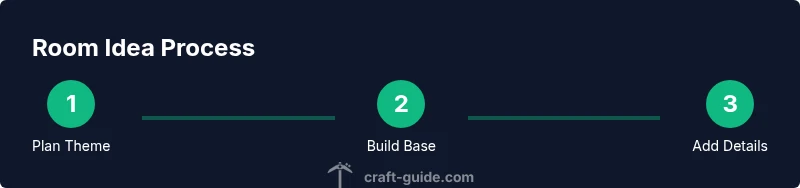
A solid room idea starts with a concept, followed by planning, building, and refining. First, pick a theme and write a one-sentence goal for the room (e.g., “a cozy reading nook with storage”). Next, draft a simple layout on grid paper or in-game using blocks to mark zones. Then, build the base structure—walls, floor, and ceiling—using palette choices that support the theme. Add lighting and furniture, focusing on scale and spacing so you don’t overcrowd the space. Finally, adjust textures, add decorative touches, and test movement through the room to ensure it’s comfortable to traverse.
Throughout this process, keep a running notes file with snapshots of block choices and placement ideas so you can reproduce or modify designs later. If you’re building collaboratively on a server, agree on a shared theme, color palette, and naming convention for rooms to maintain coherence across the base.
If you want to iterate quickly, build in Creative first, then recreate the final design in Survival to test resource requirements and durability. This approach helps you see potential issues before you commit to resource-heavy builds.
Practical build steps for a starter room idea (quick-start guide)
- Define the theme and purpose of the room, including required zones (entry, seating, storage, crafting). 2) Sketch a floor plan on paper or in-game using temporary blocks to map wall positions and door placement. 3) Build the outer shell with the chosen materials, ensuring even ceilings and clean corners. 4) Add floors and walls with secondary textures to create depth. 5) Install lighting, prioritizing safety and ambiance; avoid dark corners that spawn mobs in Survival. 6) Furnish with basic, functional blocks (beds, chests, crafting tables) and add decorative touches (frames, carpets, banners). 7) Test the space by walking through it, adjust lighting, and fix any bottlenecks. 8) Create a quick reference note with material lists and colors to guide future expansions.
Tips & Warnings: practical advice to improve results
- Pro_tip: Start with a single accent color and a second neutral to maintain cohesion across the room.
- Pro_tip: Build a small scale mock-up to visualize how furniture will sit before committing to full-size blocks.
- Pro_tip: Layer lighting—use general lighting plus task lighting to guide focus toward key features.
- warning: In Survival, avoid placing lights directly on top of flammable blocks; use non-flammable blocks as supports.
- note: Save reference screenshots of your palette for quick replication in future rooms.
These steps help you translate a concept into a practical, enjoyable Minecraft room that feels intentional and complete.
Common mistakes and how to fix them
Common mistakes include choosing too many colors, which creates visual chaos; crowded layouts that block movement; and insufficient lighting, which makes rooms feel dreary or dangerous. Fixes include reducing color variety to a 2-3 color palette, planning traffic flow before placing furniture, and adding multiple light sources to reduce dark corners. If the room lacks depth, introduce a focal element such as a feature wall, a display shelf, or a central furniture piece that anchors the space. Finally, test builds in Creative first, then re-create the design in Survival to confirm how resource constraints affect the final result.
Adapting room ideas for different playstyles and worlds
Room ideas should flex across playstyles. A single concept can be adjusted for Survival, Creative, and Multiplayer. In Survival, prioritize resource-efficient materials and storage workflows; in Creative, maximize aesthetics and experimentation; in Multiplayer, establish consistent design patterns and navigational clarity to help teammates. You can also adapt themes to different biomes—cozy cabins in forests, modern lofts in plains, or underwater grottos in oceanside worlds—by tweaking block choices to fit the environment while preserving the room’s core idea. Finally, consider server rules or map constraints that limit certain blocks and adjust your palette accordingly to maintain a cohesive look without breaking gameplay.
Inspiration, planning, and next steps
Before committing to a build, collect references from real architecture, interior design, and Minecraft builds that match your theme. Save images, notes, and color swatches to guide decisions later. Plan your next rooms by establishing a shared visual language—consistent wall materials, furniture styles, and lighting schemes—so future rooms look connected. As you gain confidence with room ideas, you can start combining motifs (e.g., a desert oasis with a cozy interior) to create more complex, engaging spaces. Finally, document your design decisions so others can learn from your process and replicate your room ideas on their own maps.
AUTHORITY SOURCES
- https://www.nature.com
- https://www.sciencemag.org
- https://www.mit.edu
Tools & Materials
- Crafting table(Essential for creating furniture and decor items; place where you plan layouts and quick-craft small items)
- Wood planks (oak/spruce)(Primary wall and floor material; choose two complementary colors for warmth)
- Block of stone or brick(Provides contrast and structural feel for ceilings and accent walls)
- Glass panes(For windows and light diffusion; optional in cabin-like rooms)
- Lanterns or glowstone(Layer lighting; place at eye level for ambiance without harsh glare)
- Slabs and stairs (wood or stone)(Create furniture silhouettes, steps, and subtle elevation changes)
- Chests and item frames(Storage and display; helps sell the room’s theme)
- Carpets/wool blocks(Add color and texture to floors; helps define zones)
- Banner or painting blocks(Decorative focal points that reinforce theme)
Steps
Estimated time: 60-90 minutes
- 1
Define theme and purpose
Decide the room’s focal point and what activities it will support (rest, storage, crafting, display). Write a one-sentence goal to guide the build.
Tip: Keep the goal simple and printable; you’ll refer back to it during the build. - 2
Sketch layout on grid
Map the footprint and zones with temporary blocks or on paper. Ensure doorways line up with movement paths.
Tip: Use a simple schematic; it saves time when placing final blocks. - 3
Build outer shell
Construct walls, floor, and ceiling using your chosen materials. Check for symmetry and even corners.
Tip: Build in Creative first to test scale before Survival resource commitment. - 4
Add lighting and texture
Place multiple light sources for layered illumination. Introduce texture with accent walls and varied blocks.
Tip: Avoid single-source lighting to reduce flat shading. - 5
Furnish and zone
Insert furniture that matches your theme; define each zone with color and block choice.
Tip: Use slabs to adjust seating height and improve visibility. - 6
Test movement and refine
Walk through the room to spot bottlenecks, adjust spacing, and ensure accessibility.
Tip: Invite a teammate to test; a second pair of eyes helps spot issues.
People Also Ask
How do I choose a theme for a Minecraft room?
Start with the room’s function and mood. Pick 2-3 colors and a set of blocks that fit the theme, then test them in Creative before committing to a full build.
Pick a function, choose a color trio, and test your blocks in Creative first.
What are essential materials for a starter room?
Begin with wood planks for walls, a contrasting floor, light sources, and basic furniture blocks. Keeps costs low and setup fast while you learn the layout.
Start with walls, floor, lighting, and basic furniture blocks.
How can I make a small room feel bigger?
Use light colors, mirror-like blocks, glass accents, and strategic lighting to reduce perceived depth. Keep furniture scaled to the room and avoid crowding.
Light colors, glass, and careful lighting help small rooms feel larger.
How should lighting be used to set the mood?
Layer lighting with a mix of ambient, task, and accent lights. Warm lighting creates coziness, while brighter, cooler lights emphasize modern vibes.
Layer ambient, task, and accent lighting for mood and readability.
Can I adapt room ideas for survival mode?
Yes. Plan around resource availability, using durable blocks and practical furniture. Keep doors, chests, and crafting areas accessible with minimal resource use.
Adapt blocks to what you can gather; keep essential work areas accessible.
How do I translate a theme into a larger build?
Treat the theme as a modular pattern; repeat core elements with variations and ensure consistent color and material language across rooms.
Treat the theme as a pattern and apply it across rooms for consistency.
Watch Video
The Essentials
- Define a clear room theme before building.
- Plan zones to improve flow and usability.
- Use layered lighting for mood and safety.
- Start in Creative to test ideas before Survival builds.
- Document decisions to guide future rooms.