Where Minecraft Bedrock Screenshots Save: A Platform Guide
Learn where Bedrock Edition saves screenshots across Windows, Android, iOS, and consoles, plus how to locate, back up, and organize saves for streamlined builds.


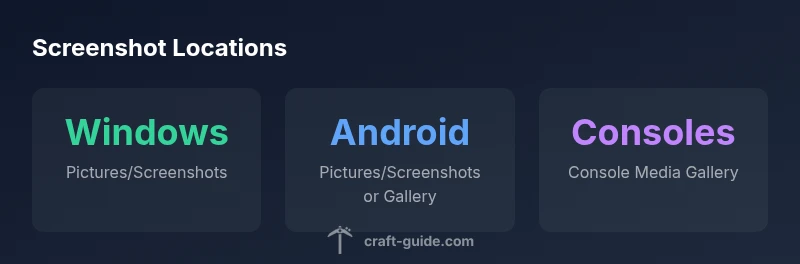
Where Minecraft Bedrock screenshots are saved depends on your platform. On Windows 10/11 Bedrock Edition, screenshots typically save in the Pictures/Screenshots folder within your user profile. On Android and iOS devices, screenshots go to the device’s Photos or Gallery app. Console versions store captures in the console’s built-in media gallery. This guide explains how to locate and organize these saves across platforms.
Why Screenshot Storage Matters for Builders and Modders
For Minecraft builders and modders, knowing where Bedrock screenshots are saved saves time when cataloging builds, sharing progress with teammates, and documenting bug reports. The location affects workflow, backup strategies, and even how you batch export images for tutorials or social posts. According to Craft Guide, adopting a consistent folder structure and naming convention reduces search time and helps you recover important moments from long play sessions. By understanding the typical defaults and platform-specific quirks, you can design a portable, cross-platform screenshot workflow that stays synchronized across devices. A well-organized archive also makes it easier to pair screenshots with notes, map seeds, and mod installation steps for future builds. In this guide, we’ll reference practical steps you can apply on Windows, Android, iOS, and consoles to keep your screenshots neatly organized. The keyword here is consistency: a repeating structure across devices minimizes frustration when you’re revisiting a project months later.
Platform-by-Platform: Where Bedrock Screenshots Typically End Up
On Windows Bedrock Edition, most users find screenshots saved under Pictures/Screenshots inside their user profile. This default location aligns with Windows photo storage, making it easy to back up alongside other images. On Android devices, Bedrock screenshots commonly appear in Pictures/Screenshots or within the Gallery/Photos app’s own folders, depending on the OEM camera app. On iOS devices, Bedrock screenshots are integrated into the Photos library, not a dedicated file path you can browse from a standard file manager. Console versions—such as Xbox, PlayStation, and Nintendo Switch—store captures in the console’s own media gallery, accessible through the system’s media apps. In each case, you can often navigate to a shared area like a Photos or Gallery app to view and export images if you want to move them to a computer or cloud storage. The goal is to know the default, but also to have a plan for moving or backing up if your project grows.
How to Change Default Save Locations and Improve Organization
Windows users can relocate the default Pictures folder so Bedrock saves go to a preferred drive or folder. Open File Explorer > Pictures > Properties > Location tab > Move, and choose a new path. Android users should check their camera/gallery app settings; many devices allow selecting a preferred storage folder, but some OEMs limit changes. If you cannot change the default, you can regularly move existing screenshots to a dedicated folder and use cloud storage for backups. iOS saves screenshots to the Photos app, and you can export batches to Files or a cloud service to group them by world or seed. Console platforms usually don’t let you change the built-in save location, but you can export captures via the system media gallery or external drives where supported. A simple practice is to create a master folder like Screenshots/Bedrock and mimic that structure across devices to maintain consistency.
Finding Screenshots Quickly: Tools and Shortcuts
Use OS tools to quickly locate Bedrock screenshots across platforms. On Windows, open File Explorer and search for file types like PNG or JPG in the Pictures/Screenshots folder or the relevant user directory. On Android, use the Gallery or a file manager to search for Screenshots or filter by date. On iOS, rely on the Photos app’s search by date or album; you can then export batches to a computer. Console users should access the console’s Media Gallery and use export options or connect the device to a computer to copy files. A practical tip is to create a shortcut or Quick Access link to the primary save location and keep a consistent naming convention that includes the world name or date.
Common Issues and Troubleshooting
If Bedrock screenshots go missing, check storage space first; a full drive can prevent new captures from saving. Verify app permissions on mobile devices to ensure the game can write to the Photos/Gallery or Files app. If you updated the game and changes seem inconsistent, look for changes in the OS save path or the gallery app. Cloud syncing can duplicate or move files; disable auto-upload temporarily to identify the local folder. If you suspect a corrupted save, try exporting recent screenshots from the console gallery or the Photos app before deleting and re-recording. For cross-platform workflows, keep a central archive on your PC and periodically back up mobile captures to the same folder structure to avoid fragmentation.
Best Practices for a Cross-Platform Screenshot Workflow
Establish a consistent folder structure across devices: Screenshots/Bedrock/WorldName/Date or similar, and use clear naming like WorldName_Date_Time. Regularly back up to cloud storage or an external drive to prevent data loss. Use in-game moments, map seeds, and mod notes alongside images to create a coherent record of your builds. When possible, batch export screenshots from mobile devices to your PC to keep the archive synchronized. Finally, document your workflow in a short guide so teammates can reproduce the same save locations and naming standards.
Platform Nuances and Edge Cases
Platform updates can subtly alter where screenshots are saved or how they appear in galleries. Windows users might see a new “Screenshots” subfolder if the Pictures location is moved; Android OEMs sometimes change the default album names after updates; iOS gallery organization can shift with iOS upgrades, affecting how you filter Bedrock images. If you rely on mods or texture packs that add overlays or UI changes, verify whether screenshots capture those changes and where the files land afterward. Keeping a simple, cross-platform rule set minimizes surprises when you switch devices or upgrade Minecraft Bedrock.
Bedrock screenshot save locations by platform
| Platform | Default Save Location | Notes |
|---|---|---|
| Windows Bedrock | Pictures/Screenshots | Common for Windows users |
| Android | Pictures/Screenshots or Gallery | Depends on OEM and Android version |
| iOS | Photos app / Camera Roll | No direct file path accessible via standard file managers |
| Consoles | Console media gallery | Accessible through system media apps |
People Also Ask
Where are Bedrock Edition screenshots saved on Windows 10/11?
On Windows Bedrock Edition, screenshots are saved in the Pictures/Screenshots folder within your user profile. This location aligns with Windows photo storage and is easy to back up alongside other images.
Windows Bedrock saves to the Pictures/Screenshots folder; you can back them up by syncing that folder with your cloud storage or external drive.
Do Bedrock screenshots on Android go to the Gallery or a specific folder?
Android devices commonly store Bedrock screenshots in Pictures/Screenshots or within the Gallery/Photos app’s own folders, depending on the OEM camera app. Check your camera app’s storage settings if you want a specific path.
Android usually saves Bedrock screenshots in Pictures/Screenshots or Gallery folders, depending on your device and camera app.
Can I change the default save location for Bedrock screenshots on Windows?
Yes. You can relocate the Pictures folder via File Explorer: Pictures > Properties > Location > Move, then select a new path. This redirects new screenshots to the chosen location.
You can move the Pictures folder to a new drive, so new screenshots save there.
Where are console screenshots saved and can I change it?
Console screenshots are stored in the console’s media gallery. Most consoles don’t allow changing the save location, but you can export captures through the system’s export options when needed.
Screenshots on consoles go to the system’s media gallery and are exportable as needed.
How can I locate a missing Bedrock screenshot on Windows?
Use Windows search in the Pictures folder for file types like PNG or JPG, filtering by date. If you moved folders recently, check both the old and new save locations.
Search for PNG or JPG files in the Pictures folder or any moved location.
“A clear, platform-aware screenshot workflow saves time for builders and streamers by keeping Bedrock images organized across devices.”
The Essentials
- Archive screenshots with a consistent folder structure
- Know the default save location per platform
- Use OS tools to locate and back up images
- Regularly back up to cloud or external drives
- Consider a cross-platform naming convention like World_Date_Time