Where Minecraft Screenshots Are Saved: A Practical Guide
Learn where Minecraft screenshots are saved across Java and Bedrock editions on Windows, macOS, Linux, Android, and iOS, with default paths, how to locate them, and tips to organize backups.


Minecraft screenshots are saved in platform- and edition-specific folders. For Java Edition, the default is a screenshots folder inside your Minecraft directory; Bedrock uses the OS-specific Pictures libraries. Access the path via the OS or search for 'Screenshots' to locate the files quickly. This quick guide helps you identify default locations and how to verify them on each platform, so you can find, back up, and share captures with ease.
Why location matters
Understanding where minecraft screenshots are saved is essential for efficient asset management, especially if you create large Minecraft builds, tutorials, or mod showcases. The destination is not a universal folder; it varies by edition (Java vs Bedrock) and by operating system (Windows, macOS, Linux, Android, iOS). This matters because a misplaced file can slow down content workflows, hinder backups, and make it harder to share your work with friends or a community. In this section we explore the most common save locations and provide a practical framework for locating, organizing, and backing up your captures. By recognizing the exact path, you can quickly grab screenshots for social posts, tutorials, or build logs without a frantic search through your hard drive, and you’ll know the exact phrase you’d use when teaching others about the process.
Java Edition save paths by OS
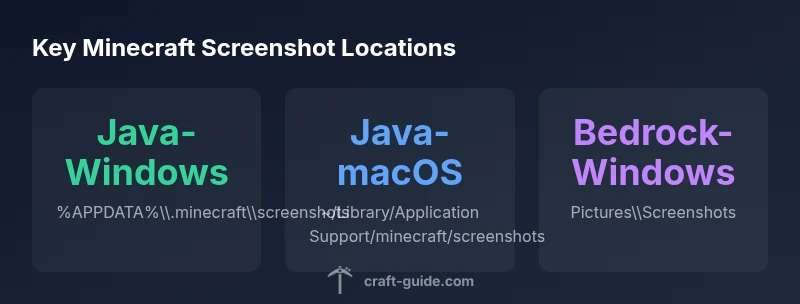
For Java Edition, the save path is typically inside the Minecraft folder, but the exact location depends on your operating system. On Windows, the default path is a subfolder of the roaming AppData directory. On macOS, it lives in the Library folder under Application Support. On Linux, the home directory hosts a hidden .minecraft folder. Knowing these locations helps you locate, back up, and share screenshots without confusion. If you’ve customized Java’s installation or changed the game directory, the screenshots will appear wherever you store the game data. Always check the launcher settings if you’re unsure where the game writes data, because the path can vary if you’ve changed the install directory.
Bedrock Edition save paths by platform
Bedrock Edition aligns its saves with the host OS rather than a single Minecraft-specific folder. In Windows 10/11 Bedrock, screenshots commonly appear in the system Pictures/Screenshots folder. On Android devices, you’ll typically find them under the device’s Pictures or DCIM/Screenshots area, depending on manufacturer conventions. iOS stores screenshots in the Photos app, since Minecraft saves to the device’s media library. This division means you should check the OS’s own media folders to locate Bedrock captures, then consider moving them into a personal project folder if you want unified organization.
How to locate or verify the path on your device
If you’re unsure where a screenshot landed, try quick OS-based searches first. On Windows, use the search bar to look for Screenshots or for files with a PNG extension and recent timestamps. On macOS, open Finder and perform a Spotlight search for Screenshots, then use the path shown at the top of the Finder window. On Linux, you can use the terminal: find ~/ -type f -name 'Screenshot*.png' or search your home directory for a .minecraft/screenshot path. On mobile devices, browse through the Photos app (iOS) or the Gallery and file manager (Android) to locate recent captures.
Organizing, renaming, and backing up your screenshots
To keep your Minecraft screenshots easy to locate, adopt a simple naming convention that includes the date, edition, and a brief descriptor (e.g., 2026-02-27_WorldName_Build.png). Create a centralized backup folder and, if possible, automate a daily transfer from your device or game folder to a cloud or external drive. Consider tagging images by project, map seed, or mod setup to speed up future retrieval. Finally, maintain a consistent folder hierarchy across devices to ensure portability when you work on multiple machines.
Troubleshooting common issues and edge cases
If you can’t find newly saved screenshots, double-check that the game actually saved the file (check the in-game screenshot counter or the PNG file size). Ensure you’re pressing the correct key (F2) and that you’re not running the game in a mode that disables screenshots or overlays. If you recently changed the install location, search both the old and new directories. For Android and iOS, remember that some apps export or sync photos differently; check the device’s media settings and permissions.
Changing the default save location or creating a workflow
If you want to change where Minecraft saves screenshots, you’ll typically need to relocate the game data directory or create a symlink to point the old path to a new one. Some players prefer a centralized folder for all project assets, which simplifies backups and version control. In practice, you can also set up an automated workflow that copies new screenshots to a dedicated project folder at a scheduled interval, ensuring your builds and tutorials stay organized across devices.
Common Minecraft screenshot save locations by edition and OS
| Platform / Edition | Default Screenshot Path | Notes |
|---|---|---|
| Java Edition - Windows | %APPDATA%\\.minecraft\\screenshots | Default for Java on Windows |
| Java Edition - macOS | ~/Library/Application Support/minecraft/screenshots | Default for Java on macOS |
| Java Edition - Linux | ~/.minecraft/screenshots | Default for Java on Linux |
| Bedrock Edition - Windows 10/11 | Pictures\\Screenshots | Default for Bedrock on Windows |
| Bedrock Edition - Android | /storage/emulated/0/Pictures/Screenshots | Default for Bedrock on Android |
| Bedrock Edition - iOS | Photos app | Default for Bedrock on iOS |
People Also Ask
Where are Minecraft screenshots saved by default?
By default, Java Edition saves to the .minecraft/screenshots folder in your user directory (path varies by OS). Bedrock saves to the OS-specific Pictures or Photos library depending on the platform. If you’re unsure, use OS search for 'Screenshots' to locate recent captures.
Java saves to the Minecraft folder, Bedrock uses the system photos or pictures, use search to locate recent captures.
Can I change where screenshots are saved?
Yes. You can move the game data directory or create a symbolic link to redirect the screenshots. Some platforms also support changing paths via launcher settings, but it depends on edition and OS. Always ensure the new location has enough permissions and space.
You can move the save location or use a link; check your launcher and OS permissions.
Why can’t I find my screenshots after an update?
Sometimes updates alter the default folder or reset path references. Use OS search for files named 'Screenshot' or PNG files created around the update date. Check both the old and new locations, and verify game installation directories if you changed them.
Check both old and new folders, search for recent PNGs, and verify installation paths.
What file format are Minecraft screenshots saved in?
Screenshots are typically saved as PNG files, which preserves image quality with lossless compression. This is consistent across Java and Bedrock editions unless you configure a different export method.
PNG is the standard format for Minecraft screenshots.
How do I move screenshots to a different folder without losing them?
Copy or move the existing PNG files to the new folder and adjust your save path if you want future captures redirected. If you use a symlink, the game writes to the new location automatically.
Move or copy the files, then adjust the path or use a symlink.
Are screenshot locations different for Bedrock vs Java?
Yes. Java Edition generally saves within the Minecraft folder on desktop OSes, while Bedrock follows OS-level folders like Pictures or Photos. Mobile Bedrock may use its own gallery or camera roll depending on the device.
Bedrock uses OS folders, while Java uses the game folder on desktop.
“Efficient asset management starts with knowing exactly where your screenshots land on each platform. A clear save path speeds up tutorials, builds, and collaboration.”
The Essentials
- Know your edition and OS to locate screenshots quickly
- Use OS search to verify locations when unsure
- Maintain a consistent naming convention for easy retrieval
- Back up screenshots regularly to cloud or external storage
- Consider centralized workflow for cross-device projects