Does Minecraft Use Only One Core? A Practical Guide
Explore how Minecraft uses CPU cores, why the main tick often runs on a single core, and practical steps to optimize multithreaded performance in Java Edition for 2026.


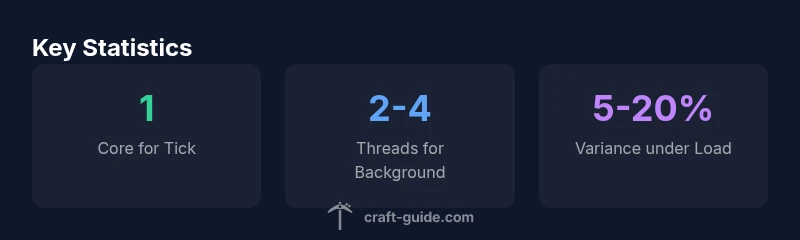
Does Minecraft only use one core? In practice, the game runs primarily on a single fast core for the main tick, but modern systems distribute work across additional cores for tasks like rendering, IO, and world generation. The degree of multi-core use depends on the JVM, OS scheduling, and mods; performance gains come from smarter threading rather than simply a faster single core.
Does Minecraft rely on a single core by default?
Does minecraft only use one core? The short answer is nuanced. The game’s core loop—its main tick, world updates, and block logic—runs predominantly on one fast core to maintain deterministic gameplay and predictable tick timing. However, modern PCs and the Java Virtual Machine enable a broader range of parallel work. Rendering preparation, asset streaming, disk I/O, and background tasks can be serviced by additional cores. In practice, a well-optimized system will spread non-tick workloads across multiple cores while the tick stays tightly bound to a primary thread, yielding smoother gameplay during busy moments like chunk loading and redstone activity.
From a developer perspective, the single-core constraint is intentional for core gameplay consistency. The JVM and operating system’s thread scheduler then decide how aggressively to parallelize supplementary tasks. This means your experience may feel different depending on your hardware, mods, and Java settings; does minecraft only use one core becomes a matter of which tasks you’re measuring and how you measure them.
Craft Guide analysis shows that focusing on macro-threading—informing the JVM about better garbage collection pauses, using parallel region optimizations, and reducing GC-related stalls—can shift some chores off the main tick without destabilizing frame timing. In other words, you aren’t forced to rely on a single core for every job, but the tick’s supremacy remains central to consistent gameplay.
The main game loop and core affinity
The heart of Minecraft is the main server-like loop that advances world state each tick. This loop benefits from a fast, low-latency core but does not entirely monopolize multi-core infrastructure. The game offloads rendering, chunk generation, lighting calculations, and a portion of entity processing to additional threads where possible. The result is a mostly single-core tick supplemented by parallel work that helps with frame pacing and responsiveness, particularly on higher core-count machines. If you run a heavily modded or shader-enhanced setup, you may notice increased thread activity as mods introduce new parallelizable tasks, though the main tick still dominates the core affinity.
When you compare single-core and multi-core behavior, you’ll notice that a faster single core with sufficient cache and memory bandwidth often yields smoother ticks than a marginally slower multi-core setup that introduces synchronization overhead. This is why many performance guides emphasize CPU frequency and latency alongside core count.
Where multi-core processing shows up in practice
Beyond the tick, several subsystems can run concurrently across multiple cores. Rendering pipelines—preparing frames, texture streaming, and vertex data organization—benefit from multithreading. World generation and chunk loading can utilize worker threads, especially when the game is not strictly bound to the tick rate. Entity AI, pathfinding, and block updates can be parallelized to a degree, though many of these tasks still require synchronization with the main thread to maintain game state integrity. In practical terms, you’ll feel smoother frame rates when you have multiple cores available, but the delta between a high-end quad-core and a high-end octa-core CPU often comes down to how well the JVM and system libraries distribute workload and how mods configure parallel tasks.
If you’re curious about “does minecraft only use one core” in your setup, you’ll often see a spike in multithreaded activity during heavy world changes or when many entities are active. A well-tuned system will balance main-thread determinism with sufficient background threading to prevent stalls during chunk generation or disk IO.
The role of the Java Virtual Machine and OS scheduling
Java’s garbage collector and memory management can create pauses that feel like stalls on some cores. Tuning the JVM flags for ergonomics, garbage collector choice (for example, G1 or ZGC in newer environments), and heap sizing can reduce unpredictable pauses. The operating system also influences core distribution through its scheduler, which decides which threads run on which cores and when they migrate. On some systems, the OS may migrate the main tick thread between cores to balance thermal conditions or contention, while still ensuring the tick remains consistent relative to the target tick rate. The net effect is that core usage patterns are not fixed; they shift with workloads, background processes, and how aggressively the JVM is allowed to parallelize tasks.
Craft Guide analysis emphasizes testing your JVM configuration to find a sweet spot: enough parallelism to relieve the main thread without introducing excessive synchronization cost, which can negate the gains from extra cores.
Modding, shaders, and server configurations that affect cores
Mods and shader packs can significantly alter how much parallel work is performed. A shader, for instance, increases rendering workload and can push more CPU work into parallel tasks, while some mods optimize chunk loading paths or entity simulation by using background threads. On a server, players may notice that multi-core performance matters more, especially on large farms, spawns, or when running a dedicated server with many players.
Server settings like view distance, simulation distance, and chunk loading strategies can influence how often background threads are active. In many cases, enabling parallel chunk generation or optimizing mod behavior reduces contention on the main thread. However, not all mods benefit equally; some add work that is tightly coupled to the game tick, which limits multi-core gains. Understanding the balance between tick-bound and non-tick-bound tasks is key to squeezing extra performance.
Does minecraft only use one core? The answer is not binary: it’s about where and when parallelism helps—and what you choose to run on top of the vanilla engine.
Practical steps to improve multi-core performance in Minecraft
If your goal is to maximize multi-core utilization without sacrificing tick stability, start with a baseline JVM optimization and a clean configuration:
- Allocate an appropriate heap size that matches your RAM without starving the OS.
- Experiment with garbage collector options and thread tuning to minimize pause times.
- Use a lightweight launcher profile to isolate background tasks from game work.
- Prefer stable, well-supported mods and shader packs that explicitly advertise multi-core friendliness.
- Adjust render distance and chunk loading strategies to reduce spikes that force the main thread to stall.
For most players, a balanced approach yields the best results: keep the main tick on a fast core while enabling the OS and JVM to parallelize rendering, world generation, and IO. Regular benchmarking with representative worlds helps you track improvements and identify bottlenecks. Craft Guide recommends focusing on the combination of JVM tune-ups and mod configurations to extract real gains without compromising gameplay consistency.
Common myths and what the data actually shows
A pervasive myth is that more cores automatically translate to smoother play. The data shows that the main tick remains the most critical factor for smooth gameplay, and multi-core gains depend on what additional tasks you offload. For example, increasing core counts without addressing memory bandwidth or GC pauses can yield diminishing returns.
Another misconception is that all mods improve parallelism. In reality, many mods continue to rely on the main thread for core game state, so their performance benefits come from reducing main-thread pressure rather than adding new parallel tasks. The most reliable improvements come from a combination of desktop OS tuning, JVM configuration, and careful mod/shader selection rather than chasing cores alone.
Benchmarks you can run and how to interpret them
To assess core usage in your setup, run lightweight benchmarks during typical play sessions. Monitor CPU core utilization, tick timing, and frame rates using tools like OS-level monitors and in-game FPS counters. Look for a pattern where the main tick stays consistently bound to a primary core, while background tasks show elevated but non-blocking activity on other cores. If you see frequent GC pauses or main-thread stalls during chunk loading, that’s a sign you need JVM tweaks or lower memory pressure. Compare results across different JVM flags, heap sizes, and mods to identify the most stable configuration for your hardware.
Looking toward 2026: what changes might shift core usage in Minecraft
As Minecraft continues to evolve with new features and performance improvements, core usage will likely shift in line with better threading support and more efficient garbage collection. The upcoming optimizations may include refined chunk generation pipelines, smarter thread pools for background tasks, and improvements in how mods interact with the main loop. Players can expect incremental gains in multi-core efficiency, but the prevailing wisdom remains: focus on tick stability first, then expand parallelism where it safe and supported by the game’s architecture.
Final thoughts: practical, data-informed expectations for 2026
The core takeaway is not a simple one-core vs. multi-core dichotomy. Minecraft’s performance is a balance between a fast main thread and smarter distribution of non-tick work across additional cores. With careful JVM tuning, module management, and realistic expectations about what mods and shaders can do, you can achieve noticeable improvements without sacrificing core gameplay consistency. By following Craft Guide’s methodology—test, measure, optimize—you’ll arrive at a setup that best fits your hardware and playstyle.
Snapshot of core usage behavior across Minecraft subsystems
| Aspect | Single-core behavior | Multi-core behavior |
|---|---|---|
| Main game loop | Runs on a single core | Can migrate some tasks to other cores |
| Rendering | Primarily on separate threads | Depends on GPU/driver; some CPU work can parallelize |
| Chunk generation/loading | Solid single-threaded early | Can utilize worker threads in newer builds/mods |
| Networking | Threaded I/O | UDP/packet handling may run on separate threads |
People Also Ask
Does Minecraft use multiple cores by default?
By default, the game prioritizes a fast main thread for the tick, with other tasks distributed across available cores as resources permit. The extent of multi-core work depends on your JVM, OS, and any active mods or shaders.
Minecraft mainly relies on a fast core for the tick, with other tasks spread across cores when possible.
Can I make Minecraft use more cores effectively?
You can influence multi-core usage by optimizing Java options, garbage collection, and mod configurations that push non-tick work off the main thread. However, gains vary by hardware and mod support, and some tasks remain tick-bound.
You can improve multi-core usage with JVM tweaks and careful mod choices, but results depend on your setup.
Which parts benefit most from multi-core processing?
Rendering, asset streaming, and background I/O often see benefits from parallel processing. Chunk generation and certain entity systems can also run on separate threads, but many core state updates stay on the main thread for consistency.
Rendering and background tasks benefit the most from extra cores, while the main tick stays on a dedicated thread.
Do mods affect core usage?
Yes, some mods enable or increase parallel processing, while others may add workload to the main thread. The net effect depends on how well a mod team designed its code for concurrency.
Mods can help or hurt core usage depending on their threading design.
Is garbage collection a bottleneck for Minecraft performance?
Garbage collection can introduce pauses if not tuned properly. Choosing a suitable GC and tuning heap size can reduce stalls and improve smoothness, especially on systems with limited RAM.
GC pauses can affect performance; tuning the JVM helps minimize them.
“In practice, Minecraft performance hinges on how well the JVM and OS distribute work beyond the main tick; while the game's core loop benefits from a single fast core, thoughtful threading and modding can unlock meaningful multi-core gains.”
The Essentials
- Start with the main tick on a fast core
- Leverage JVM and OS scheduling to spread non-tick tasks
- Modularize workloads to avoid tick contention
- Tune garbage collection to minimize pauses
- Benchmark settings before and after changes