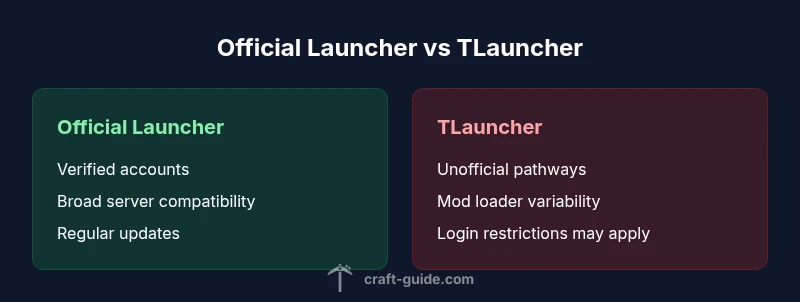
Minecraft and TLauncher Cross-Play — A Practical Comparison
Explore whether Minecraft Java Edition can play with TLauncher, the limitations, licensing concerns, server policies, and best practices for reliable cross-launcher play. This analytical guide covers version parity, anti-cheat implications, and setup tips for mixed-launcher groups.


Short answer: Yes, Minecraft Java Edition can technically play with TLauncher under certain conditions, but it is not officially supported. According to Craft Guide, you must use the same game version, ensure both clients access the same server type, and understand licensing and anti-cheat implications. For most players, a legitimate official launcher offers the cleanest cross-play experience.
The Compatibility Landscape
The question of can minecraft and tlauncher play together sits at the intersection of official support, licensing, and server policies. In practice, Java Edition clients can connect to the same servers if they expose compatible protocols and allow non-official clients. However, many servers enforce strict authentication and anti-cheat checks that favor clients launched through Mojang/Microsoft’s official channel. This creates a tension between accessibility for friends who use TLauncher and the stability you get from the official launcher. Craft Guide analysis shows that the majority of active Java Edition servers prioritize verified accounts and consistent versioning to prevent desynchronization across players. From a purely technical standpoint, the game’s networking stack is tolerant of different launcher clients as long as the game version, mod loadout, and server expectations align. The social reality, though, is different: communities generally prefer standardized tooling to minimize disputes about eligibility, bans, or rollback issues. For many players, this means that cross-launcher play is possible in limited, controlled contexts, but not a guaranteed, universally supported feature across all servers and game modes.
How Versioning Impacts Playability
Version parity is the single most important factor when mixing launchers. Java Edition updates frequently alter networking, entity behavior, and data formats. If one player runs 1.20.1 on TLauncher and another runs 1.19.4 on the official launcher, the mismatch can prevent connection or cause subtle desyncs that ruin gameplay. The practical rule is simple: everyone must be on the same major and minor version, with compatible snapshots or mod packs agreed upon before joining. TLauncher users often curate their own mod sets or Forge/Fabric configurations, which adds another layer to version management. The risk here is twofold: servers may reject mismatched clients, and players may experience client-side crashes or world corruption when modules don’t align. Craft Guide emphasizes that version discipline is the backbone of successful cross-launcher play and recommends sticking to a shared, stable version cluster for group sessions.
Server Policies and Anti-Cheat Realities
Server administrators frequently deploy anti-cheat systems that scrutinize login flows, client signatures, and data packets. When players arrive from a launcher not officially sanctioned by the game, some servers automatically deny access or restrict capabilities. This reality makes can minecraft and tlauncher play together largely situational: it may work on private or loosely moderated servers, but not on mainstream public networks. The anti-cheat ecosystem, including common plugins and services, often assumes standard authentication rituals and verified accounts. As a result, cross-launcher play more reliably occurs on servers that explicitly permit non-official clients, or on private networks with clear guidelines and restricted permissions. If you plan to host or join such environments, coordinate with server admins about launcher compatibility and policy acceptance to avoid misunderstandings or account risk.
Practical Scenarios and Setups
For friends who want to play together without swapping platforms, consider these practical setups. First, agree on a common version and a shared mod/loadout approach. Use a server that explicitly supports Java Edition clients from different launchers and confirm that it doesn’t enforce strict account verification beyond what the game requires. On LAN, a local server can sometimes tolerate mixed launchers more readily than online public servers, provided all participants run the same version and enable the same mods. If you’re experimenting with mod packs, keep the scope tight: use Forge or Fabric with a common Fabric/Forge version and align on the API versions. Document the steps you’ve taken so teammates can reproduce the environment. While this kind of setup can be enjoyable, it’s essential to stay within server rules and respect licensing terms to avoid future access problems.
Security, Licensing, and Moderation
The licensing landscape matters when you mix launchers. Mojang/Microsoft licenses a single copy per account through the official launcher, and server operators expect that standard proof of ownership. TLauncher, while popular for convenience, operates in a legal gray area in some jurisdictions and may expose users to login or security questions. From Craft Guide’s standpoint, the safest path for sustained play is to stick with legitimate accounts and the official launcher for cross-play on supported servers. Moderators on many communities actively monitor for unauthorized or inconsistent authentication patterns, which can lead to temporary bans or stricter access policies. If you choose to explore non-official launchers, ensure everyone involved understands the risks and complies with server rules. The goal should be a fun, fair experience without compromising player safety or account security.
Best Practices for a Smooth Experience
To maximize reliability, adopt a set of best practices that minimize friction. Establish a single, agreed-upon version—preferably the latest stable Java Edition build supported by the group—and create a shared plan for mod and Forge/Fabric loader versions. Prefer servers with clear policies about launcher compatibility and guest access to avoid surprises during play sessions. Keep clients updated and avoid downloading from third-party repositories that aren’t trusted by your group. Regularly back up your worlds and test new configurations on a small private server before inviting the full group. If possible, use the official launcher for public play to ensure robust authentication and smoother cross-play with compatible servers. Craft Guide’s experience suggests that consistent setups dramatically reduce disconnects and world corruption, helping keep your group aligned.
What This Means for Casual Players and Builders
For casual players, the convenience of TLauncher might be appealing, but the trade-off is greater potential instability and a higher chance of run-ins with server policies. Builders who rely on specific toolchains or mod packs may find cross-launcher play acceptable only in tightly controlled environments. The key is clear communication: confirm with server admins about launcher support, version parity, and mod compatibility before inviting others. When everyone follows the same rules, can minecraft and tlauncher play together becomes a manageable reality in selected communities rather than a universal feature.
Case Studies: Two Common Scenarios
Scenario A: A small group wants to play on a private server with a fixed mod set. They agree on version 1.19.4 and Forge 36.1.x, ensure all players use matching mod loaders, and use a whitelisted server. The experience is stable, and cross-launcher play proceeds without major issues. Scenario B: A larger public server advertises compatibility with Java Edition clients but enforces strict account verification. TLauncher users may face login failures or restricted gameplay options, showing how official policies influence actual playability. In both cases, alignment on version, mods, and server rules is the deciding factor.
Limitations You Should Expect
Cross-launcher play is not a guaranteed, universal feature. You will encounter limitations around authentication, anti-cheat enforcement, and server policy that can change with updates or configuration changes. Expect occasional disconnects, world desynchronization, or minor performance variances when mixing launchers. The long-term takeaway is to prioritize official tooling for cross-play on servers that require verified accounts and standardized security practices. When possible, keep a separate, dedicated setup for friends who use TLauncher to minimize disruption to your ongoing builds and survival play.
Comparison
| Feature | Minecraft Java Edition (Official Launcher) | TLauncher (Unofficial/Third-Party Launcher) |
|---|---|---|
| Account authentication | Verified, official login tied to a Mojang/Microsoft account | May support non-official login paths; can vary by server |
| Version parity | Strictly aligned with official game versioning | Depends on user setup; versions may drift without coordination |
| Mod/Forge/Fabric support | Extensive, well-supported mod loaders with documented compatibility | Mod loader support is variable and not standardized |
| Server compatibility | Broad support on most public servers; clear policies common | Some servers block or limit cross-launcher clients |
| Anti-cheat considerations | Typically compatible with standard anti-cheat suites on official servers | Anti-cheat treatments can be inconsistent; higher risk of access issues |
| Update cadence | Official cadence with predictable releases | Update timing depends on community tooling; can be slower/unstable |
| Cost/licensing | Official launcher requires licensed ownership; standard in most ecosystems | No formal licensing for launcher itself, but licensing for accounts varies |
| Best for | Players seeking reliability, official support, and broad server access | Groups testing flexibility, mods, or trying to play with friends using non-official tools |
Benefits
- Gives groups a sense of what works across launchers in practice
- Highlights versioning and policy areas to watch before joining servers
- Encourages careful planning and backup strategies for worlds
Negatives
- Not all servers permit non-official launcher clients
- Anti-cheat and authentication paths can block access unexpectedly
- Mod compatibility can be fragile across launchers
- Relying on non-official tools may raise licensing and security concerns
Official launcher wins for reliability; cross-launcher play is possible but limited
If you want stable cross-play, use the official launcher and a server that supports verified accounts. TLauncher-based play should be reserved for controlled groups with explicit admin permission and agreed-upon versioning.
People Also Ask
Can Minecraft Java Edition players using TLauncher join official servers?
It’s possible on some servers that permit non-official clients, but many will block or restrict access. Always check server policy before attempting to join with TLauncher. Using the official launcher minimizes surprises and maximizes compatibility.
Some servers allow non-official launchers, but many do not. Check with server admins before trying to join with TLauncher; the official launcher generally avoids access issues.
Is crossplay between TLauncher and the official launcher possible on all servers?
No. Crossplay depends on server rules, authentication, and anti-cheat configurations. While some servers tolerate mixed launchers, others enforce strict policies. Expect variability and plan accordingly.
Crossplay isn’t universal. Some servers allow it, others block it—check policies first.
What are the main risks of mixing launchers?
Risks include access denial, desynchronization, and potential world corruption if version or mod configurations don’t align. Licensing concerns and security issues with unofficial tools can also arise. Always test in a safe environment before inviting a group.
Main risks are access blocks and data mismatches; test first and use trusted setups.
Do servers enforce licensing terms for cross-launcher play?
Yes, many communities expect verified accounts and compliant licensing. Unverified or offline-style access can violate server terms and lead to bans or restricted play. When in doubt, favor official launchers and legitimate accounts.
Licensing terms vary; use verified accounts and the official launcher when possible.
What setup maximizes the chance of smooth cross-launcher play?
Standardize on a single, latest stable Java Edition version, use the official launcher, and play on servers with clear cross-launcher policies. If using TLauncher, ensure everyone uses the same mod/loadout and is aware of server rules.
Use one version, official launcher where possible, and agreed server guidelines.
Is it legal to use TLauncher to play with friends?
Legality depends on regional laws and how the launcher is used. TLauncher itself is a third-party tool; ensure you’re compliant with local laws, Mojang/Microsoft licensing terms, and server rules. The safest approach is to play with legitimate accounts via the official launcher.
Legality varies by region; stick to legitimate accounts and servers’ rules where possible.
The Essentials
- Match the game version across all players
- Prefer servers with clear launcher policies
- Use the official launcher for best compatibility
- Be wary of anti-cheat restrictions and licensing
- Document settings before joining group sessions