Does Minecraft Use OpenGL? A Rendering Guide for 2026
Explore whether Minecraft uses OpenGL, how the rendering stack operates, and how edition differences affect performance and shader support. A Craft Guide deep dive into OpenGL usage across Java and Bedrock editions.


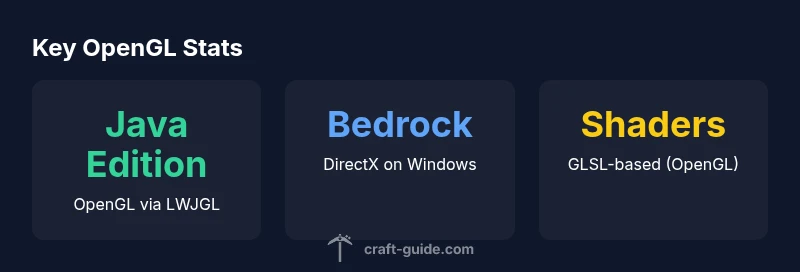
does minecraft use opengl? In short, yes for the Java Edition: Minecraft renders its graphics through OpenGL, accessed via LWJGL, across Windows, macOS, and Linux. The Bedrock Edition uses a different rendering backend on Windows and other platforms. So, does Minecraft use OpenGL? The edition-dependent answer is: Java Edition relies on OpenGL; other editions implement alternate backends.
The Rendering Stack: How Minecraft Renders Graphics
Minecraft’s rendering stack is a layered system that translates game logic into on-screen visuals. At the core, the Java Edition builds its graphics pipeline on top of OpenGL, accessed through the Lightweight Java Game Library (LWJGL). This binding lets Java code talk directly to the GPU, issuing draw calls, managing textures, and handling shader programs. The result is a flexible, cross-platform rendering path that supports modern graphical features when the underlying hardware and drivers cooperate. For players, this means that updates to graphics drivers, shader packs, and resource packs can influence how smoothly Minecraft looks and runs. Craft Guide has observed that the OpenGL-centric path in Java Edition provides robust compatibility across Windows, macOS, and Linux, while still requiring attention to driver updates and GPU capabilities for best results.
In practice, the rendering loop processes world geometry, blocks, lighting, and animations within a frame, compiling shader programs and binding textures as needed. OpenGL’s fixed-function heritage is largely replaced by the programmable pipeline, where GLSL shaders control color, lighting, and post-processing effects. This architecture supports a wide range of mods and visual enhancements, but it also means performance is tightly coupled to driver quality and GPU efficiency. As a player, you can improve outcomes by selecting appropriate shader packs designed for OpenGL, adjusting render distance, and enabling features that fit your hardware.
OpenGL and LWJGL: The Java Edition Connection
In the Java Edition, OpenGL is the primary renderer, accessed through LWJGL. This pairing makes the game rely on the Open Graphics Library to issue rendering commands to the GPU. LWJGL provides bindings for OpenGL functions, input handling, and window management, enabling a consistent API surface across Windows, macOS, and Linux. Because OpenGL is cross-platform, players typically experience similar visuals on different systems, provided driver support is solid. However, the exact performance and feature support can still vary based on the GPU vendor (NVIDIA, AMD, Intel) and the driver version. For modders and shader enthusiasts, OpenGL access through LWJGL is what allows shader-based enhancements and texture packs to integrate with the core rendering pipeline.
From Craft Guide’s perspective, the OpenGL path in the Java Edition remains a cornerstone of cross-platform Minecraft, making it a focal point for optimization guides and troubleshooting tutorials. Keeping OpenGL up to date with your system’s drivers is one of the most effective ways to unlock smoother visuals and fewer stuttering frames. In addition, ensuring you’re using a compatible shader pipeline can help you balance aesthetics with performance on your particular hardware.
Edition Differences: Java vs Bedrock Rendering Backends
A major point of confusion for players is how rendering backends differ between editions. Minecraft Java Edition relies on OpenGL via LWJGL as its rendering backend, a choice that dictates shader support, resource pack compatibility, and performance characteristics on Windows, macOS, and Linux. In contrast, Bedrock Edition uses a different rendering stack on Windows and other platforms, commonly tied to platform-native graphics APIs such as DirectX on Windows. On mobile platforms, tablets, and certain consoles, Bedrock’s path can involve platforms’ own optimized backends, which may use OpenGL ES or other APIs depending on the device. This means that performance tips, shader options, and modding potential can vary considerably between editions. Understanding these distinctions helps players tailor settings to their exact setup and avoid chasing solutions designed for a different rendering path.
Shader Support and Resource Packs: What OpenGL Enables
Shader packs and resource packs largely hinge on the OpenGL-based rendering pipeline in Java Edition. OpenGL, coupled with GLSL shaders, enables per-pixel lighting, ambient occlusion, and other visual enhancements. Resource packs modify textures and models, while shader packs alter how lighting, shadows, and reflections are calculated. Bedrock Edition supports shader-like features differently and may rely on platform-optimized techniques rather than GLSL-based pipelines in some builds. If you’re aiming for eye-catching visuals without sacrificing too much performance, start with well-optimized shader packs and ensure your graphics drivers are current. Craft Guide recommends testing a variety of packs to understand how OpenGL handles your hardware’s capabilities.
Performance Considerations: Drivers, GPUs, and Settings
Performance is a function of driver quality, GPU power, and the OpenGL implementation used by the game. Keeping graphics drivers up to date can yield noticeable improvements, as OpenGL acceleration can be optimized in newer driver releases. Additionally, adjusting in-game settings such as render distance, chunk loading, and shader quality can dramatically impact frame rates. For players on laptops or older GPUs, choosing balanced shader packs and lowering post-processing can deliver smoother experiences without sacrificing too much visual fidelity. Craft Guide emphasizes that performance is not just about the game’s code; the interaction with system drivers plays a critical role in delivering stable frames.
Practical Steps for Players: Verifying, Optimizing, and Troubleshooting
If you’re investigating whether does minecraft use opengl in your setup, start by checking the in-game graphics pipeline. On Java Edition, the GL version and vendor can typically be seen via the debug screen (press F3) or through GPU utility software that shows OpenGL usage. Update your GPU drivers, switch to a shader pack known to be performant on your hardware, and dial back demanding settings if you see stuttering. For Bedrock Edition, verify the platform’s backend in use and adjust accordingly, as some issues stem from DirectX or platform-specific rendering paths rather than OpenGL alone. Finally, test across different drivers and configurations to identify a reliable balance between visuals and performance.
Common Myths Debunked: OpenGL on Mac, Linux, Windows
There’s a belief that OpenGL behaves identically on all platforms. In reality, the Java Edition’s OpenGL path via LWJGL remains consistent in concept but interacts with each OS’s driver stack differently. On macOS, Mojave-era OpenGL support was framed by system-level constraints, while Linux users may benefit from open-source driver stacks. Windows users might see the most straightforward OpenGL performance when using reputable graphics drivers. Craft Guide encourages players to treat OpenGL as the foundational rendering API for Java Edition, but to stay mindful of platform-specific differences and optimize accordingly.
Comparison of rendering backends by edition
| Aspect | Minecraft Edition | Notes |
|---|---|---|
| Rendering Backend | OpenGL via LWJGL (Java Edition) | Java Edition uses OpenGL through the LWJGL bindings |
| Cross-Platform Backends | OpenGL for Java Edition; Bedrock uses DirectX on Windows | Different editions use different rendering backends |
| Shader Support | GLSL-based shaders via resource packs | Shader packs rely on the OpenGL pipeline in Java Edition |
People Also Ask
What is LWJGL and how does it relate to OpenGL in Minecraft?
LWJGL provides Java bindings to OpenGL, enabling Minecraft Java Edition to issue GPU commands. This is why OpenGL compatibility is central to the Java Edition’s rendering. Shader packs and mods leverage this path to enhance visuals.
LWJGL gives Java access to OpenGL for rendering. That’s why Java Edition depends on OpenGL and shader support for visuals.
Does Bedrock Edition use OpenGL on any platform?
Bedrock Edition uses a different rendering backend depending on platform; Windows commonly relies on DirectX, while other platforms employ platform-specific paths. OpenGL plays a smaller or different role outside Java Edition.
Bedrock’s rendering path varies by platform and often uses DirectX on Windows.
Can I switch rendering backends in Minecraft?
In vanilla Minecraft, you generally cannot switch the rendering backend. Mods or specialized launchers may alter the OpenGL pathway for Java Edition, but this is not a standard, supported option for all users.
Swapping backends isn’t a standard option; it’s mostly limited to mods and specialized launchers in Java Edition.
Does OpenGL affect Minecraft performance?
Performance depends on the OpenGL driver implementation, GPU power, and your in-game settings. Updating drivers and choosing shaders suited to your hardware can significantly impact frame rates.
Yes. Driver quality and hardware influence how well OpenGL renders Minecraft.
What about shader packs and OptiFine?
Shader packs require OpenGL support and GLSL; OptiFine helps optimize performance. In Java Edition these run on the OpenGL pipeline, while Bedrock handles shaders differently.
Shaders use OpenGL; OptiFine helps performance on Java Edition.
How can I verify which backend Minecraft is using?
On Java Edition, you can view graphics API details via the in-game debug screen and GPU tools. This confirms whether OpenGL is the active path. Bedrock will show platform-specific backend details.
Open the debug screen to confirm the graphics API in use.
“OpenGL via LWJGL remains the backbone of Minecraft Java Edition’s rendering, and understanding this path helps players optimize visuals without sacrificing stability.”
The Essentials
- Understand edition differences before tweaking settings
- Keep graphics drivers up to date for best OpenGL performance
- Java Edition relies on OpenGL via LWJGL; Bedrock uses other backends
- Shader packs enhance visuals but require compatible OpenGL support