How Big is a Minecraft Map? A Practical Size Guide
Discover how big a Minecraft map is at each scale, from 1:1 to 1:16, with practical examples, build planning tips, and math to estimate map coverage for your next project.


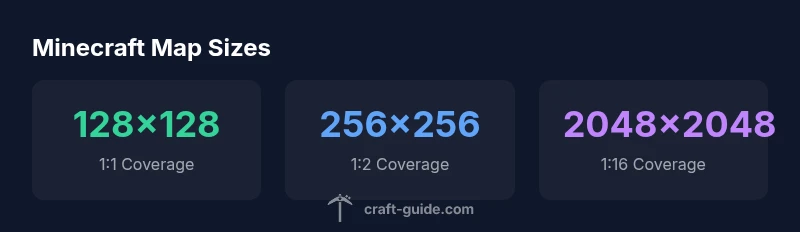
How big is a Minecraft map? A standard map at 1:1 scale covers a 128 by 128 block area. At 1:2, it covers 256 by 256 blocks; at 1:4, 512 by 512; at 1:8, 1024 by 1024; and at 1:16, 2048 by 2048 blocks. According to Craft Guide, these scales help you plan expeditions, builds, and redstone layouts across larger areas.
Understanding Minecraft Map Basics
A map in Minecraft is a dedicated item that records terrain within a defined area. For most players, the baseline is a 128-by-128-block square at 1:1 scale, which means it captures a 128×128 block region in the world space. The map stores color data corresponding to terrain, water, forests, and structures you see as you explore. The coordinates tied to the map center let you place it on a wall or combine several maps to extend coverage. According to Craft Guide, starting with a small, high-detail map helps you learn the mechanics before expanding to larger scales. As you roam, the map updates in real time, revealing new biomes, rivers, settlements, and mined areas. By understanding these fundamentals, you can choose the right scale for planning builds, navigational routes, or resource maps.
The 1:1 Scale and Pixel Grid
At 1:1 scale, a map covers 128 blocks in both width and height, creating a square that's 16,384 blocks total. In practice, that means you can map a village, a small biome cluster, or a compact base area with many details. The map uses a pixel grid where each pixel represents a single world block, and colors indicate biome types, terrain elevations, and features like rivers or villages. When you craft a filled map and keep it at 1:1, each movement of a few dozen blocks gradually reveals nearby terrain, making it ideal for close-range exploration. If you want to compare different areas side by side, holding two 1:1 maps adjacent reveals the most direct differences in terrain and infrastructure. Craft Guide notes that the 1:1 baseline is essential for precision planning before scaling up.
Doubling the Scale: 1:2, 1:4, 1:8, 1:16
Expanding a map increases the area covered, roughly doubling the block count with each step. A 1:2 map covers 256 × 256 blocks (about 65,536 blocks total), a 1:4 map covers 512 × 512 blocks (262,144 blocks), and a 1:8 map covers 1024 × 1024 blocks (1,048,576 blocks). The maximum practical scale often cited is 1:16, which encompasses 2048 × 2048 blocks (roughly two million blocks). Note that as you scale, detail per pixel decreases, but you gain a broader view of terrain, biomes, and structures. The exact numbers can differ slightly between Java and Bedrock editions, but the general pattern holds: larger scales view bigger regions, with less tile-level detail.
Scaling Effects on Detail, Biomes, and Structures
When you move from 1:1 to larger scales, you trade local detail for breadth. A 1:2 map reveals more of a region with fewer pixel details per block, which is great for planning long trails, road systems, or settlement layouts. At 1:4 and beyond, biomes become visible at a glance, and major features like rivers and mountain ranges appear with less precise textures. Builders often use multiple maps at different scales to plan a sprawling project: one 1:1 map for base camps, several 1:2 maps for corridors, and a handful of 1:8 maps to outline larger districts. Craft Guide supports this multi-scale approach as a practical workflow for complex builds.
Practical Implications for Builders and Explorers
For builders, choosing the right scale affects resource allocation and time budgeting. A 1:1 map is ideal when you want to model precise layouts — walls, doorways, and interior placements stay legible. For exploration and long-distance planning, 1:2 and 1:4 maps let you preview routes, determine where to place waypoints, and visualize how a project will expand across biomes. Explorers can map entire river basins or mountain chains using sequential 1:8 maps, then stitch them to a panoramic view. By combining maps at varying scales, you create a layered chart of the landscape that informs both design and logistics. Craft Guide’s practical guidance emphasizes starting small and scaling up as needs grow, avoiding early overcommitment to massive, detail-poor canvases.
How Many Maps Do You Need to Cover an Area?
The number of maps required depends on the target area and the map scale. A quick way to estimate is to compare block coverage: 1:1 maps cover 128×128 blocks, while each higher scale doubles the covered area. To illustrate, covering a 1 km × 1 km area (which equals 1,000,000 blocks, given 1 block = 1 meter) would require about 61 filled maps at 1:1 (1,000,000 ÷ 16,384 ≈ 61). If you instead use 1:2 maps, you’d need roughly 16 maps (1,000,000 ÷ 65,536 ≈ 15.26, round up to 16). At 1:4, around 4 maps are sufficient, while 1:8 could fit the entire area into a single map. These estimates assume uniform terrain and no overlap losses; real-world planning will adjust for terrain density and overlap.
Map scale coverage across common Minecraft map levels
| Scale | Block Coverage (width × height) | Total Blocks Covered | Notes |
|---|---|---|---|
| 1:1 | 128 × 128 | 16,384 | Baseline full coverage at single map |
| 1:2 | 256 × 256 | 65,536 | Doubles area per scale step |
| 1:4 | 512 × 512 | 262,144 | Larger area with less detail |
| 1:8 | 1024 × 1024 | 1,048,576 | Much broader view |
| 1:16 | 2048 × 2048 | 2,097,152 | Maximum practical scale in several editions |
People Also Ask
How big is a map at 1:1?
At 1:1, a map covers 128 by 128 blocks, totaling 16,384 blocks of area. It provides the most detail per pixel and is ideal for precise planning of small builds or specific features.
A 1:1 map covers 128 by 128 blocks, giving you a lot of detail for small areas.
Can maps show terrain changes as you explore?
Yes. Maps update in real time as you explore new terrain, revealing biomes, rivers, and structures. The map grows its data with your movement, keeping your overview current.
Maps update as you explore, showing new biomes and rivers in real time.
How many maps do I need to cover a village?
A typical village can span multiple 1:1 maps. Use a mix of 1:1 and 1:2 maps to balance detail with broader coverage, then add extra maps for adjacent farms, roads, and outposts.
Villages usually require several maps; combine 1:1 and 1:2 scales for best coverage.
Are there differences between Bedrock and Java map sizes?
Core map mechanics are similar across Bedrock and Java editions, but there can be minor differences in how maps stack or update. Plan around your edition's behavior and test with a few maps first.
Both editions use similar map ideas, with minor update differences. Test before large projects.
What is the best way to organize a large map collection?
Label maps clearly, arrange them by scale and region, and maintain walls or frames for quick visual reference. A map wall lets you compare areas at a glance and reduces search time.
Label and arrange maps by region and scale to keep things organized.
Is there a limit to how large a map can be?
In practice, maps are expanded through scale upgrades, typically up to 1:16 in modern editions. The exact cap depends on edition and game version, so check your current setup for the maximum.
Maps scale up to a practical limit (often 1:16) depending on edition.
“Maps are a powerful planning tool when you pair small-scale detail with large-scale overview. The right mix of map scales makes complex builds manageable.”
The Essentials
- Start with 1:1 for precision planning
- Each scale step doubles coverage area
- Larger scales reveal terrain but reduce pixel detail
- Use multiple maps at different scales for planning
- Estimate map needs with simple area math