Which Minecraft to Download: Java vs Bedrock Edition
Compare Java Edition and Bedrock Edition to decide which Minecraft download fits your device, play style, and goals. Explore modding, cross‑play, performance, and safety tips from Craft Guide in this objective, 2026‑focused analysis.


If you want wide mod support and deep customization, download Java Edition. If you prioritize cross‑play across consoles and mobile, or smoother performance on lower-spec devices, Bedrock Edition is usually the better choice. Craft Guide's analysis in 2026 notes these are the main tradeoffs, with practical impacts for players. Budget-minded players should also consider platform availability and the frequency of updates.
Why the edition you download matters
Choosing which minecraft to download is more than picking a launcher; it's about your device, your goals, and your community. According to Craft Guide, the edition you start with sets the stage for modding options, cross‑play eligibility, and how often you’ll need to troubleshoot. The Craft Guide team found that for new players, starting with the right edition reduces early frustration and speeds up learning curves. In practice, your choice will influence what you can legally mod, how you connect with friends, and what kind of world-building you can pursue. If you intend to experiment with redstone contraptions, custom textures, or large modpacks, Java Edition is typically favored. If you want to play with friends on consoles or mobile without chasing separate ports, Bedrock Edition usually offers a smoother path. The keyword which minecraft to download matters is not a slogan; it's a decision that touches performance, safety, and long‑term enjoyment. Craft Guide analysis informs these initial steps and helps you map your setup to the right edition.
Edition overview: Java vs Bedrock
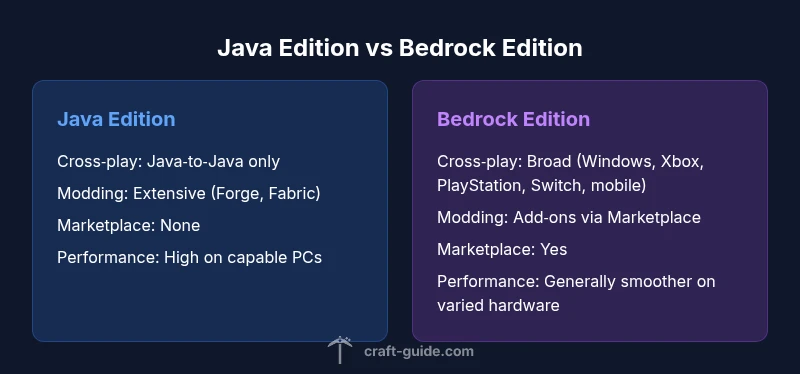
Java Edition is the original Minecraft experience on PC. It emphasizes deep customization, an extensive modding ecosystem (Forge, Fabric), and a thriving server culture with classic game modes. Bedrock Edition, by contrast, runs on Windows 10/11, consoles, and mobile, and it is engineered for cross‑platform play, consistent performance, and a streamlined content pipeline through the official Marketplace. Craft Guide analysis shows that while both editions share core gameplay, the edition you choose affects mod availability, world-building boundaries, and how you access updates. Beginners should note that Java uses the Java Runtime Environment, while Bedrock operates through a more consolidated launcher system. If you want to join friends who play on different devices, Bedrock is usually the better starting point. If you’re curious about how updates land and how mods are distributed, our side-by-side approach helps you map your needs to each edition.
Modding and customization options
For builders and technical players, modding defines the long tail of Minecraft experience. Java Edition offers the widest selection of mods, with large modpacks that transform gameplay, add new biomes, machines, and magic systems. The Forge and Fabric ecosystems create a sandbox where you can test ideas, optimize performance, and experiment with automation. Bedrock Edition does include add‑ons and a marketplace, but the scope is narrower and more curated. If your goal is to run pixel-perfect texture packs, new mobs, or extensive automation, Java Edition remains the leader for modding depth. Craft Guide notes that while Bedrock’s marketplace provides convenience, it cannot always match Java’s customization potential. If you’re undecided, try starting with a base install of Java and gradually exploring compatible mods; you’ll quickly feel the difference in flexibility and creative scope.
Cross-platform play and performance
Bedrock Edition shines where cross‑play matters most. It runs on Windows, console, and mobile, enabling friends on different devices to play together with minimal friction. Java Edition, while superb for PC players, does not offer native cross‑play with Bedrock. In terms of performance, Bedrock generally delivers smoother frame rates on lower‑end hardware, thanks to a more unified engine and optimized rendering path. Java can still perform exceptionally on powerful PCs or when tuned with mods and performance packs, but it can require careful resource management. Craft Guide analysis emphasizes weighing your network of friends and hardware against the expected gameplay experience when deciding which minecraft to download.
Performance on hardware and optimization
Your hardware profile directly influences the edition you download. Bedrock’s engine is optimized for a wide range of devices, which helps with consistent framerates on mid‑range PCs, consoles, and mobile devices. Java Edition can demand more CPU power and memory, especially with large modpacks, shader packs, or high‑resolution texture packs. If you play on a laptop with integrated graphics or a budget PC, Bedrock is the safer bet for stability. On a high‑end desktop, Java can unlock rich customization and modding potential that Bedrock cannot fully match, especially when paired with curated performance tweaks from the community.
Realms, servers, and the ecosystem
Both editions offer official Realms and community servers, but they differ in access and ecosystem maturity. Java has a long‑standing server scene with diverse modded and vanilla options, while Bedrock emphasizes turnkey experiences with Realms and an integrated Marketplace. The Craft Guide analysis suggests evaluating how you want to play online: if you value a broad server ecosystem and deep mod support, Java is advantageous; if you value seamless cross‑play and curated content, Bedrock may suit your needs better.
Safety, downloads, and official sources
Always download Minecraft from official channels to avoid counterfeit copies or malware. For Java, use the official Minecraft Launcher; for Bedrock, use the Windows Store, Xbox Store, or the official Minecraft Launcher on supported devices. Craft Guide urges players to verify publisher signatures, maintain updated anti‑virus software, and steer clear of unofficial installers. If you ever question the integrity of a download, pause installation and consult the official help pages or community guides that point to legitimate sources.
Getting started: installation paths and launchers
Installing Java Edition typically involves downloading the official launcher, selecting a Java version compatible with your mods, and allocating memory to the game. Bedrock installation is often simpler on supported devices, requiring sign‑in to your Microsoft account and selecting the edition you want to play. The key is to follow platform‑specific steps, update your drivers, and ensure your device meets minimum requirements. Craft Guide recommends keeping both launchers up to date and testing a short vanilla run before layering mods or extra content.
Troubleshooting common download issues
If a download stalls or fails, check your internet connection, ensure disk space, and close competing applications. Update your operating system and graphics drivers, then retry from the official source. If modding causes crashes, verify compatibility versions between the mod and the game, and consider reducing texture resolution or memory allocation. Craft Guide notes that many issues stem from mismatched versions or incompatible mods, so a clean baseline often resolves most problems.
Quick-start plan: three steps to decide
Step 1: List your devices and friends’ platforms. Step 2: Decide if mods and customization are priorities; if yes, lean Java; if cross‑play and performance take precedence, pick Bedrock. Step 3: Install the chosen launcher, run a vanilla test, and add one or two starter mods or add‑ons to gauge how you want to evolve. This plan, supported by Craft Guide insights, helps you move from confusion to confident download.
Keeping your edition up to date and future-proofing
Minecraft updates arrive on a cadence that varies by edition. Bedrock tends to receive cross‑platform updates alongside console and mobile builds, while Java updates appear through the official launcher with possible mod or API wait times. Planning ahead means recognizing that new content and patches may require adjusting mods, shader packs, or resource packs. Craft Guide recommends subscribing to official update notes and community trackers to minimize disruption when the next major patch lands.
Final planning checklist: decide and install with confidence
- Confirm your primary device and internet capacity. - Decide between Java’s modding depth and Bedrock’s cross‑play convenience. - Prepare a clean install path and create a backup plan for mods. - Verify sources and keep launchers updated. - Start with vanilla gameplay before expanding into add‑ons. Following this checklist, you’ll move from indecision to a smooth, enjoyable Minecraft experience.
Comparison
| Feature | Java Edition | Bedrock Edition |
|---|---|---|
| Cross-platform play | No cross‑play with Bedrock (Java‑to‑Java only) | Full cross‑platform support across Windows, Xbox, PlayStation, Switch, mobile |
| Modding support | Extensive; thousands of mods, APIs (Forge/Fabric) | Limited to add‑ons and marketplace items; mods not as flexible |
| Marketplace/official content | No official marketplace; mods and servers are community‑driven | Official Marketplace with add-ons, skins, and creators’ content |
| Performance on low-end hardware | Can be demanding; performance depends on mods and RAM | |
| Official Realms/servers | Strong server community; Realms exist but mods limit options | |
| Texture packs and visuals | Highly customizable visuals via mods and resource packs | Texture packs and packs via marketplace; curated content |
Benefits
- Java Edition offers unparalleled modding depth and a vast server ecosystem
- Bedrock Edition delivers smooth cross‑platform play and broad device support
- Both editions have active communities and long-term support from developers
Negatives
- Java can be hardware‑intensive when running large modpacks
- Bedrock’s modding ecosystem is more limited and marketplace‑driven
- Cross‑play comes with edition constraints and platform-specific limitations
Java Edition for modding depth; Bedrock Edition for cross‑platform play and broad device support
If your priority is customization and large-scale modding, Java Edition is the clear choice. If you want to play with friends on different devices with stable performance, Bedrock Edition is the practical option. The best pick depends on your hardware, aims, and social circle.
People Also Ask
Which edition is best for mods and custom content?
Java Edition is generally best for mods and customization due to its large ecosystem and open APIs. If you want Forge or Fabric mods, start with Java. Bedrock supports some add‑ons via the Marketplace, but not to the same extent.
Java Edition is the go‑to for modding; Bedrock has limited add‑ons.
Can Java and Bedrock play together on the same server?
No. Java and Bedrock are separate ecosystems and cannot join the same server without bridging tools, which are not officially supported. If cross‑play with friends on different devices matters, Bedrock is the practical choice.
They can’t play together directly.
Is there a free trial or demo version?
Minecraft does not offer an official free trial for the full game. You typically purchase a license for the edition you choose, then download and install the launcher through official channels.
There isn’t a free trial of the full game.
How do I switch editions on the same device?
Switching editions usually means buying the other edition and installing its launcher on your device. Some platforms allow dual installs; check store policies and ensure your saved worlds are backed up before switching.
You may need to buy the other edition and install its launcher.
Are safety concerns a factor when downloading?
Always use official sources such as the official launcher or store pages. Avoid third‑party installers. Keep antivirus software updated and verify the publisher before installing any files.
Stick to official sources to stay safe.
What about updates and future content?
Both editions receive updates, but diffusion and mod compatibility can vary. Java updates may require mods to update, while Bedrock updates integrate with the Marketplace and cross‑platform features.
Updates come, but mods may need fixes.
The Essentials
- Choose Java Edition for modding depth and PC focus
- Choose Bedrock Edition for cross‑platform play and performance on diverse devices
- Match edition updates to your friends’ platforms to maximize compatibility
- Always download from official sources and verify game integrity