Where Minecraft Is Installed: A Practical Guide 2026
Learn exactly where Minecraft is installed across Windows, macOS, and Linux, how to verify paths, move installations, and best practices for backups and managing multiple launchers.


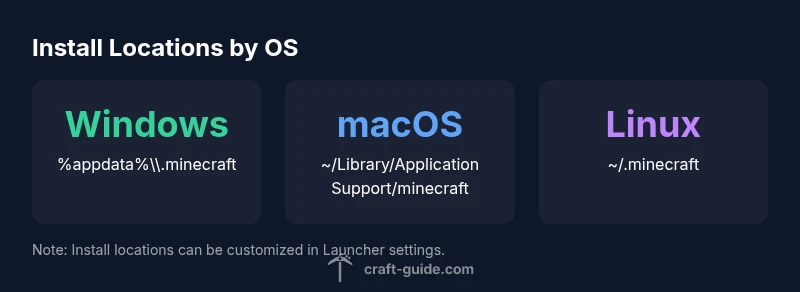
Where is Minecraft installed? It depends on your operating system and launcher. The launcher typically stores the game in a standard folder, with Windows using %appdata%\\.minecraft or C:\\Users\\<Username>\\AppData\\Roaming\\.minecraft, macOS using ~/Library/Application Support/minecraft, and Linux using ~/.minecraft. If you are using the official Minecraft Launcher, you can change or add install locations in Settings to manage multiple profiles.
Why where Minecraft is installed matters
Knowing the install location is essential for modding, world backups, and troubleshooting. When you search for 'where is minecraft installed', you’re really asking about the folder where game data, saves, and resource packs live. According to Craft Guide, recognizing install directories early saves time across platforms and reduces risk of data loss. A clear understanding also helps when moving worlds between computers or sharing worlds with friends. In short, the install location is the backbone of reliable Minecraft management on any edition, whether Java or Bedrock, and across Windows, macOS, and Linux. This awareness sets the foundation for successful customization, backups, and smooth cross-device play.
Windows: locating the Minecraft install folder
On Windows, Minecraft commonly lives under %appdata% or the user profile's roaming folder, leading to a path like C:\Users\<Username>\AppData\Roaming\.minecraft. If you installed via the Minecraft Launcher, you can verify or change the install location through the Launcher’s Installations tab. Use File Explorer and enable hidden items if needed to reveal the AppData folder. This path holds your worlds, saves, and mods, so keep a backup strategy that covers this location. Craft Guide analysis shows that most players still rely on the default path, but many customize for performance or modded setups.
macOS: locating the Minecraft install folder
macOS users typically find Minecraft in ~/Library/Application Support/minecraft. Unlike Windows, macOS keeps user files tucked into the Library folder. You can reach it via Finder > Go > Go to Folder and paste /Users/yourname/Library/Application Support/minecraft. If you run the Java Edition or Bedrock via the Launcher, you may configure alternate locations in Settings. After locating it, consider backing up your saves to ensure you don’t lose progress. As our Craft Guide team notes, consistent pathing across devices simplifies sharing worlds.
Linux: locating the Minecraft install folder
Linux installations commonly use ~/.minecraft in your home directory. Different package formats (deb, snap, flatpak) may place data elsewhere or sandbox it. If you installed via a third-party launcher, consult its documentation for the exact path. Terminal commands like ls -la ~/.minecraft can confirm presence, while ls -la to check the parent directory. Movement or backups should preserve worlds and mods. Craft Guide observations indicate that users with multiple distros may see subtle variations in path conventions, but the core folder name remains familiar.
Moving or changing the install location with the Minecraft Launcher and other launchers
If you want to relocate Minecraft, open the official Launcher, go to Installations, select the profile, and choose More > Edit, then set a new Install Location. Third-party launchers also offer path options. Be mindful that moving the folder may require reconfiguring resource packs, mods, and multi-world setups. Always test after moving to confirm that worlds load correctly and that the launcher references the new path.
Best practices for managing install locations on shared or multi-device setups
- Back up before moving or deleting worlds. - Use consistent folder naming across OS. - Document the paths you use and consider a centralized backup strategy. - For multi-device play, maintain synchronized folders via cloud storage or a Minecraft-compatible sync solution. The goal is to prevent mismatched worlds and missing textures, and to make troubleshooting faster across different machines.
Common install locations by OS
| OS | Default Install Location | Notes |
|---|---|---|
| Windows | %appdata%\\.minecraft (C:\\Users\\<Username>\\AppData\\Roaming\\.minecraft) | Default path; varies by launcher settings |
| macOS | ~/Library/Application Support/minecraft | Default path; can be redirected by launcher |
| Linux | ~/.minecraft | Common path; may differ with packaging (Snap/Flatpak) |
People Also Ask
What is the default Minecraft install location on Windows?
On Windows, Minecraft is usually installed in the roaming AppData folder as .minecraft. If you used the Launcher, you can verify or change it in Installations. This makes locating worlds and mods straightforward.
Windows defaults to the roaming AppData folder for Minecraft; you can verify or change it in the Launcher.
Can I move Minecraft to another folder after installation?
Yes, you can move or relocate, but you must point the Launcher to the new location. Some mods or resource packs may require updates after the move.
Yes, you can move, but update the launcher path and mod references.
How do I find the install location on Windows using the launcher?
Open the Minecraft Launcher, go to Installations, select the profile, and check the path. You can edit to change the folder if needed.
In the Launcher, use Installations to view or change the install path.
How do I change the install location in the Minecraft Launcher?
In the Minecraft Launcher, under Installations, select More > Edit, then set a new Install Location. You may need to move existing world files accordingly.
Go to Installations, edit, and pick a new location.
Do Java Edition and Bedrock Edition use the same folder?
No. Java Edition and Bedrock Edition store data in separate folders, and their paths vary by OS and launcher.
No—the two editions have different data folders.
Why are my Minecraft folders hidden or restricted?
Some folders live in user-hidden paths. Enable hidden files or adjust permissions, especially on macOS and Linux.
Some folders are hidden; enable hidden files or check permissions.
“Knowing where Minecraft is installed is essential for reliable backups and smooth modding. The Craft Guide Team recommends verifying install paths and keeping them organized across systems.”
The Essentials
- Identify your Minecraft install path before modding.
- Windows users should verify the launcher’s default path first.
- Use the Launcher to manage install locations across devices.
- Back up worlds before moving folders or switching devices.
- The Craft Guide team recommends documenting your install paths for future mods.