How to Redeem a Minecraft Code
Learn how to redeem a Minecraft code across Java and Bedrock editions with a safe, step-by-step approach. Includes troubleshooting, security tips, and links to official sources.


You will learn how to redeem a Minecraft code across platforms, including Java and Bedrock editions. This guide explains where to redeem, which accounts you need, and how to verify you unlocked the content. Before you begin, have your gift code, a stable internet connection, and the right device ready. We also cover common issues and safety tips so you don't fall for scams.
Understanding Minecraft Codes and Why They Matter
According to Craft Guide, a Minecraft code is a digital key or gift code that unlocks content or access to services across different editions (Java and Bedrock). Codes can come as physical gift cards or digital codes purchased from official stores. The main purposes are to grant access to the Marketplace, add-on skins, or a month of Realms hosting. Codes are edition-specific and platform-specific, so always verify compatibility with your account. The Craft Guide team emphasizes using codes from trusted sources to avoid scams and ensure you get what you paid for. Be mindful of expiration dates, regional restrictions, and account linking requirements. When redeemed correctly, codes unlock content without altering your existing save files. Always keep the code private until you’re ready to redeem, and confirm the unlock on your device once the process completes.
This process is designed for players of all skill levels, from beginners who just started a fresh world to seasoned builders who want access to premium content. If you’re new to Minecraft, understand that a code isn’t the same as a new game purchase; it often unlocks a specific item, skin, or time-limited bundle. The steps remain simple but require attention to the right platform and account. By following official channels and avoiding unofficial sites, you reduce risks and streamline the experience. Craft Guide’s guidance centers on clarity, safety, and practical steps that work across Windows, consoles, and mobile devices.
Where to Redeem Your Minecraft Code and Which Accounts You Need
A Minecraft code typically needs a linked Microsoft account for Bedrock platforms and a Minecraft Java Edition launcher for PC. The exact redemption flow depends on your device. On Windows 10/11, you’ll redeem through the Microsoft Store or the Minecraft launcher; on consoles, redemption is handled via the console’s store; on mobile, redemption occurs through the Minecraft app or the device store. Always redeem codes on official stores to ensure authenticity and to prevent fraud. Ensure your device time is synchronized with the network to avoid minor verification issues. If you already have a Microsoft account, link it to your Minecraft profile to simplify future purchases. Craft Guide analysis shows that consistent account linking reduces post-redemption issues and makes cross-platform play smoother. If you encounter regional restrictions, check your account region settings and the code’s allowed regions.
For Java Edition players, codes are often tied to a Mojang account rather than a Microsoft account, so you’ll follow different steps. The important takeaway is to identify the correct redemption path for your edition and device. Always start from the official Minecraft Help Center or Microsoft Support pages to confirm the exact steps for your setup. If your code is part of a bundle (like a Realms trial), read the bundle terms to understand what gets unlocked and how long access lasts. Craft Guide recommends keeping your account information secure and avoiding sharing codes in public forums.
Step-by-Step Redemption (Windows/Mobile/Console) – Narrative Guide
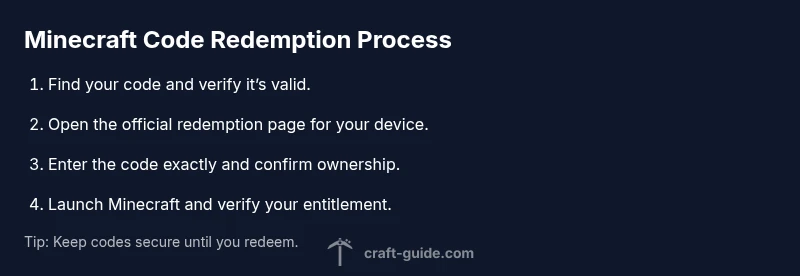
The process to redeem a Minecraft code is straightforward when you approach it in a logical sequence. First, locate the official redemption page for your device (Windows, Android, iOS, or console). Then, input the code exactly as printed or shown in your digital receipt. After submission, you’ll typically be asked to confirm ownership by signing into your Microsoft or Mojang account. Once confirmed, launch Minecraft and verify that the new content or access is visible in your library or marketplace. If you’re using Windows or a console, you may need to restart the game or log out and back in to sync your entitlements. Finally, test by joining a game or attempting to access the newly unlocked feature. If anything fails, revisit the official help resources or contact support.
Always work in a stable network environment and ensure your device time is accurate. If you’re redeeming a gift code on a mobile device, keep the code handy in case you need to re-enter it. The key is to stay on the official store pages and never share your code publicly. Craft Guide’s approach is to keep instructions clear, step-by-step, and platform-aware so players of all ages can complete the redemption process with confidence.
Common Issues and Quick Fixes
Redeeming a Minecraft code can hit snags such as an invalid or already redeemed code, region restrictions, or account linkage problems. If the code isn’t accepted, double-check the characters and ensure you’re entering the code on the correct official page for your platform. If the code has already been used, contact support with your purchase details—the issue may be with the code itself or with your account. Region restrictions may apply to certain bundles; if you see a region block, verify your account region and the code’s limitations. If you’re asked to sign in and you can’t access your account, use the official recovery options from the platform’s login page and reattempt redemption. Craft Guide recommends documenting purchase receipts and code numbers in case you need to verify authenticity later. If you encounter persistent issues after following the official steps, reach out to customer support rather than attempting workarounds that could compromise your account.
For Java Edition, ensure you’re using the correct launcher and that your Mojang/Microsoft account is properly linked if required. For Bedrock, confirm you’re using the appropriate storefront (Microsoft Store, Google Play, Apple App Store, or your console store). In all cases, use trusted sources and avoid third-party sites offering “instant” redemption, which are often scams or phishing attempts.
If you’re redeeming when a sale or bundle is temporarily unavailable, wait a short period and retry. Sometimes stores perform maintenance or regional server updates that temporarily block redemption. Craft Guide notes that patience saves you from accidental mistakes and supports a smoother, more reliable experience.
Security and Best Practices for Minecraft Codes
Treat Minecraft codes like cash. Do not share them publicly, and store them securely until you’re ready to redeem. Use two-factor authentication on your Microsoft/Mojang accounts whenever possible to prevent unauthorized access. If a code arrives via email, ensure it’s from an official source and avoid clicking unfamiliar links. When redeeming, perform the process directly on official websites or apps; never enter codes on third-party pages that request login information. Keep track of expiry dates and terms to avoid losing access. Craft Guide emphasizes that security and accuracy matter as much as speed when redeeming codes, especially if purchases are time-limited or tied to Realms subscriptions.
Additionally, consider keeping separate, strong passwords for gaming accounts and email accounts. Regularly review connected devices and active sessions to prevent unauthorized access. If you suspect a credential breach, reset passwords promptly and contact support to secure your entitlements. By following these safety guidelines, you preserve your in-game content and maintain a clean, hassle-free redemption experience.
How Redeemed Codes Connect to Realms, Marketplace, and Cross-Platform Play
Redeemed Minecraft codes often unlock content that extends beyond a single device. Marketplace items, skins, textures, and Realm access become available across Bedrock platforms, and in some cases, content may transfer across devices when your account is properly linked. If you’re managing Realms or cross-platform play, verify that the content you unlocked is visible on all devices connected to the same account. In some cases, content is tied to a specific edition, so confirm that you’re using the correct edition while attempting to access the unlocks. Craft Guide emphasizes testing by loading content on multiple devices to ensure consistency and to avoid surprises when switching between laptops, consoles, or mobile devices. If any discrepancies occur, consult the Help Center and re-link accounts if needed. This ensures a seamless gaming experience when moving between Java and Bedrock or between different platforms.
Craft Guide's Final Recommendations and Practical Takeaways
The Craft Guide team recommends following official redemption paths on trusted platforms and keeping codes secure until the moment of use. Always verify your edition compatibility and account status before beginning. Plan ahead by locating your code, ensuring internet connectivity, and preparing your device. If something goes wrong, start over from the official support channels instead of experimenting with risky workarounds. Craft Guide’s practical approach centers on clarity, safety, and verifiable steps, so you can confidently redeem your Minecraft code and unlock the desired content without frustration.
Tools & Materials
- Gift code or digital code(Printed on a card or sent via email; copy exactly as shown)
- Device with internet(PC, Mac, iOS, Android, or console with a supported browser or app)
- Stable internet connection(Wired or strong Wi-Fi; avoid public networks for sensitive codes)
- Microsoft/Mojang account(Needed for Bedrock; ensure you can sign in and verify ownership)
- Official store access(Microsoft Store, Mojang launcher, or console store depending on edition)
- Purchase receipt or order number(Helpful if you encounter issues or need to verify provenance)
Steps
Estimated time: 15-25 minutes
- 1
Open official redemption page
Navigate to the official store or Minecraft help page for your device and locate the redeem option. This ensures the code is processed securely and reduces the risk of scams.
Tip: Bookmark the official page for quick future redemptions. - 2
Enter the code exactly as printed
Type the code characters with care, avoiding spaces or mistyped characters. A single wrong character can invalidate the entire code.
Tip: Use copy-paste only from trusted sources if available to minimize errors. - 3
Sign in to the correct account
Sign in with the Microsoft or Mojang account that owns the Minecraft edition you’re redeeming for. Cross-account redemption is not always supported.
Tip: If you don’t remember the linked email, use the account recovery options first. - 4
Confirm ownership and redeem
Review the terms, confirm ownership, and submit the redemption. You should see a confirmation page or notification once successful.
Tip: Take a screenshot of the confirmation for your records. - 5
Launch Minecraft and verify unlocks
Open the game to confirm the entitlements appear in the Marketplace or your library. Some items may require restarting the launcher or game.
Tip: If content doesn’t appear, log out and back in, then retry the verification step. - 6
Test cross-device access
If applicable, sign in on another device to ensure the content is accessible across platforms.
Tip: Ensure your accounts are properly linked and that you’re using the same platform edition. - 7
If issues persist, contact official support
Use the official Help Center or support channels and provide your order details, code, and device information.
Tip: Avoid third-party services that promise quick fixes; they may be scams.
People Also Ask
What is a Minecraft code and what does it unlock?
A Minecraft code is a digital key that unlocks specific content or access within the game, such as Marketplace items or Realms time. Codes are edition- and platform-specific, so confirm compatibility before redemption.
A Minecraft code unlocks content for your edition and platform after you redeem it on the official store.
Can I redeem a code on any device?
Redemption is usually possible on the device and store matching your edition (Java or Bedrock). Bedrock often requires a Microsoft account, while Java uses Mojang accounts. Always start from the official Help Center pages for your platform.
Redeem on the supported device and store for your edition, following official guides.
What if the code doesn’t work?
Double-check the code for accuracy, ensure you’re on the correct redemption page, and confirm the code hasn’t expired or been used. If issues persist, contact official support with purchase details.
If the code doesn’t work, verify accuracy and contact official support with your details.
Is there a deadline to redeem a code?
Some codes have expiry dates tied to promotions or bundles. Check the terms on the issued card or receipt and redeem promptly to avoid losing access.
Some codes expire, so redeem promptly and check the terms.
Do gift codes expire or have region restrictions?
Yes, some codes may be region-locked or have expiry restrictions. Always verify the region and terms on the purchasing page before redeeming.
Region and expiry terms can apply to codes; check them first.
Can I redeem codes for both Java and Bedrock editions?
Code compatibility depends on the edition and platform. A Bedrock code typically doesn’t unlock Java content, and vice versa. Use the code on the official platform for your edition.
Bedrock and Java codes are usually edition-specific; redeem on the correct platform.
Watch Video
The Essentials
- Verify platform compatibility before redeeming.
- Redeem only on official stores to avoid scams.
- Verify unlocks in-game after redemption.
- Keep codes secure and private.
- If issues persist, use official support resources.