Minecraft Xbox One Edition: A Practical Starter Guide
Learn how to start a fresh survival world in Minecraft Xbox One Edition with a practical starter guide. Set up, gather basics, build a starter shelter, and progress confidently.


You will learn how to start a new survival world in Minecraft Xbox One Edition, gather essential resources, and build a secure starter shelter. You’ll need an Xbox One with Minecraft installed, a controller, and a TV or monitor. This guide covers setup, basic mining, shelter design, and early progression tips to avoid common mistakes.
What is Minecraft Xbox One Edition?
According to Craft Guide, Minecraft Xbox One Edition brings the classic sandbox to living-room play with couch co-op, simplified controls, and a robust survival experience. The edition supports local split-screen multiplayer on a single console and a wide world that encourages creative builds as well as practical survival tasks. While it shares core mechanics with other editions, the console version emphasizes approachable play and a curated marketplace for community-made worlds and skins. Understanding these basics helps you jump in with confidence and start shaping your first world quickly.
Getting Set Up: Requirements and Version Notes
To get started, ensure you have a ready-to-play setup: an Xbox One console with the latest firmware, a copy of Minecraft for Xbox One (disc or digital), a controller, and a display connected via HDMI. An active Xbox Live account improves online features and saves, though you can play offline in survival mode as well. Craft Guide analysis shows that keeping the game updated ensures access to the latest fixes, optimization, and compatibility with seeds and marketplace content. Prepare a comfortable play area and consider enabling subtitle and accessibility options if needed.
Starting a New Survival World: World Settings and Seed Choices
From the main menu, choose Create New World and select Survival mode with Normal difficulty for a balanced challenge. Seeds are optional but can dramatically affect your early resource locations and biome variety. If you use seeds, pick one that spawns nearby woodlands and water. Craft Guide recommends naming your world and noting your seed so you can replay or share it with friends. Avoid enabling cheats on your first run to experience authentic progression and learning.
Controls and Interface on Xbox One Edition
Familiarize yourself with the layout: use the left stick to move, the right stick to look around, and the D-pad for quick access to items. Inventory is opened with the Menu button, and the crafting interface is simple and scrollable. The map, hotbar, and crafting grid update in real time as you gather resources. If you’re playing with a friend on the same console, you can enable split-screen collaboration and share building tasks, making early goals more engaging.
Gathering Basics: Wood, Stone, and Early Resources
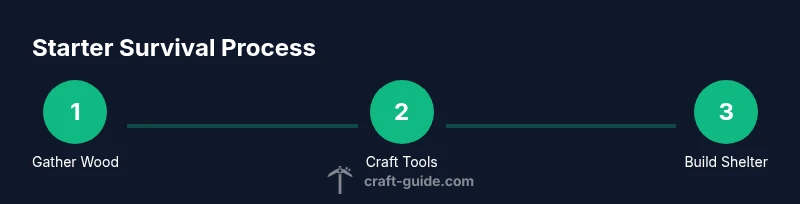
Your first minutes should focus on wood from nearby trees. Wood enables crafting a crafting table and wooden tools, which in turn let you mine stone and mine coal for torches. Charcoal is an alternative fuel if you don’t find coal quickly. Craft Guide notes that efficient early resource gathering sets the tone for your survival run, reducing stress during the first night.
Crafting Essentials: Tools and Weapons
Begin with wooden pickaxes to harvest stone, upgrading to stone tools as soon as possible. A stone pickaxe improves mining speed and helps you access ore quickly. Craft a basic sword for defense against mobs and a few torches to light your shelter. Keep your crafting table and basic storage chest nearby to organize your materials.
Building a Starter Shelter: Design Principles
A simple, sturdy shelter protects you from hostile mobs at night. Aim for a small footprint with a door, a roof, and a few windows for visibility. Place torches inside and outside to deter mobs. A second story or elevated floor can give you storage space and a better overview of your surroundings. Craft Guide recommends modular, expandable design so you can add rooms without reconstructing the entire base.
Food, Farming, and Sustenance
Food is essential for sustaining health and stamina. Start with simple farming by planting seeds—wheat, carrots, or potatoes—and expand as you discover more crops. Build a small farm near your shelter for a renewable food source. If you stumble upon animals, set up a basic pen to harvest meat or leather safely. Fresh food boosts healing and allows longer exploration sessions.
Exploration and Progression Strategies
With tools crafted and a shelter secured, begin cautious exploration. Stick to daylight hours when possible, and map your surroundings to avoid getting lost. Mine shallow caves to collect iron and coal, then upgrade gear to tackle tougher biomes. The goal is steady progression: better tools, more resources, and larger builds without overextending your safety margins.
Common Pitfalls and How to Avoid Them
Nightfalls are deadly for unprepared players. Always carry a weapon and torches, and avoid aggressive mobs by retreating to your shelter during storms or at dusk. Don’t neglect food and water in the early game; starvation or fatigue slows progress and makes exploration riskier. Craft a simple armor set as soon as you have iron, which dramatically reduces damage from mobs. Craft Guide emphasizes patience over haste to build a sustainable world.
Console-Specific Tips and Marketplace Content
Xbox One Edition supports a marketplace with community-created worlds, textures, and skins. Exploits and glitches are rare in the latest patches, but always back up saves when trying new seeds or world-saving techniques. Local co-op can accelerate learning and creativity—team up with a friend to share responsibilities like mining, farming, and building. If you participate in online play, ensure your account settings respect your family safety preferences and privacy.
Craft Guide's Expert Tips and Final Thoughts
The Craft Guide Team highlights that beginners should set small, concrete goals: build a secure shelter, gather a renewable food source, and craft a basic set of tools within the first few in-game days. Keep a journal of seeds and world features to optimize future starts. By focusing on practical milestones, you’ll enjoy a smoother, more confident journey through Minecraft Xbox One Edition.
Tools & Materials
- Xbox One console(Ensure system firmware is up to date.)
- Minecraft for Xbox One(Disc or digital copy.)
- Controller(One or more controllers for comfort.)
- TV or monitor(HDMI connection, proper display settings.)
- Stable internet connection(Helpful for online features and updates.)
- Xbox Live account(Needed for online features and Save cloud.)
- Notepad or pen(Jot seeds, world notes, and milestones.)
Steps
Estimated time: Estimated total time: 2-3 hours
- 1
Create a new survival world
From the main menu, select Create New World, set to Survival, and choose Normal difficulty. Avoid cheats on your first run to experience authentic progression and learn the mechanics.
Tip: Name your world and note the seed if you want to replay or share it. - 2
Punch trees to gather wood
Break trees to obtain logs, which you convert into planks and sticks. Collect at least 20 logs for a strong early toolkit and a sturdy shelter frame.
Tip: Stay aware of mobs while gathering; use the shield when needed. - 3
Craft basic wooden tools
Use those logs to craft a crafting table, a wooden pickaxe, and a wooden axe. These let you access stone and mine more efficiently.
Tip: Upgrade to stone tools as soon as you can; speed up early mining. - 4
Mine for stone and coal
Digging into a nearby hill or hillside for stone provides the material for better tools, while coal is essential for torches.
Tip: Carry extra torches to light your path and prevent mob spawns. - 5
Build a simple starter shelter
Construct a small, safe shelter with a door, a roof, and some windows. This gives you a safe daytime base for the first night.
Tip: Place torches around the exterior to deter mobs from approaching. - 6
Light up your base
Set up a lighting grid using torches to keep the interior safe and visible. A well-lit base reduces surprise attacks at night.
Tip: Light nearby trees or pathways to mark your base from a distance. - 7
Establish a basic food source
Plant seeds or start a small animal pen to ensure a renewable food supply. Wheat, carrots, or potatoes are good starting crops.
Tip: Rotate crops and expand your farm as resources allow. - 8
Craft a crafting table and storage
Place a crafting table in your shelter and set up chests to organize tools, materials, and food.
Tip: Label chests if possible, or use color-coded storage to stay organized. - 9
Plan progression and next steps
Set short-term goals like finding iron, expanding your base, and creating armor. Track milestones to stay motivated.
Tip: Keep notes of your discoveries and seeds for future worlds.
People Also Ask
How do I start a new world in Minecraft Xbox One Edition?
From the main menu, choose Create New World, select Survival mode, set difficulty, and start playing. Avoid cheats on your first run to experience core progression.
From the main menu, select Create New World, pick Survival, set the difficulty, and start playing.
Can I play multiplayer on Xbox One Edition?
Yes, you can play with others on the same console through split-screen, and online play is available depending on your setup and marketplace content.
Yes, you can play locally with split-screen on one console and online where supported by your setup.
What is the best first resource to gather?
Wood is the best starting resource because it unlocks essential tools, crafting tables, and storage. Use wood to craft stone tools quickly.
Wood is the best starting resource because it helps you craft the tools and storage you need early on.
Which tools should I craft first?
Craft wooden tools to upgrade to stone tools as soon as possible. A stone pickaxe makes mining more efficient and opens access to iron early.
Start with wooden tools, then upgrade to stone as soon as you can for faster mining.
How does Xbox One Edition differ from other editions?
Console editions have platform-specific updates and features. Some cross-play features and marketplace content differ from Java or Bedrock editions.
Console editions have unique updates and features, so plan around your version’s strengths.
Where can I find additional builds or seeds?
Explore the Marketplace for community-made worlds and skins, and share seeds with friends to recreate interesting spawn points.
Check the Marketplace for worlds and seeds you can try, then share your own seeds with friends.
Watch Video
The Essentials
- Start with a Survival world and set clear early goals
- Build a sturdy starter shelter before nightfall
- Upgrade from wood to stone tools ASAP for efficiency
- Create a renewable food source to sustain exploration
- Keep resources organized in dedicated chests for speed
- Use torches liberally to deter mobs and aid navigation