Minecraft Free and Online: A Practical Guide for 2026
Explore legitimate ways to play Minecraft free and online, differentiate browser demos from the full game, and learn safe, legal options for trying Minecraft without immediate purchase. This guide clarifies features, limitations, and best practices for 2026.


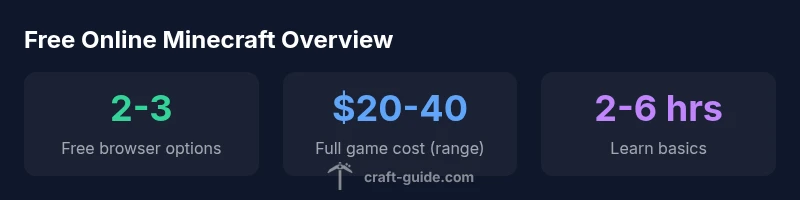
minecraft free and online typically refers to browser-based or demo experiences that do not require a purchase. These options let you explore basic building and exploration without paying, but they do not include the full features, official servers, or cross-platform play found in the paid Java or Bedrock editions. For a complete Minecraft experience, you’ll need to purchase the base game or access it through a licensed platform.
What 'minecraft free and online' means in 2026
The phrase minecraft free and online is common in searches as players seek to try Minecraft without an immediate purchase. In practice, this usually points to browser-based demos, classic web clients, or limited trial experiences rather than the full Java or Bedrock editions. According to Craft Guide, these options are excellent for testing basic controls, world-building, and creative exploration, but they intentionally exclude the broader ecosystem: large-scale multiplayer servers, the marketplace, and cross-platform play that characterize the paid versions. For families and new players, free online access can be a valuable introduction to Minecraft’s core mechanics, planning, and design workflows. Craft Guide Team notes that many learners leverage these free experiences to decide whether they want to invest in the full game, or to use official demos in school or club settings. This distinction matters for expectations—free online experiences are learning tools, not a substitute for the complete title.
A practical takeaway from Craft Guide Analysis, 2026 is that most free online options emphasize creativity over progression, encouraging exploration, redstone tinkering, and basic building with limited materials. If your goal is survival gameplay, combat, or extensive modding, you will soon need to switch to a paid edition or an approved school/education variant.
Browser-based options: Minecraft Classic and demos
Browser-based options fall into two broad categories: officially hosted browser demos and community-run browsers that simulate earlier versions. The official browser-demos typically offer a capped feature set, a fixed number of blocks, and limited inventory management compared with modern editions. They are designed to showcase core mechanics—placing blocks, exploring a procedurally generated world, and experimenting with simple redstone contraptions. Community demos can extend accessibility but come with safety considerations and potential version drift. When engaging with any browser-based option, verify provenance, read the terms of service, and avoid sites that request sensitive information. The key advantage is immediate access—no downloads, no installation—making it ideal for quick experiments, classroom demos, or curiosity-driven learning.
Educationally oriented browsers and demos are particularly effective for beginners who want to understand the user interface, crafting basics, and world-building fundamentals. However, they often restrict multiplayer access and may lack the performance optimizations found in the desktop Java or Bedrock editions. Craft Guide Team emphasizes testing different options to see which interface and controls feel most intuitive before committing to a paid version.
How paid access compares to free online options
Paid Minecraft editions unlock a broader universe of features, servers, and cross-platform play. The Java Edition, Bedrock Edition, and Education Edition each offer distinct advantages, such as cross-play across devices (where supported), access to the official marketplace, and robust modding ecosystems. In contrast, free online options typically emphasize solo creative play, limited inventories, and static server environments. The material progression, character advancement, and long-term world-building potential are far richer in paid versions. From a value perspective, the upfront cost is offset by ongoing updates, official support, and the ability to join a wide array of servers with communities. Craft Guide Analysis notes that many players begin with a free online trial, then migrate to a paid license once they’re confident the game will remain a long-term hobby. If you’re evaluating options for a classroom or club, consider a blended approach: start with free demos for exposure, then move to a paid license for sustained use and collaboration.
Consider also the platform differences: Java Edition shines for PC players with strong mod support, while Bedrock is optimized for cross-platform play across Windows, consoles, and mobile devices. Education Edition provides curriculum-ready content but requires licenses and organizational accounts. Planning your access path around these distinctions helps maximize value and minimize confusion for learners and creators.
Safety and legality: avoiding scams and hacks
The allure of free Minecraft online can lure players toward questionable sites that imitate official content. These sites may require account sharing, push suspicious software, or bundle adware with downloads. To stay safe, use only official channels or well-known partners, avoid sharing login credentials, and enable two-factor authentication where available. Be wary of “unblocked” or “free” claims that prompt payment through third-party services, and never download unofficial executables from untrusted sources. Craft Guide Team recommends sticking to reputable sources, especially when attempting anything beyond browser demos. If you encounter a suspicious link, disengage, report it, and seek alternatives such as official trial pages or classroom demonstrations offered by your school or community center.
For younger players or parents, setting up child-friendly environments with parental controls and supervising online activity is essential. Online safety is not a barrier to creativity; it’s a baseline practice that protects your device and personal information while you explore Minecraft-based learning experiences.
Educational and community alternatives that are free
There are legitimate, no-cost avenues to engage with Minecraft concepts without purchasing the full game. Many schools and libraries host classroom licenses or provide guided, curriculum-aligned activities that are effectively free for students. Community projects also exist where players share world seeds, build challenges, and tutorials that require only access to a browser or a free trial. These options can be especially valuable for younger players developing design thinking, problem-solving, and collaboration skills. Craft Guide Analysis highlights that while these avenues don’t replace the official experience, they do create meaningful learning opportunities, especially for introductory players exploring block-based creativity, resource management, and cooperative building.
If you’re a content creator or educator, you can leverage free experiences to scaffold lessons, then transition to paid editions for deeper exploration, advanced mechanics, and full multiplayer participation. The key is to align your goals with the available features and licensing terms so your students or audience gain maximum value without violating terms or risking account security.
Practical setup guide for trying free online Minecraft
Getting started with free online Minecraft experiences is straightforward: start from the official page for browser demos or a trusted education portal, create or sign in with a basic account, and select a demo world or sandbox mode. If you’re curious about multiplayer, look for official demo servers or educator-led sessions that offer safe access. Ensure your device meets minimum requirements and that your browser is up to date to prevent performance issues.
For teachers and parents, plan a short, structured session with clear objectives—such as learning to place blocks, use chests, and build a simple shelter. Encourage students to share their designs, run a collaborative build, and reflect on how design decisions affect resource usage and efficiency. Craft Guide Team notes that structured activities improve engagement and help beginners grasp fundamental mechanics before moving to paid editions.
Limitations and best practices for free users
As a free user, expect limited inventory, restricted server access, and occasional performance bottlenecks on older hardware. To optimize your experience, close background apps, enable hardware acceleration, and adjust graphics settings for smoother gameplay. When evaluating options, prioritize official sources to avoid scams and ensure compatibility with your device. A practical best practice is to treat any free online experience as a stepping stone: use it to learn core concepts, then transition to a paid edition or education version when you’re ready to expand into multi-user worlds, mods, and the broader ecosystem that defines modern Minecraft.
blockEndNote
Comparison of free online options vs paid Minecraft
| Mode | Accessibility | Cost | Notes |
|---|---|---|---|
| Browser Demo/Classic | Online browser | Free | Simple sandbox experiences with limited features |
| Full Minecraft (Java/Bedrock) | Desktop/Console/Mobile | Paid | Full features, cross-play across editions varies |
| Education Edition (education use) | School accounts | Paid | Education-focused features |
People Also Ask
Is Minecraft free online?
Yes, there are browser-based demos and classic online modes that are free to try. They provide a taste of the building and exploration experience but lack the full feature set and cross-play available in paid editions.
Yes—free browser demos exist, but they don't include the full game features or cross-play found in paid editions.
What is Minecraft Classic?
Minecraft Classic is an early browser-based version designed to showcase core building mechanics. It is intentionally limited but offers a quick, safe way to experiment with basic blocks and creativity.
Minecraft Classic is a browser-based, limited version that highlights basic building gameplay.
Are there safe browser-based Minecraft games?
There are safe, official browser demos and school-focused portals. Avoid unofficial sites that request personal data or downloads, and stick to trusted platforms to minimize risk.
Yes, use official browser demos or trusted educational portals and avoid unverified sites.
Can you play with friends online for free?
Most free options are single-player or sandbox experiences. Full online multiplayer with friends requires a paid edition or a school/education license in appropriate settings.
Free options usually don't include full online multiplayer; paid editions are typically needed for that.
What are the limitations of free online versions?
Limitations include restricted worlds, limited inventory, fewer mods, and no access to official servers or cross-platform play. They’re great for experimenting but not a full replacement for the paid game.
Limitations include restricted features, no official servers, and limited cross-platform play.
Are educational versions free for schools?
Educational access typically uses licensed programs, with some free trials or classroom bundles available through institutions. Individual free access is uncommon without a school license.
Educational access usually requires a school license or trial program, not free to individuals.
“Free online Minecraft options are valuable entry points for learning and creativity, but they should be used with clear expectations about features and safety. The full experience unlocks the broader community and tools that truly expand what you can build.”
The Essentials
- Start with official browser demos to sample core mechanics
- Expect feature gaps between free options and paid editions
- Prioritize safety and verify source before engaging with any site
- Consider a blended approach: demo first, then pay for full access
- Education-focused routes provide curriculum-aligned experiences