How Big Is Minecraft? Understanding World Size
Explore how large Minecraft worlds can get, how their size is determined, and how scale affects builds, exploration, and servers. A data-driven guide by Craft Guide.


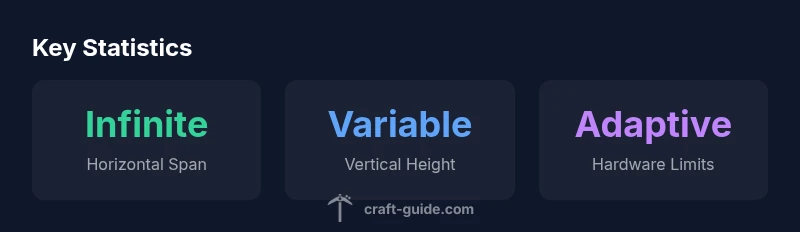
Minecraft worlds are procedurally generated and effectively boundless horizontally, with no fixed maximum size. The game creates terrain on demand as you explore, so the playable map expands with your exploration and seed choices. Practical limits come from hardware, storage, and performance, not a hard in-game boundary; both Java and Bedrock editions follow this same underlying concept.
Understanding the scale of Minecraft worlds
How big is minecraft is a question that often leads to confusion if you treat the map as a fixed plot of land. To answer it properly, you must separate horizontal expansion, vertical build height, and the procedural generation that creates terrain as you move. According to Craft Guide, the scale of Minecraft worlds is best understood by distinguishing three interacting dimensions: horizontal space, vertical build limits, and the ongoing engine that generates landforms on demand. The horizontal span is effectively boundless because chunks load only when you approach them, and the seed determines the overall layout of biomes, oceans, and landforms across vast distances. Vertical space is finite, but the exact height depends on the edition and version; you seldom reach the upper bound in normal play, while caves, cliffs, and mountains add perceptual depth. In practice, this means you can push exploration and construction far beyond your initial plans, without encountering a known end point. The important takeaway is that the game's size is not defined by a single number but by how you design, explore, and host worlds.
How seeds and terrain generation shape size
The size of a world in minecraft is less about fixed acreage and more about how terrain is generated. Seeds influence only the starting layout and biome distribution; they do not set a maximum playable area. The generation algorithm loads chunks as you approach them and uses noise functions to carve landforms, rivers, and caves. Because this process happens on demand, seeds with dramatic features can still yield vast diversity elsewhere, creating a sense of scale that feels endless. Understanding this helps players plan large builds: you can place a colossal structure in one biome while leaving other areas relatively untouched, knowing you won’t “fill” the world in a conventional sense. For server operators, seeds also guide world composition and distribution of resources, which in turn affects how players move around and how performance patterns emerge across the map.
Practical implications for exploration, building, and servers
From the moment you start exploring, the world is loaded in chunks around you, which has direct consequences for performance, storage, and planning. Because there is no fixed maximum, you’ll encounter maps that feel endless, but memory constraints and disk space ultimately cap how far you can travel before you must prune data or upgrade hardware. For builders, the huge expanse is an opportunity: you can plan mega-projects, test materials across environmental zones, and stage builds in different biomes without worrying about hitting a boundary. For servers, the key concerns are memory allocation, view distance, and the cost of maintaining chunk data for many simultaneous players. If you run a public world, consider a sensible seed choice to shape spawn regions, set generous but sustainable view distances, and implement periodic cleanups to prevent accumulation of stale chunks. In summary, understanding practical limits helps balance creativity with performance.
Vertical limits and world height: what changes across editions
Vertical space in Minecraft is finite, yet the exact ceiling can vary by edition and version. The vertical dimension matters for multi-story builds, deep cave exploration, and how you approach redstone contraptions and vertical transportation. Java and Bedrock editions share the core concept of a procedurally generated world, but there are edition-specific differences in how high you can build, how far up and down you can travel before encountering terrain or lighting limits, and how chunks are loaded at extreme heights. For most players, height limits are more about design opportunities than about fighting against an arbitrary cap. If you’re designing a tower, a castle, or a towering monument, you’ll shape your build around the built-in height constraints rather than fighting against a fixed boundary. Keep in mind that future updates can tweak these boundaries, so stay aware of patch notes and community guides for the latest figures.
Planning projects: estimating space for big builds
To plan a large build, start with a realistic footprint and work outward. Define the base dimensions in blocks, then map those dimensions to chunks and biome distribution to estimate terrain coverage. Consider both the spawn area and the regions you intend to modify, as this affects how long you’ll need to maintain the world and what storage you’ll require. Use a modular approach: plan subprojects that fit into known chunk boundaries, then repeat the pattern across biomes to achieve a cohesive look. When thinking about how big is minecraft in practical terms, remember that world size is less about a single measurement and more about the scope of your build, the tools you use, and the hardware you rely on. Document seed choices and WorldEdit-friendly coordinates so you can reproduce or expand your project later.
Testing world size in practice: a quick checklist
Experimentation is the surest way to understand how big your world feels. Start by creating a test world with a modest seed and a high render distance, then travel in a straight line for several thousand blocks while monitoring performance and chunk loading. Note how long it takes to generate new terrain, how the game handles long-distance transportation, and where the rendering distance begins to noticeably degrade. Test both Java and Bedrock if possible to understand edition-specific differences. Use server tools to monitor memory usage, tick rate, and disk activity during peak times. Finally, mark milestones—e.g., first mile, tenth mile, and so on—so you can translate your experience into a practical plan for future builds.
How updates affect world size and performance
Updates to Minecraft frequently modify terrain generation parameters, new block types, and world mechanics, which can alter how big a world feels in practice. A major update might shift biome distributions, change height-related boundaries, or introduce new performance characteristics for players and servers. Because these changes impact both exploration and build planning, it’s wise to revisit your seed choices, backup strategies, and hardware requirements after each patch. While the underlying concept of a procedurally generated, effectively boundless world remains, the experience of traveling, creating, and hosting a world can change with new features and optimizations. Staying current with patch notes helps you adjust your projects and expectations accordingly.
Common myths vs. reality
Many players assume a hard world boundary exists or that size is strictly limited by a single parameter. The reality is more nuanced: the world scales with your hardware, and generation happens on demand, so exploration can feel endless even as the game imposes practical limits. Misunderstandings often stem from anecdotal experiences in specific seeds or older versions. By focusing on how size interacts with performance, storage, and play style, you can plan ambitious builds without chasing an artificial cap. Craft Guide’s approach is to present the mechanics clearly, test assumptions with hands-on experiments, and offer practical strategies to optimize large worlds.
Key concepts shaping Minecraft world size
| Aspect | Description | Source |
|---|---|---|
| World expansion | Procedurally generated terrain expands as you explore; no fixed cap | Craft Guide Analysis, 2026; https://www.minecraft.net/en-us/about-minecraft |
| Height limits | Vertical build height varies by edition and version | Craft Guide Analysis, 2026; https://www.minecraft.net/en-us/about-minecraft |
| Performance considerations | Memory and disk usage scale with world size | Craft Guide Analysis, 2026; https://education.minecraft.net |
People Also Ask
Is there a hard limit to the size of a Minecraft world?
No fixed hard limit exists; size is effectively unbounded, though hardware and software constraints eventually limit exploration. Build plans should account for performance and storage rather than chasing a cap.
There isn’t a strict cap; your hardware and game version determine how far you can go.
Do Java and Bedrock editions differ in world size?
They share the core concept of a procedurally generated world, with edition-specific differences in height limits and chunk loading. In practice, both are effectively boundless but feel different in how they render and load terrain.
Both editions are boundless in principle, with some variant limitations.
Can seeds change how big a world can get?
Seeds determine terrain layout and biome distribution, not a fixed maximum size. The overall map expands as you explore and as the engine loads new chunks.
Seeds don’t cap size; they shape what the land looks like.
How can I estimate how big my build needs to be?
Plan in stages, define footprints in blocks, and gauge chunk coverage and storage needs. Itemize subprojects that fit existing chunk boundaries to keep plans scalable.
Plan in stages and measure your footprint.
Does world size affect performance?
Yes. Larger worlds increase memory use and rendering demand, especially with high render distances and many players. Optimizing view distance and server resources helps manage this.
Larger worlds can strain hardware; optimize settings.
Are there practical ways to limit a world’s size?
There isn’t a built-in cap, but you can influence growth via seed choices, biome distribution, and server configurations, plus manual pruning if needed.
There’s no hard limit, but growth can be managed.
“The Minecraft world size is a continuum, not a fixed box. Size depends on hardware, performance, and how you choose to explore and build.”
The Essentials
- There is no fixed maximum world size; size is hardware-driven.
- Seeds affect terrain layout, not the total playable area.
- Plan for performance when designing large builds.
- Test world size by traveling far and monitoring resources.
- Stay updated on patches to understand evolving size limits.