Minecraft vs Minecraft Education Edition: Key Differences
Explore the differences between Minecraft and Minecraft Education Edition, focusing on audience, licensing, classroom tools, safety, and practical guidance for educators and players.


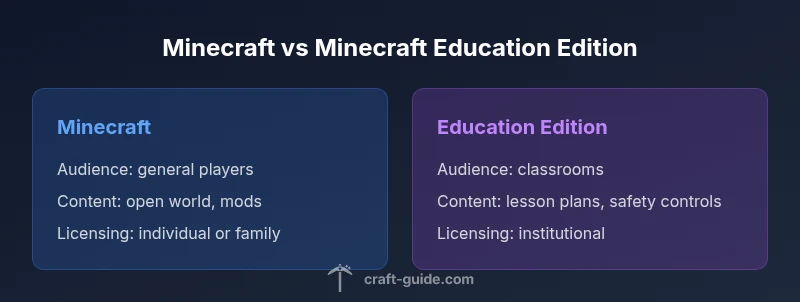
Minecraft Education Edition is designed for classrooms and teacher-led activities, while standard Minecraft targets general play and creativity. The main differences lie in licensing, safety features, and built-in learning tools. This quick comparison helps players and educators decide which edition fits their goals. Consider your setting, available hardware, and whether collaboration features or curriculum alignment matter most.
Difference between Minecraft and Minecraft Education Edition
The difference between minecraft and minecraft education becomes most apparent when you compare purpose, tooling, and governance. Minecraft (in its consumer forms) centers on exploration, creativity, and player-driven storytelling across Java and Bedrock editions. Minecraft Education Edition, by contrast, is a classroom-focused product that integrates teaching resources, safety controls, and collaboration workflows. According to Craft Guide, understanding these distinctions helps both players and educators pick the edition that best supports their goals. In practice, this means that the Education Edition aligns with lesson plans and classroom management needs, while the base game emphasizes free-form play and community-driven projects. Both versions share core Minecraft gameplay mechanics, but they diverge in how they organize access, content, and evaluation.
Audience, Goals, and Context
The most obvious difference between minecraft and minecraft education is the intended audience. The consumer version is built for solo players, families, streamers, and hobbyists seeking open-ended exploration, redstone experiments, and world-building. Minecraft Education Edition targets schools, clubs, and homeschooling environments, where teachers steer activities, assess progress, and align content with curriculum goals. Craft Guide’s analysis shows that when classrooms adopt Education Edition, the emphasis shifts from individual achievement to collaborative projects, descriptive feedback, and structured investigations. This shift alone changes how players approach problem-solving, resource management, and teamwork, even when the underlying game rules remain familiar.
Licensing, Access, and Platform Availability
Licensing is a core differentiator. Minecraft Education Edition requires an institutional license or a school-managed subscription, whereas standard Minecraft licenses are typically purchased by individuals or families. Platform availability also differs: Education Edition is optimized for classroom devices and school networks, with features designed to work behind firewalls and under controlled environments. The consumer editions support a broader range of devices, including PCs, consoles, and mobile devices, with fewer impediments to spontaneous play. This divide in licensing models and deployment environments often drives the decision between the two editions.
Core Gameplay and Feature Sets
Both editions share the fundamental Minecraft gameplay loop—exploration, resource gathering, crafting, and building. However, the Education Edition introduces features intended to facilitate learning outcomes and collaboration, such as structured lesson prompts, teacher tools, and classroom-friendly workflows. In contrast, the base game emphasizes independent creation, exploration, and sharing with other players. For teachers and students, this means the Education Edition can act as a platform for experiments, demonstrations, and evidence-based projects, while the consumer edition offers more freedom and spontaneity for personal projects and social play.
Classroom Tools and Curriculum Alignment
Education Edition integrates curriculum-aligned content and teacher-facing tooling that can streamline lesson planning and assessment. Educators can organize activities around standards, use built-in rubrics, and track student progress within the game. In the consumer editions, you’ll find community-created maps, servers, and challenges, but there is no centralized, curriculum-focused framework. Craft Guide emphasizes that the Education Edition shines when teachers want a turnkey, classroom-ready experience with guided activities, whereas the standard edition excels for open-ended creation and cross-community collaboration.
Safety, Privacy, and Moderation in Education Contexts
Safety and privacy are central in Education Edition. Schools often implement stricter controls around chat, world editing permissions, and online connectivity to protect students. The consumer editions offer more open communication and cross-player interaction, which can be exciting but requires parental or organizational oversight in shared environments. Educators should familiarize themselves with available safety settings, user permissions, and acceptable use policies before starting a lesson, ensuring a respectful, secure learning space. Craft Guide notes that proactive planning around safety saves time and reduces friction during classroom sessions.
Transitioning from Classroom to Casual Play and Back
Many schools begin with Education Edition for specific units, then switch to standard Minecraft for exploration or student-led projects. Conversely, after a period of casual play on the consumer edition, teachers might introduce Education Edition features to reinforce concepts through structured tasks. The transition requires managing licensing, account provisioning, and ensuring students have access to the right edition on the same devices. Practical steps include coordinating with your IT team, aligning hardware capabilities, and setting clear expectations for content and collaboration. This adaptability is one of the strengths of the Minecraft ecosystem, allowing educators and players to tailor experiences to their needs.
Common Misconceptions and Realities
A common assumption is that Education Edition is simply a classroom skin on the same game. In reality, it is a distinct product with its own licensing, safety controls, and built-in learning resources. Another misconception is that Education Edition cannot support creative, open-ended play. In practice, it can, but the emphasis shifts toward structured activities, teacher-guided exploration, and assessment-friendly workflows. By separating expectations and planning around these realities, schools can maximize both engagement and learning outcomes.
Practical Scenarios and Decision Guidance
When choosing between Minecraft and Minecraft Education Edition, consider the goals, audience, and required alignment with curriculum standards. If the objective is collaborative problem solving within a classroom, with teacher-led activities and built-in lesson plans, Education Edition is often the better fit. If the aim is broad creativity, personal exploration, or community-driven projects, the consumer edition provides greater flexibility. Craft Guide recommends starting with a pilot classroom project to evaluate compatibility with goals, hardware, and student engagement before a broader rollout.
Comparison
| Feature | Minecraft (Consumer Editions) | Minecraft Education Edition |
|---|---|---|
| Audience and use case | General players, families, creators | Classrooms, clubs, homeschool groups |
| Licensing model | Individual/family licenses or platform bundles | Institutional licenses with curriculum features |
| Curriculum alignment | Limited built-in curriculum tools | Built-in lesson plans and standards alignment |
| Safety and moderation | Standard safety settings, community moderation varies | Teacher controls, classroom safety and privacy features |
| Content and tools | Core game tools, mods via community resources | Education-focused tools, pins, cameras, boards, and lesson prompts |
| Platform flexibility | Broad device support (Java/Bedrock across platforms) | Education edition optimized for school devices and environments |
Benefits
- Education Edition enables curriculum alignment and teacher oversight
- Consumer Minecraft offers maximum creativity and community play
- Flexible deployment for schools and districts
- Access to a wide ecosystem of user-created content
Negatives
- Education Edition licensing can be complex to manage
- Not all features from the consumer edition transfer to Education Edition
- Classroom controls may limit spontaneous exploration for some students
- Industry-wide familiarity varies among educators
Education Edition is best for classroom learning; consumer Minecraft excels in open-ended creativity
Choose Education Edition for structured lesson plans and safety features. Choose consumer Minecraft for flexible, creative exploration and broader community collaboration.
People Also Ask
Is Minecraft Education Edition free for schools?
Education Edition licenses are typically provided by schools or districts and are not generally free to individual users. Availability depends on institutional purchases and negotiated terms with the vendor. Check with your school's IT or procurement office to understand current access.
Education Edition licenses are usually provided through schools, not as a free personal download. Talk to your school’s IT department to see if it’s available.
Can students use both editions on the same device?
Yes, with proper account management and licensing, devices can host both editions. You’ll need to install the appropriate launcher or app for each edition and ensure users have access rights. Plan a simple onboarding flow to avoid confusion.
It's possible to use both editions on the same device if you manage licenses and accounts, but plan the setup to keep things clear.
Do both editions support cross-platform play?
Both editions support core Minecraft gameplay across platforms, but Education Edition emphasizes classroom tools and may limit some cross-player interactions to maintain a controlled learning environment.
Core gameplay carries across platforms, but classroom features may limit cross-play to keep sessions focused and safe.
What teaching tools exist in Education Edition?
Education Edition includes lesson plans, teacher tools for managing activities, and classroom-friendly features designed to support learning outcomes. These resources help teachers structure activities, assess progress, and integrate with curriculum standards.
It comes with built-in lesson plans and teacher tools to help manage activities and track progress.
Which edition is better for solo exploration?
For solo exploration and experimentation without curricular constraints, Consumer Minecraft is generally better. Education Edition can support individual tasks, but its strength lies in guided classroom activities.
If you’re mainly exploring on your own, the consumer edition is typically the better fit.
How should I start a classroom pilot?
Begin with a small unit or project aligned to a standard, prepare a short lesson plan, gather feedback from students, and measure outcomes against goals. Use a limited number of devices and a clear success metric to evaluate impact.
Start with a small unit, pilot a lesson, and collect student feedback to gauge impact.
The Essentials
- Identify your primary goal: learning outcomes vs creative freedom
- Assess licensing and device compatibility before choosing
- Leverage Education Edition for classroom efficiency and assessment
- Pilot a small group to validate fit before wider rollout