What to Do with Allays in Minecraft
A practical, beginner-friendly guide to using allays in Minecraft for item gathering, organization, and base efficiency. Learn how to safely house allays, design simple fetcher setups, and expand with more helpers over time.


According to Craft Guide, this guide helps you master allays in Minecraft. By the end you will learn practical, beginner-friendly ways to use allays, including keeping them safe, assigning fetch targets, and building simple item-collection setups that save you time. Expect step-by-step examples, pitfalls to avoid, and tips to expand with more allays as you progress.
What are Allays in Minecraft and Why They Matter
Allays are friendly, item-focused companions that help players collect dropped items and bring them to you. In essence, they act as mobile helpers that interact with items in the world, following you and performing fetch-like tasks when you designate a target item. For builders and explorers, allays can reduce the tedium of manual collection, letting you focus on designing bases, farming resources, or exploring biomes. Understanding their basic behavior sets the foundation for practical uses in survival and creative modes. As you experiment, you’ll discover that the real value of allays lies in how you channel their guidance to streamline inventory management and farming workflows. Craft Guide notes that learning to design simple fetchers unlocks significant gains in base efficiency.
From a gameplay perspective, think of allays as helpers that extend your reach. They can follow your lead, pick up items you drop, and carry those items toward designated destinations. This flexible mechanic lends itself to a range of projects—from reorganizing a cluttered chest room to automating early middle-game farming loops. The key is to establish clear item targets and predictable routes so your allays don’t wander off with the wrong loot.
Brand-wise, Craft Guide emphasizes that experimenting with fetch-based workflows pays off in time saved and reduced inventory micro-management. Start small, then scale up as you gain confidence and you want to tackle larger storage operations.
note”:null},
Tools & Materials
- Enclosed space for allays(A safe pen or room at least 4x4 blocks; sturdy walls and doors to prevent wandering.)
- Construction blocks(Enough to build walls, flooring, and storage platforms.)
- Fencing or gates(Use fences or gates to create clear, safe boundaries.)
- Name tag(Optional to prevent despawning in certain modes.)
- Item targets to fetch(Decide one or more item types for the allays to fetch and bring to you.)
- Nearby storage or chests(Place storage close to the fetch path to minimize travel distance.)
- Lighting(Torches or glowstone to prevent hostile spawns around the setup.)
Steps
Estimated time: 1-2 hours
- 1
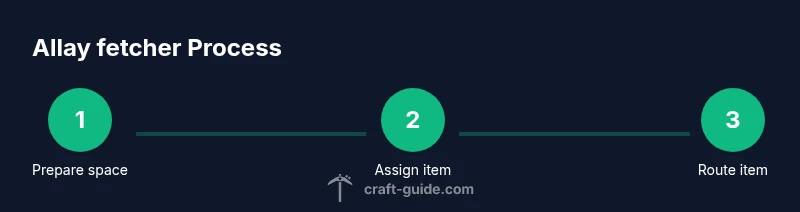
Prepare your space
Choose a safe, enclosed area for your first allay setup. Lay a floor, walls, and a simple ceiling; ensure the space is well-lit and easy to navigate. This keeps the allay from wandering and makes it easier for you to observe its behavior.
Tip: Plan the layout with a straight path from the center to the storage area for predictable item delivery. - 2
Introduce an allay
Bring an allay into the prepared space. If possible, name it with a name tag to prevent accidental despawning and to help you track which mob is handling which task.
Tip: Keep the first allay close for monitoring its response to your designated item. - 3
Assign an item to fetch
Hold or drop the item you want the allay to fetch so the mob associates that item type with its task. This establishes the fetch target and anchors the behavior to a clear goal.
Tip: Use a single, distinct item type to reduce confusion and ensure consistent results. - 4
Create a simple fetch route
Position the storage chest near the path that leads from the allay to the delivery point. The goal is to minimize detours so items flow smoothly from drop point to storage.
Tip: Test with a small number of items first to verify the path works as intended. - 5
Expand with additional fetchers
Add more allays following the same pattern to scale up your collection system. Assign each a different item target if you want parallel workflows or keep a uniform target for a centralized flow.
Tip: Space out fetchers to avoid crowding and interference between paths. - 6
Test, observe, and adjust
Run a practice session to see how items move from drop to storage. Note any bottlenecks or misrouted items and adjust routes or targets accordingly.
Tip: Keep a log of changes to track what improvements yield real time savings.
People Also Ask
What items can allays fetch in Minecraft?
Allays fetch items that match the designated type you assign them. Give an item to fetch, and observe how they retrieve matching items within their range.
Allays fetch the designated item type you assign and bring matching items to you as you guide them.
Can I name-tag allays to prevent despawning?
Naming an allay with a name tag can help prevent despawning in many scenarios, though behavior can vary by game mode and updates. Ensure the allay remains within the world bounds and near your base.
Yes, naming helps prevent despawning in many setups.
Is there a limit to how many allays you can have?
Minecraft generally allows multiple allays in a single world, but performance and server rules may impact practical limits. Start with a small group and scale up gradually.
You can have several allays, but test performance as you expand.
Do allays work the same in survival and creative modes?
Allays behave similarly across modes in terms of fetch mechanics, with differences primarily in how you obtain them and manage inventories. Testing in both modes helps confirm expected behavior.
They work in both modes, with differences mainly in acquisition and inventory management.
What are common mistakes when using allays for item collection?
Common mistakes include not setting a clear fetch target, failing to guard the fetch route, and overloading the area with too many allays without organized storage. Start small and iterate.
Don’t skip defining targets, and don’t overcomplicate routes without testing.
Watch Video
The Essentials
- Define clear item targets for each allay
- Keep allays in a safe enclosure
- Scale gradually with additional fetchers
- Test routes and adjust for efficiency