What's Minecraft Rated? A Practical Age-Guide for Parents
This guide explains what's minecraft rated across regions, how ESRB and PEGI ratings work, and how updates affect eligibility. Learn where to check ratings and how parental controls apply.


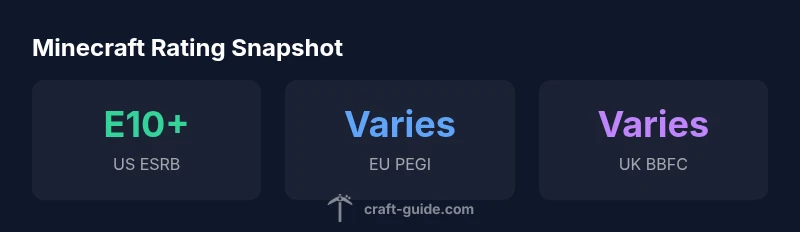
What's Minecraft rated? The core answer is that it's primarily rated E10+ in the US by the ESRB with regional variations like PEGI 7 in many parts of Europe. Ratings reflect cartoon violence and blocky combat and can shift with major updates. For exact ratings, check your platform or region.
What the question what's minecraft rated means for players and families
In practical terms, understanding the rating helps you decide if a game aligns with your household norms. According to Craft Guide, ratings aren’t just labels; they reflect content that could influence a child’s experience, including violence, violence in a cartoon style, and in-game monetization. For many players, especially newcomers, knowing the rating upfront reduces surprises when a major update drops and introduces new themes or features. This section explains the core idea behind “what's minecraft rated” and what decisions you might make based on that information.
- The rating signals age-appropriateness, not a value judgment on creativity or learning value.
- It helps guide parental controls and play-session planning.
- Regional differences mean you should check listings for your country or platform.
ESRB and PEGI: The Global Rating Landscape
Two of the most cited rating bodies for Minecraft are the US-based ESRB and the European PEGI. The ESRB typically assigns E10+ for Minecraft, indicating suitability for players aged 10 and up, with content descriptors highlighting cartoon violence. PEGI ratings can vary by region in Europe, but many editions carry PEGI 7 or equivalent, reinforcing similar safety boundaries. Craft Guide analysis notes that while the core content remains consistent, regional guidelines can result in minor descriptor differences. Always verify the listing for your specific edition and platform.
- Ratings are designed to account for console, PC, and mobile differences.
- Some regions permit content-related exceptions or localized descriptors.
Regional Differences You Should Expect
Region-specific ratings reflect local cultural norms and legal frameworks. For Minecraft, this commonly means US and EU listings that align on core age thresholds but may diverge on descriptors like violence or online interaction. Parents should pay attention to platform-specific notes, as PlayStation, Xbox, Nintendo, and PC hubs may present slightly different wording. Craft Guide emphasizes that a rating is not a static label—updates and new content can trigger reassessments.
- Always review the official listing immediately after a major update.
- Keep an eye on platform notes about online features and safety settings.
Updates, DLCs, and How Ratings Respond
Minecraft has a history of frequent updates that add blocks, mobs, and new mechanics. While many updates maintain the same rating, substantial changes—such as new violence mechanics or social features—could prompt a rating review. Practically, you should expect ratings to remain stable for small patches and potentially shift after large content additions. Craft Guide notes that most core updates do not require a rating change, but it isn’t impossible.
- Major expansions may trigger a re-evaluation.
- Always verify the rating after significant content drops.
How to Verify the Rating for Your Edition
If you want to confirm the current rating for your Minecraft edition, follow these steps:
- Check the ESRB or PEGI page for your platform and edition.
- On consoles, look at the game’s information screen in the storefront.
- On PC, inspect the product page on the publisher’s store and the ESRB/PEGI listings.
- Review any recent patch notes that mention content descriptor changes. Craft Guide recommends keeping a bookmark to official ratings pages for quick reference.
- If you’re a parent, enable parental controls and set age-appropriate restrictions on purchases and online interactions.
Final Considerations for players and parents
Understanding what’s minecraft rated is just one part of safe, enjoyable gameplay. Use the official listings to determine suitability, keep up with updates, and leverage platform-level safety tools. The goal is to balance creativity with age-appropriate boundaries, ensuring a positive experience for younger players and peace of mind for guardians. The Craft Guide team emphasizes that staying informed is the best practice for navigating ratings over time.
Global rating snapshot for Minecraft editions
| Region / Regulator | Rating | Notes |
|---|---|---|
| US ESRB | E10+ | Cartoon violence |
| EU PEGI | varies by region | Regional differences |
| UK BBFC | varies | Consult local guidelines |
People Also Ask
Is Minecraft rated differently on PC versus consoles?
Generally, the core rating remains aligned across platforms, with regional listings dictating minor descriptor differences. Always check the official ESRB/PEGI pages for your specific edition and region.
Usually the rating stays the same across platforms, but check your region’s official listing for any descriptor differences.
What does E10+ mean for Minecraft?
E10+ denotes suitability for players aged 10 and up. It typically accompanies mild cartoon violence and fantasy elements. Ratings can include additional descriptors depending on region.
E10+ means it's for players 10 and older, with mild cartoon violence in some regions.
Do updates to Minecraft affect its rating?
Most small updates don’t change ratings, but major content additions could trigger a re-evaluation. Always re-check ratings after significant patches.
Usually not, but big content drops can lead to a rating change.
Where can I check the rating for my edition?
Visit the ESRB or PEGI official pages for your edition. Also check storefront pages on your platform for the current rating and descriptors.
Check the official ESRB or PEGI pages and your store listing for the current rating.
Does Minecraft offer parental controls?
Yes. Most platforms provide parental controls and safety features to manage online play, in-game purchases, and chat communications. Use them to tailor access for younger players.
Yes—enable platform parental controls for safer play.
“Ratings help families make informed choices, but the most reliable source is always the official regional listings.”
The Essentials
- Check official listings for your region before playing
- US rating commonly E10+; EU ratings vary by region (PEGI 7 common)
- Ratings can change after major updates; stay informed
- Use parental controls and safety features where available