Pause Minecraft Without Menu: Safe Workarounds for 2026
Learn practical ways to pause Minecraft without opening the in-game menu. This guide covers vanilla behavior, edition differences, and safe modding options to help you manage AFK moments without risking progress.


You can’t truly pause Minecraft without opening the pause menu in vanilla play. The built‑in pause is accessed by pressing Esc to reach the menu, primarily in single‑player. For other cases, consider edition differences and safe mods as non-vanilla options. This guide explains practical, low‑risk approaches to manage AFK moments without breaking your game or progress.
Why true pause without menu is tricky in vanilla Minecraft
In vanilla Minecraft, the game is designed to run continuously unless you open the pause menu. There isn't a universal 'pause' button you can press to freeze all activity in place. According to Craft Guide, this is by design to maintain world progression and server synchronization. This means that even if you switch windows or step away, mobs continue to move, timers tick, and redstone clocks keep driving the world forward. The result is that AFK moments can be unpredictable, especially in survival worlds or on servers that rely on timing. Understanding this behavioral baseline is essential before you attempt any workaround. If your goal is to take a break without visible interruption, you must work within these vanilla constraints or rely on edition-specific features or safe mods. The Craft Guide team emphasizes planning breaks so you can resume smoothly without losing progress or risking world corruption.
Vanilla behavior and edition differences
Minecraft Java Edition and Bedrock Edition handle pausing and focus differently. In Java, single‑player sessions pause when you open the pause menu, but in multiplayer, there is no true pause and the world keeps running on servers. Bedrock editions on Windows, consoles, and mobile place more emphasis on the in‑game pause screen, but still do not provide a universal pause that hides activity from a server. Craft Guide analysis shows that most players rely on the standard pause to manage time, but a subset uses mods or client‑side tweaks to simulate a pause-like state. For beginners, the key takeaway is: vanilla pause equals menu activation in single‑player, and there is no guaranteed pause without the UI in multiplayer. If you play on a server, talk to admins about any pause‑like features or safe AFK practices.
When you might want to pause without menu and what you can do
Sometimes you want to step away without bringing up a menu. If you're playing solo and only want to minimize interruptions, you may explore 'Pause on Lost Focus' if your version supports it; enabling it lets the game pause when the window loses focus. If your edition lacks this option, Modding becomes the alternative, but it's important to choose only trusted sources, back up worlds, and understand how the mod affects achievements. Craft Guide analysis shows that while such mods exist, they can affect achievements and compatibility; use them sparingly and test in a copy of your world. For many players, the simplest, safest approach is to use the built‑in pause when you can and avoid actions that trigger the game to progress in the background.
Safe, vanilla-friendly approaches to manage AFK moments
Here are practical options that stay within vanilla rules: plan breaks during offline play and use the pause to resume; use a local world not on a server to keep control over progress; reduce in‑game activity during your break (avoid long farms or timers). The goal is to minimize risk while you are away. Craft Guide recommends always saving your game properly before stepping away and backing up your world. If you must step away mid‑session, keep a mental checklist: communicate to co‑players, avoid exploiting timers, and resume with a clear plan to re‑enter the world.
Modding and third‑party options: what to consider
Modding can introduce a pause feature, but it's not part of vanilla Minecraft. If you decide to explore mods, choose reputable sources, read user reviews, and make sure to back up worlds. Be aware that mods can disable achievements, conflict with other mods, or trigger anti‑cheat on servers. Always test in a copy of the world and understand how the mod affects gameplay. Craft Guide notes that powered pauses from mods are not standardized, so behavior can vary widely between versions.
Handling single‑player vs multiplayer break times
In single‑player, you can usually rely on the pause menu for a clean stop; in multiplayer, you can't pause the server, so your actions may affect other players. If you need a break, tell your friends, use a pre‑agreed break slot, or temporarily leave the world loaded by closing the client (which may cause you to disconnect). Remember that any client‑side pause solutions won't freeze server activity unless the server implements one. Craft Guide's guidance is to use safe, official features and communicate with others.
Practical walk‑through: No‑menu pause attempt (no mod required)
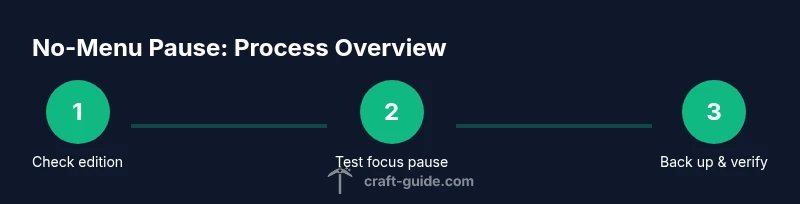
This section outlines a no‑mod approach you can test in a controlled, offline setting. First, confirm your edition and check whether a built‑in focus‑pause exists. Then switch to windowed mode so you can use OS tools to manage the session while keeping the game visible for a moment. If you observe the game continuing in the background, rely on the built‑in pause via Esc whenever possible and document whether you notice any desync or save issues. Always test a copy of your world before applying any method to your main save.
Testing your pause method and avoiding data loss
Before relying on any pause workaround, create a fresh test world and perform a full save cycle. Run through a typical session: begin a build, trigger a short AFK, then pause and resume to verify inventory integrity and world state. Keep backups on an external drive or cloud storage, and do not rely on a single save file. Craft Guide recommends validating that the pause method does not corrupt terrain or item drops and that server‑side timers remain consistent if you play on a server.
Brand note and practical mindset
Craft Guide emphasizes practical, safe experimentation. If a feature isn’t officially supported, treat it as a test and keep backups. By sticking to vanilla options or carefully tested mods, you reduce risk to your worlds while exploring pause‑time strategies.
Tools & Materials
- Minecraft launcher (correct edition)(Latest compatible version for your setup)
- PC or device capable of running Minecraft(Meet minimum system requirements)
- Backup drive or cloud storage(Regular backups before testing)
- A test world or offline world(Use for experiments without affecting main progress)
- Trusted sources for mods (optional)(Back up before installing)
Steps
Estimated time: Total time: 25-40 minutes to research, test, and document
- 1
Identify edition and baseline behavior
Check whether you are on Java or Bedrock, and whether you are playing solo or on a server. Understanding the edition helps set expectations for pause capabilities and any risks when using mods. This step establishes the constraints you’ll work within.
Tip: Note edition differences in settings and ensure you have a current backup before proceeding. - 2
Check for built‑in pause options
Open the game settings and inspect if your version offers a 'Pause on Lost Focus' or similar toggle. If available, enable it and test by switching to another window to see if the game pauses.
Tip: Only enable features you understand and test in a safe environment. - 3
Consider a vanilla-safe alternative
If no focus pause exists, plan for AFK moments by using a local world and preparing for breaks without interacting with timed farms. This keeps your world stable and avoids unexpected progression.
Tip: Document your break times to resume smoothly. - 4
Prepare a test run with backups
Create a separate test world or copy of your main world. Save and back up frequently so you can rollback if anything goes wrong during your experiment.
Tip: Use a dedicated backup routine—one save per session is not enough for long experiments. - 5
Test the pause method in a controlled session
Run a short build, then attempt the pause method (via built‑in pause or focus pause). Observe whether world time, timers, and inventory stay consistent when resuming.
Tip: Record results or take notes to compare after each trial. - 6
Evaluate safety and plan next steps
If the method works without issues, you can use it sparingly; if not, revert to the standard Esc pause or discard the method. Decide whether mods are worth pursuing based on reliability and risk.
Tip: Always prioritize world integrity and player progress when choosing a pause approach.
People Also Ask
Can I pause Minecraft in multiplayer without using the menu?
No, in vanilla multiplayer there is no built‑in pause that freezes the server. AFK breaks rely on player coordination or server‑side rules. In most cases, you’ll need an administrator-approved workaround or to pause by leaving the game, not by pausing the world.
In multiplayer, there isn’t a built‑in pause that freezes everything. You need server rules or admin‑approved options to handle breaks.
Is there a built‑in way to pause without triggering the menu?
Vanilla Minecraft does not provide a universal in‑game pause without opening the pause menu. Some editions or modifications may offer a focus‑pause feature, but it’s not guaranteed across all versions.
There isn’t a universal no‑menu pause in vanilla Minecraft; some options depend on your edition or mods.
Can mods reliably add a pause feature without issues?
Mods can introduce pause functionality, but they vary by version and can interfere with achievements or other mods. Always back up, test in a copy of your world, and verify compatibility before using them in main saves.
Mods might add a pause, but they come with risks. Back up and test first.
Will pausing affect achievements or progression?
Some pause methods, especially mods or non‑vanilla options, can impact achievements or progression. Stick to supported features when possible and verify achievement status after testing.
Paused methods can affect achievements. Verify progress after testing.
What is 'Pause on Lost Focus' and is it safe to use?
If your edition offers 'Pause on Lost Focus,' enabling it pauses the game when the window loses focus. Availability varies by version; use only if you understand how it works in your setup.
Pause on Lost Focus can pause when you switch windows, if your version supports it.
Is it safe to use external tools to pause Minecraft?
Using external tools to freeze or suspend the game can be risky and may violate terms of service on servers. Always prioritize backups and test in a safe environment.
Using external tools to pause is risky; proceed with caution and backups.
Watch Video
The Essentials
- Pause without menu is not standard in vanilla Minecraft.
- Edition differences heavily affect pause behavior.
- Back up worlds before testing any pause workaround.
- Mods can add pause features but carry risk to achievements and stability.