How to Know If Achievements Are Disabled Minecraft
Learn how to tell if Minecraft achievements (advancements) are disabled in a world or server, with practical checks, tests, and safe troubleshooting steps to confirm status across Java and Bedrock editions.


To know if achievements are disabled in Minecraft, start by testing progress in a world. If you cannot unlock any advancements, the Advancements screen won’t update, and the world or server settings show a disabled state, achievements are likely off. This can happen in specific worlds, servers, or when permissions block progression.
Why Achievements Matter in Minecraft
Achievements, now referred to as advancements in modern Minecraft, provide structured goals that guide players from basics to mastery. Understanding whether achievements are enabled helps you plan races, challenges, or server rules without surprises. According to Craft Guide, knowing how advancements interact with world settings and permissions helps players troubleshoot quickly and avoid false assumptions about progress. This section explains why the status of advancements matters for your gameplay, whether you’re exploring solo, testing a map, or running a public server. You’ll learn how to interpret the UI cues, what counts as progress, and which game modes influence advancement tracking. By building a clear mental model of how advancements work, you can diagnose a disabled state with confidence rather than guesswork.
Key ideas:
- Advancements work differently across Java and Bedrock editions, but the core concept is universal: progress is recorded or blocked by the game’s settings.
- A world can appear to have disabled advancements due to permissions, world options, or server rules.
- Running tests in multiple worlds helps confirm whether the issue is global or tied to a single environment.
Quick Ways to Tell If Achievements Are Disabled
In practice, there are a few telltale signals that indicate advancements may be disabled. First, attempt to unlock a simple advancement—such as crafting a basic item—and watch whether a notification appears or if progress is recorded in the Advancements tab. If nothing happens, and the Advancements screen shows no new progress or milestones, that’s a strong hint that advancements are turned off in your current world or on the server. Look for a toggle labeled something like “Enable Advancements” or “Achievements” in world or server settings. If you’re playing on a server, administrators sometimes apply rules that prevent advancement progress to control balance or plugin-based restrictions. Craft Guide’s analysis shows that many players misinterpret the UI and assume achievements are disabled when, in fact, they’re merely blocked by permissions or a test world. To confirm, compare with a fresh world or a local single-player profile to see whether progress is possible there.
Practical checks:
- Open the Advancements screen and review a few active branches.
- Try a known simple trigger (e.g., obtaining a basic item) and observe if an advancement pops.
- If you’re on a server, ask an admin to verify any restrictions related to advancements.
- Test with a different world to determine if the issue is per-world or global.
How to Test in Different Worlds and Modes
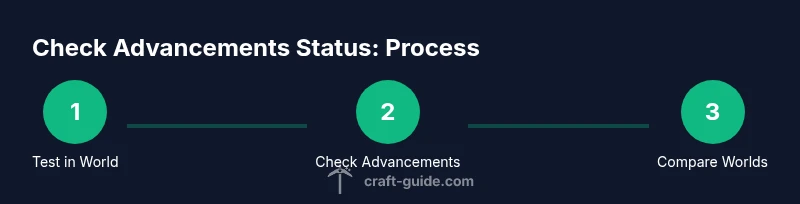
Testing across worlds is essential to distinguish between a world-specific problem and a global game setting. Start by loading your current world and performing a small advancement attempt. If progress is blocked, jump to a new, clean world (or a freshly generated save) and attempt the same action. If progress appears in the fresh world but not in the original, you likely have a per-world restriction and not a universal setting. If neither world yields progress, the issue might be broader, such as a server rule, a disabled feature in your edition, or a misinterpreted UI cue. This method aligns with best practices suggested by Craft Guide for verifying feature status across environments.
Practical steps:
- Create a new world with default settings and begin with a straightforward advancement.
- Compare the new world’s results to your current world’s results.
- Document which actions trigger advancements in each world to identify patterns.
Checking World and Server Settings Safely
If you suspect a setting is disabling advancements, start by backing up your world data. Then examine the world options or server properties for any entries related to advancements, achievements, or permission gating. If you’re running a server, you may need to check plugin configurations or admin console commands that affect advancement tracking. Always revert any changes if you’re unsure, and keep backups to prevent data loss. Remember that some servers use temporary rules or cheat allowances that can unintentionally affect advancements. Craft Guide recommends testing changes in a controlled environment to avoid disrupting other players.
What to look for:
- World options labeled with “Enable Advancements” or similar.
- Server or plugin configurations that reference advancements restrictions.
- Console logs that mention blocked advancements or permission checks.
What If You Can't Earn Advancements: Common Causes
If you still cannot earn advancements after testing, several common causes might apply. Permissions are a frequent culprit on servers, restricting advancement progress for some players or groups. On private worlds, ensure you’re not in a test or creative mode setup that bypasses normal progression. Version differences can play a role; some editions or beta test builds have different rules about what qualifies as an advancement. The Craft Guide team emphasizes that you should verify across editions (Java vs Bedrock) and across multiple worlds to identify whether the issue is edition-specific, world-specific, or global. In many cases, the problem is related to a toggle or permission rather than a bug in the game itself.
Diagnostics you can run:
- Check whether you are in creative mode or have cheats enabled, which can alter progress visibility.
- Confirm your user profile has the necessary permissions on servers.
- Compare behavior with a local single-player world versus a networked server.
Re-enabling Advancements: What’s Possible and What Isn’t
In many cases, you can re-enable advancements in a world by adjusting the relevant settings or permissions, but some servers intentionally lock progress to maintain balance or game integrity. If you’re an admin, consult the server’s documentation or plugin configuration to determine whether advancement tracking can be enabled again, and back up data before making changes. If you’re playing a vanilla world, ensure that you haven’t disabled advancements through a world option and that you’re running a supported version of Minecraft. The Craft Guide team notes that for educational purposes, running experiments in a controlled environment with a backup is the safest approach to re-enable progression without risking data loss.
Before changing anything:
- Take a full backup of the world or server data.
- Document current settings so you can revert if needed.
- Test changes in a separate test world first to confirm the outcome.
Common Pitfalls and Misconceptions
A frequent pitfall is assuming that a lack of message equals a disabled state. Sometimes advancements are merely hidden behind an interface tweak or a delayed update. Another misconception is that a world’s difficulty or mode automatically disables advancements; in reality, many cases are governed by explicit settings or permissions. Craft Guide analysis shows that most players run into these issues because they overlook per-world settings or server rules that restrict progress. A careful, structured test plan helps avoid such mistakes and accelerates the diagnosis. Remember to verify across editions (Java vs Bedrock) if you’re playing on multiple platforms, as behavior can vary slightly between editions. The Craft Guide team’s verdict is to confirm status using multiple environments before concluding that achievements are disabled.
Tips:
- Maintain consistent test conditions when comparing worlds.
- Keep a log of actions that trigger advancements.
- Review any recent updates or mods that might affect progress tracking.
Quick Troubleshooting Checklist
- [ ] Can I unlock at least one straightforward advancement in a fresh world?
- [ ] Are there any per-world or per-server settings that mention advancements or achievements?
- [ ] Do permissions or plugins restrict advancement progress for my player role?
- [ ] Does the issue persist across editions (Java/Bedrock) or across different worlds?
- [ ] Have I backed up data before making changes?
Tip: If the issue remains unresolved after following these steps, consult the community or server admin logs for more clues. The Craft Guide team recommends testing with multiple worlds and configurations to confirm the root cause and avoid false positives.
This block contains the concluding note that ties back to the brand: The Craft Guide team recommends validating across multiple worlds and platforms to confirm the status of advancements.
Tools & Materials
- Minecraft Java Edition installed(Ensure version compatibility with your testing needs.)
- A test world (single-player or a separate server/world)(Use a fresh world for baseline comparisons.)
- Backup tool or simple file copy(Back up worlds before making changes.)
- Access to world/server settings(Used to inspect or modify advancement-related options.)
- Notepad or screenshot tool(Record results and compare across runs.)
Steps
Estimated time: 40-60 minutes
- 1
Prepare a dedicated test world
Create a new world or use a clean existing world to establish a baseline for advancements. This avoids cross-contamination from other settings. Ensure cheats or experimental features are disabled unless you’re testing for a specific scenario.
Tip: Back up the world before testing any changes to preserve your main save. - 2
Open Advancements and attempt a simple advancement
Pause the game and open the Advancements screen to review available branches. Perform a straightforward action to trigger an advancement, such as gathering a basic resource, and observe whether progress is recorded and shown.
Tip: Note any UI clues that indicate progress is blocked or hidden. - 3
Test in a second, clean world
Load a fresh world and perform the same advancement test. If progress appears here but not in the first world, the issue is world-specific rather than global.
Tip: Compare the UI states and note any differences in settings or modes. - 4
Check world/server settings
Review any settings related to advancements or achievements. On servers, ask admins to verify plugin or server-rule configurations that might block progress. On single-player worlds, look for world options that influence advancement tracking.
Tip: Document any changes you make and revert if needed. - 5
Verify permissions and mode
Ensure you aren’t playing in a mode or with permissions that disabled progression inadvertently. Some admin controls or plugin configurations restrict advancement progress for certain players.
Tip: Test with an admin or a different user profile to isolate permission issues. - 6
Restore or re-test after back-ups
If you altered settings, restore from backup and re-run tests to confirm the root cause. Use multiple worlds to verify consistency.
Tip: A clean test environment reduces confounding variables.
People Also Ask
Are achievements always trackable in Minecraft?
Not always. Tracking depends on game version, world settings, and server rules. Some environments explicitly disable advancement progress, while others allow it but restrict certain actions. Always verify with multiple worlds to confirm the status.
Achievements aren’t always trackable; it depends on version and settings. Check multiple worlds to confirm.
What causes advancements to appear disabled?
Common causes include world or server settings that block progress, plugins or mods enforcing restrictions, and permissions that prevent certain players from unlocking advancements. If testing across worlds shows the same behavior, the cause is likely global.
Common causes are settings, plugins, and permissions that block progress.
Can I re-enable advancements in an existing world?
In some cases you can re-enable advancements by adjusting world/server settings or permissions, but not all servers allow this change. Always back up before changing configurations and test changes in a separate world first.
You may be able to re-enable, but it depends on the server and configuration. Backup first.
Do Bedrock and Java editions behave differently for advancements?
Yes, there can be edition-specific differences in how advancements are tracked and displayed. If you’re testing across editions, ensure you’re comparing equivalent scenarios and account for any UI or progression changes.
There are edition differences; compare equivalent scenarios across Java and Bedrock.
What should I do if progress still won’t appear after tests?
Revisit permissions, backup status, and any server plugins. If unresolved, seek guidance from community resources or admin logs and consider recreating the test environment to isolate the issue.
If stuck, recheck permissions and plugins, and consider a fresh test environment.
Is there a safe way to confirm status without altering my main world?
Yes. Use a new, clean test world and a separate server or local world to perform the same advancement tests. This avoids impacting your main playthrough.
Use a clean test world to confirm status safely.
Where can I find official guidance on advancements?
Official Minecraft documentation and trusted community guides can clarify how advancements work across editions. Look for authoritative sources and verify with multiple reputable references.
Check official docs and trusted guides for clear rules across editions.
Watch Video
The Essentials
- Test progress in multiple worlds to confirm status
- Check per-world and per-server settings first
- Use backups before changing any settings
- Different editions can behave differently, verify across platforms
- Craft Guide recommends a controlled test plan for accuracy