How to Get Rid of an Agent in Minecraft
Learn to identify and safely remove an agent in Minecraft, whether vanilla or modded. This comprehensive guide covers backup, targeted removal, mod management, and verification to keep your world stable.


Goal: Learn how to get rid of an agent in Minecraft, a term that usually refers to a modded NPC or data-pack entity. This guide walks you through identifying whether the agent is vanilla or modded, then removing it safely with commands, disabling mods, or restoring from a backup. The Craft Guide team found that following these steps minimizes world damage while you learn.
Understanding what an agent is in Minecraft
In vanilla Minecraft, there is no official mob or entity called a generic 'agent'. The term is widely used by players to describe a non-player character (NPC) that behaves like a cooperative spy, guard, or controlled follower, or more commonly, an NPC introduced by a mod, data pack, or map. Because this agent is not part of the base game, its presence and behavior can vary dramatically from one world to another. Some players call a named villager, a disguising creature, or a scripted mob an agent, while others use the term for any mod-added NPC that interacts with players in a special way. The Craft Guide team notes that understanding whether the agent is part of your vanilla experience or a modded extension is the critical first step, because removal options differ accordingly.
According to Craft Guide, starting with a clear definition of what you’re dealing with helps you choose the safest removal path and minimizes the chance of unintended side effects in your world.
Why you might want to remove an agent
There are several reasons you might want to remove an agent from your Minecraft world. The entity could be causing performance issues by spawning too frequently, interfering with villager trades, or triggering unintended behavior after a game update or mod change. Another common reason is to tidy up a map or adventure scenario where the agent is no longer needed. Craft Guide analysis shows that worlds with heavy modding tend to accumulate stray NPCs that players consider pests or distractions, making clean-up a practical maintenance task.
Removing an agent can also help you regain control over spawn rules and ensure that your world runs smoothly, especially in survival settings where every entity consumes server resources.
How to identify whether the agent is vanilla or modded
Start by listing your installed mods, data packs, and resource packs. If the agent appears only after enabling a particular mod, data pack, or server-side script, it is likely modded. Check for unique spawn rules, custom names, or behavior that wouldn’t be possible with vanilla code. You can also observe where the agent spawns: if it appears in areas tied to a specific mod’s features (e.g., a dungeon, a dimension, or an event), that’s a hint. If you still can’t tell, create a clean test world with the same mods and data packs to compare behavior. The Craft Guide team recommends documenting each agent’s name, location, and behavior to help determine the best removal approach.
Craft Guide’s research also suggests keeping a log of the agent’s attributes (health, equipment, and AI tasks) to avoid removing something essential by mistake.
Back up your world before making changes
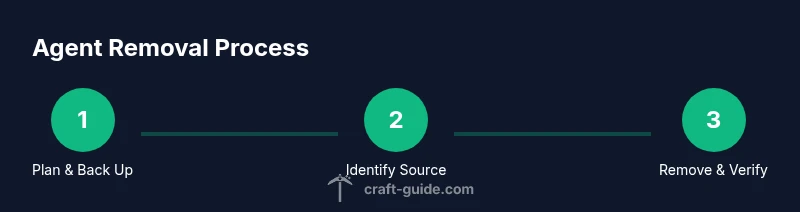
Before touching any entity, back up your world. In Minecraft, backups guard against accidental data loss when removing agents or altering mod files. Save a copy of your world folder to a safe location, and if you’re running a server, copy the world to a local machine or cloud storage. Label backups by date and the suspected source of the agent (mod, data pack, or vanilla). This precaution aligns with best practices and helps you revert if removal introduces unexpected side effects. Craft Guide emphasizes that a solid backup is your first line of defense against irreversible mistakes.
Having a recent backup also makes it easier to compare before/after states to ensure no other elements were impacted.
Removing a vanilla or modded agent with commands
If the agent is part of vanilla gameplay and you can identify its exact type or name, you can attempt a targeted removal with commands. If the agent is modded, you may need to remove or disable the source mod or data pack. In the absence of a universal 'remove agent' command, the recommended approach is to locate the agent’s coordinates or tag and then despawn or kill it, followed by cleaning up any spawn rules tied to it. After removal, reload the world or restart to ensure the agent does not respawn. The Craft Guide team emphasizes using precise selectors to avoid affecting other entities. This process reduces risk and preserves your world integrity. If you can’t identify the exact type, focus on removing the data path or mod source instead of brute-forcing entity removal.
Tip: Try removing the agent in a testing portal or isolated chunk so you can observe the effect without risking the entire world.
Handling mod data packs and disable mods safely
If the agent is introduced by a mod, the simplest method is to disable or uninstall the mod from the client and/or server. For data packs that create an agent, remove or disable the data pack. After disabling, start the game and verify that the agent no longer spawns. If the agent persists, re-check mod load order, dependencies, or conflicting scripts, and consider updating or downgrading to a stable version. The Craft Guide team notes that keeping a clean mod list improves reliability and reduces stray NPCs. Always ensure you have a compatible backup before removing or downgrading mods.
In a server environment, coordinate with admins to minimize downtime and ensure that other players aren’t affected by removal actions.
Post-removal verification and prevention
With the agent removed, explore nearby areas to confirm it does not reappear in new chunks. Revisit your backup to compare world state and confirm no other unintended changes occurred. To prevent future issues, document any changes, label downloaded mods, and set spawn rules that limit unwanted NPCs. Consider setting up a test world for future mod changes so you can safely evaluate agents before deployment. Craft Guide’s recommendations emphasize proactive maintenance and version control to reduce future incidents.
Tools & Materials
- Backup storage (cloud or external drive)(Create a full backup of the world save before making changes)
- Minecraft environment with OP/cheats enabled(Access to commands or admin rights is necessary)
- List of installed mods and data packs(Identify potential sources of the agent)
- Coordinate navigation tools (map/ compass)(Helpful for locating agent spawn points)
- Text editor for mod configuration(Useful if you need to tweak config files)
Steps
Estimated time: 25-45 minutes
- 1
Plan and back up
Create a fresh backup of the world and note the agent's location, behavior, and any related mods or data packs. This preserves a restore point in case removal causes unintended consequences.
Tip: Label the backup with date and suspected source for quick reference. - 2
Identify the agent’s origin
Review installed mods and data packs. Look for recent changes that introduced the agent, and compare behavior to vanilla expectations. Documentation helps you decide whether to remove via commands or by disabling a source.
Tip: Keep a simple table of agent name, location, and behavior for quick decisions. - 3
Prepare safe removal in a test area
If possible, reproduce the agent in a separate test world or a single-chunk area to experiment without affecting your main world.
Tip: Test in a controlled environment before touching the main save. - 4
Attempt targeted removal (if identifiable)
If you know the agent’s type or a unique tag, attempt a targeted removal (despawn or kill) to minimize collateral impact. Use precise selectors to avoid removing other entities.
Tip: Document any command used and the result for future reference. - 5
Disable or uninstall the source
If the agent is tied to a mod or data pack, disable or uninstall that source from the client/server. This prevents the agent from respawning in future sessions.
Tip: Keep the old mod/data pack in a separate archive in case you need to revert. - 6
Remove related spawn rules
Check for spawn rules or loot tables that reference the agent. Remove or adjust these rules to prevent reoccurrence.
Tip: Only modify rules you understand to avoid breaking other NPCs. - 7
Reload and verify
Reload the world or restart the game and observe whether the agent reappears. If it does, revisit the mod/data pack or consult its documentation.
Tip: Watch for any console messages or errors during reload. - 8
Document and monitor
Record what you changed, which mod or data pack was involved, and any follow-up observations. Monitor the world for a while to ensure stability.
Tip: Set a reminder to re-check after a game update or mod change.
People Also Ask
What is considered an 'agent' in Minecraft?
In vanilla Minecraft, there is no official 'agent' mob. The term usually refers to a modded NPC or data-pack entity. Understanding the origin helps determine removal steps.
In vanilla Minecraft, there isn’t an official agent. It’s typically a modded NPC or a data-pack entity.
How do I tell if the agent is from a mod or a data pack?
Check installed mods and data packs, and look for unfamiliar spawn rules or behavior. If the agent only appears after enabling a specific mod or data pack, it’s likely modded.
Look at your mods and data packs, and note where the agent spawns. If it only shows up after a mod, it’s probably modded.
Can removing the agent affect other parts of the game?
Removing a modded agent could impact related content or automation. Always backup first and test in a controlled environment to minimize side effects.
Removing the agent can affect other content tied to it; back up and test in a controlled setup.
What if I can’t locate the agent’s origin?
Try disabling mods or data packs one by one to see if the agent disappears, and use logs or world backups to track changes.
If you can’t find the source, try disabling mods one by one and check logs.
Is it safe to delete a mod or data pack to remove the agent?
Yes, but only after backing up and ensuring there are no dependencies. Removing a mod or data pack can affect other features.
Yes, but back up first and check for dependencies before removing.
What should I do after removing the agent?
Reload the world, verify that the agent doesn’t respawn, and monitor for any unintended effects. Document the change for future reference.
Reload and monitor; document what you changed.
Watch Video
The Essentials
- Back up your world before removal.
- Determine if the agent is vanilla or modded before acting.
- Use targeted removal or disable the source to avoid collateral effects.
- Verify the world after removal and document changes.
- The Craft Guide team recommends proactive maintenance and backups to prevent future issues.