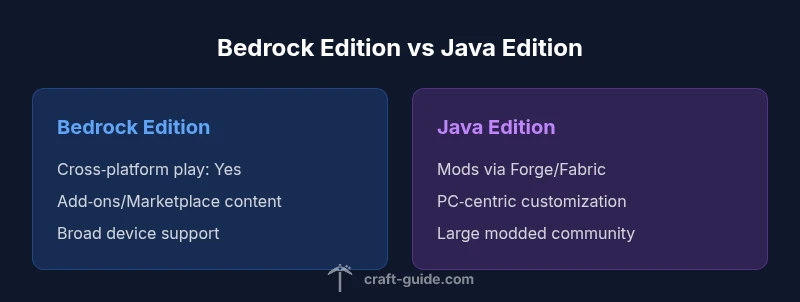
Minecraft Bedrock Edition vs Java: Side-by-Side Edition Guide
Compare Minecraft Bedrock Edition and Java Edition to decide which fits your devices and playstyle. Explore cross-play, mods, performance, and updates in a clear, practical guide for players from beginner to advanced.


Bedrock Edition and Java Edition are two official Minecraft builds designed for different players. Bedrock runs on Windows 10/11, consoles, and mobile with cross‑play, while Java runs on PC only and emphasizes modding. If you want broad device support and multiplayer with friends on different platforms, Bedrock is the better fit; if you want mods and classic PC performance, Java wins.
What are Minecraft Bedrock Edition and Java Edition?
Minecraft Bedrock Edition and Java Edition are two official builds of the same core game, designed to serve different audiences and hardware ecosystems. Bedrock Edition runs on Windows 10/11, consoles (PlayStation, Xbox, Nintendo Switch), and mobile devices, and it uses a cross‑platform multiplayer model. Java Edition, by contrast, is PC‑native and built on Java; it emphasizes moddability, world customization, and the year‑to‑year evolution of the Java codebase. According to Craft Guide, the two editions emerged from different design goals: Bedrock to maximize reach and consistency across devices, Java to empower power users with a flexible, mod-friendly environment. For players deciding where to start, understanding these foundations helps you pick an edition that matches your devices, play habits, and aspirations. In this guide, we dissect the core differences, benefits, and tradeoffs in a clear, practical way.
Core Differences at a Glance
- Cross‑Platform Play: Bedrock supports cross‑play across Windows, Xbox, PlayStation, Switch, and mobile; Java is PC‑only.
- Modding and Customization: Java has a long tradition of community mods; Bedrock uses official add‑ons and a marketplace rather than full modding.
- World Size and Performance: Bedrock is optimized for diverse hardware and runs smoothly on lower‑end devices; Java generally requires more RAM and a capable CPU for large mods or heavy builds.
- Updates and Parity: Both editions receive major updates, but parity can vary in minor features and optimizations.
- Content Ecosystem: Bedrock relies on the Marketplace for skins, maps, and texture packs; Java relies on a broad ecosystem of independent mod packs and launchers.
- Servers and Community: Bedrock servers emphasize cross‑platform play; Java has a larger, more mature modded server scene.
This snapshot helps set expectations as you read deeper. Craft Guide highlights that the choice often comes down to whether you value cross‑device multiplayer (Bedrock) or deep modding and PC‑centric control (Java).
Edition-Specific Features: Bedrock vs Java
Bedrock Edition offers a unified codebase across platforms, which means you can jump between PC, consoles, and mobile with compatible worlds and content. It features a polished marketplace with official skins, maps, and texture packs, curated by Microsoft. Java Edition remains the long‑standing playground for PC players, boasting Forge/Fabric mod ecosystems, advanced world editing, and broad launcher support. The Craft Guide team notes that Bedrock’s strength lies in accessibility and consistency, while Java’s strength lies in freedom, customization, and a robust modding culture. If your group plays across devices, Bedrock is typically the practical choice; if your focus is mods and creative control, Java is often preferable. When deciding, reflect on your preferred control scheme, hardware, and the kinds of communities you want to engage with.
Performance and Compatibility
Performance varies by hardware and edition. Bedrock is designed to run smoothly on a wide range of devices, including mid‑range PCs and many consoles, with stable frame rates and faster load times on lower specifications. Java, while enjoying strong optimization on high‑end PCs, can demand more RAM and CPU resources, especially with heavy mod packs or large world generations. One practical takeaway is to profile your current hardware: if you have a modest rig or primarily game on a console, Bedrock is often the safer bet for consistent performance; if your setup is a powerful PC and you crave high‑fidelity worlds with mods, Java can deliver the most flexible experience.
Modding and Customization
Modding and customization define Java Edition. The Java ecosystem includes Forge and Fabric mod loaders, thousands of mods, and custom launchers that enable complex gameplay changes, new dimensions, and massive fabrications. Bedrock Edition supports add‑ons and the official Marketplace, which provide curated content, skins, and maps but do not offer true, system‑level mods. For many players, this distinction is decisive: Java unlocks creative limitless modding at the cost of complexity and compatibility variability, while Bedrock offers a safer, more streamlined path to personalizing the experience through supported content on a stable platform.
World Generation and Redstone Behavior
World generation carries subtle but meaningful differences between editions. Java worlds can differ in seed interpretation, biome distribution, and generation quirks influenced by the Java codebase’s history and community discoveries. Bedrock worlds share many biomes but may differ in height limits, cave generation, and ore distribution tuned for performance across devices. Redstone behavior can vary in edge cases, particularly with complex contraptions created by players moving between editions. If you design intricate redstone builds or rely on precise world layouts, test your designs in the target edition and consider seeds that produce similar terrain across your chosen platform.
Multiplayer and Servers
Bedrock Edition shines for cross‑platform multiplayer, allowing players on Windows, Xbox, PlayStation, Switch, and mobile to share servers and realms. Java Edition has a vast, mature multiplayer ecosystem with a wide range of server types, from pure vanilla to heavily modded experiences, and is favored by server operators who want deep customization and robust community management. If your group spans multiple devices, Bedrock is typically the better choice; if you want to run a server with heavy mods, Java’s ecosystem provides more options and a longer history of community tools.
Purchase, Licensing, and Access
Purchasing and access can feel different across editions. Bedrock content is often delivered through platform stores and bundles, with cross‑platform access tied to the store accounts and device families you use. Java Edition is typically purchased as a standalone PC product via the official site or preferred retailers and is tied to a personal account on launchers. This means price, licensing options, and bundle availability can vary by platform and region. Consider which ecosystem aligns with your preferred device set, as well as how you intend to manage friends’ access and server hosting.
Practical Guide: Choosing the Right Edition
- If you play with friends who are on consoles or mobile, start with Bedrock Edition for cross‑platform compatibility. 2) If you want to install thousands of mods, build intricate machines, and customize gameplay at a deep level, choose Java Edition. 3) If you own a modern PC and crave high‑fidelity worlds, both can work, but Java will offer more control over mods while Bedrock offers smoother, cross‑device play. 4) Consider hardware: if you have limited RAM or an older PC, Bedrock’s lighter footprint is advantageous; for current hardware with RAM to spare, Java excels in mod support and performance headroom. 5) Plan your server strategy: Bedrock for cross‑platform servers; Java for large modded communities. Craft Guide’s analysis shows that choosing the edition is less about one “best” than about aligning with your play goals, devices, and the type of community you want to join. For a practical, hands‑on decision framework, match your hardware, social circle, and content interests to the edition that best supports those needs.
Authority Sources
- https://www.minecraft.net
- https://www.mojang.com
- https://www.pcgamer.com
Comparison
| Feature | Bedrock Edition | Java Edition |
|---|---|---|
| Cross-Platform Play | Yes on Windows/Xbox/PlayStation/Switch/mobile | No (PC only) |
| Modding & Add-Ons | Marketplace/official addons | Robust modding via Forge/Fabric |
| World Generation & Features | Shared worlds with Bedrock tweaks | Java‑specific biome generation and features |
| Performance & Hardware | Optimized for diverse hardware; stable on midrange devices | More resource-intensive; strong on high-end PCs with mods |
| Updates & Parity | Parallel updates; feature parity can vary | PC‑centric updates with mod parity considerations |
| Marketplace vs Mods | Official marketplace content | Large modding ecosystem; launches via multiple launchers |
| Servers & Community | Wide range of Bedrock servers; cross‑platform | Large Java server ecosystem; deep modded options |
| Purchasing & Ownership | Store-based purchases; bundles | Standalone PC purchase via launcher or site |
Benefits
- Great cross‑platform play across devices
- Broad device accessibility and bundles
- Stable updates with official content
- Java edition offers expansive modding and customization
- Active, large server communities (Java)
Negatives
- Bedrock modding is limited to addons/marketplace
- No cross‑play between Bedrock and Java
- Bedrock features may lag behind Java in certain mods
- Java requires more powerful hardware for large mod packs
Bedrock for cross‑device play; Java for modding and PC customization
Bedrock Edition excels in cross‑platform play and accessibility, making it ideal for groups using multiple devices. Java Edition shines for modding depth and PC‑centered customization, suited to players who want to customize, build, and experiment with community tools. Your choice should hinge on device compatibility and how you value mods versus official content.
People Also Ask
Can Bedrock players join Java servers?
No. Bedrock and Java editions are not cross‑compatible for multiplayer. Players on Bedrock cannot join Java servers, and vice versa. If you want a shared server experience, pick Bedrock for cross‑platform play or Java for modded communities.
No. Bedrock players can’t join Java servers, and Java players can’t join Bedrock servers.
Which edition is better for modding?
Java Edition has the larger modding ecosystem with Forge and Fabric, offering extensive customization. Bedrock supports addons and a storefront, but it does not support full mods. If mods are central to your play, Java is the better choice.
Java is the go‑to for mods and custom content.
Is Bedrock Edition cross‑platform with consoles?
Yes. Bedrock supports cross‑platform multiplayer across Windows, Xbox, PlayStation, Switch, and mobile. This makes it easy to play with friends regardless of device.
Bedrock works across Windows, consoles, and mobile.
Can you transfer worlds between editions?
There is no direct world transfer between Bedrock and Java editions. You would need to recreate content or use seed-based methods to replicate terrain where possible.
Worlds can’t be moved directly between editions.
Do both editions receive updates at the same time?
Major updates generally release for both editions, but parity for new features can vary. Java often leads in mod parity, while Bedrock focuses on cross‑platform stability.
Both get big updates, but features can arrive at different times.
Which edition is cheaper to start with?
Pricing varies by platform. Java Edition is typically a one‑time PC purchase through a launcher; Bedrock pricing depends on platform stores and bundles. Budgeting may differ by device ecosystem.
Pricing depends on the platform and edition.
The Essentials
- Choose Bedrock for cross‑platform multiplayer across devices
- Choose Java for deep modding and PC customization
- Test both editions if possible with your friends’ platforms
- Plan your server strategy around edition capabilities (Bedrock vs Java)
- Consider hardware constraints to ensure smooth performance