Difference Between a Minecraft Server and a Realm: A Practical Guide
A detailed, analytical comparison of Minecraft servers and Realms, covering setup, customization, costs, performance, and ideal use cases to help players choose the right multiplayer solution.


According to Craft Guide Analysis, 2026, the difference between a Minecraft server and a Realm centers on control, customization, and scalability. A server (self-hosted or third-party) offers broad configuration, plugin support, and room to grow, while Realms provide a simple, hosted option designed for small groups with minimal setup. Both enable multiplayer play, but the path you choose shapes future expansion.
What They Are: Servers vs Realms
According to Craft Guide Analysis, 2026, a Minecraft server and a Realm are both multiplayer environments, but they target different player needs. A server is a flexible piece of software that runs on your hardware or a hosting provider, granting you control over configurations, plugin support, world settings, and admin tools. Realms, by contrast, are a managed, hosted option provided by Mojang that aims to simplify uptime, automatic backups, and cross-device access for small groups. Realms are edition-specific (Java or Bedrock) and come with a predictable, fixed feature set. This distinction matters because it influences customization, maintenance effort, and long-term scalability. Craft Guide emphasizes that your decision should hinge on group size, desired level of control, and anticipated growth.
- Realms shine for quick setup and minimal maintenance.
- Servers excel when you need plugins, large worlds, and deep customization.
- Both support cross-platform play within their respective limits, but Realms generally offer less headroom for expansion than a fully configurable server.
Core Differences at a Glance
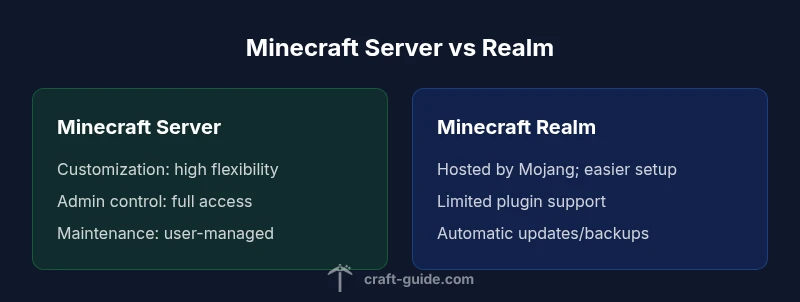
- Control level: Full admin control on servers vs. managed controls on Realms.
- Customization: Plugins, mods, and configs on servers vs. built-in options on Realms.
- Maintenance: User-managed on servers vs. Mojang-managed maintenance on Realms.
- Scaling: Flexible scaling with self-hosted/third-party options vs. fixed capacity on Realms.
- Cost model: Variable hosting costs vs. fixed subscription through Mojang.
- Setup time: Longer setup on servers vs. near-instant on Realms.
- Best for: Large communities and modded play on servers vs. small groups seeking simplicity on Realms.
Setup, Access, and Administration
Setting up a Minecraft server typically involves selecting a hosting method (self-hosted, VPS, or dedicated game server host), ensuring proper hardware, and configuring a server jar with your preferred version and options. You’ll install plugins, manage permissions, and schedule backups. Admin control is granular: you decide who can run commands, which plugins are allowed, and how the world evolves over time. Realms, in contrast, are designed for plug-and-play onboarding. You sign into your Mojang account, create a Realm, invite players, and begin playing with baseline settings. Administration is minimal, with automatic backups and straightforward invites. The trade-off is less customization and fewer plugins, but a dramatically simpler maintenance experience. Craft Guide recommends matching your choice to your comfort with configuration tasks and your tolerance for ongoing management.
- Realms reduces setup time and ongoing maintenance.
- Servers demand more time for configuration and updates, but enable broader customization.
Customization, Plugins, and Modding
Customization is the differentiator. A Minecraft server lets you deploy a vast array of plugins, mods, and server-side tweaks to alter gameplay, add new mechanics, or optimize performance. This flexibility appeals to players who want unique rulesets, economy systems, or adventure maps. Realms, however, offers a curated feature set with reliable defaults and limited plugin support. The absence of heavy modding in Realms reduces compatibility headaches but constrains what you can change about core gameplay. Craft Guide notes that the “modding ecosystem” is a major reason players pick servers, while Realms is favored by players who prioritize stability, simplicity, and cross-device access without the burden of ongoing compatibility issues.
- Servers: maximum customization potential and breadth of mods/plugins.
- Realms: stable, simplified experience with limited customization options.
Costs, Value, and Longevity
Cost structures diverge. Minecraft servers come with variable pricing: you can pay for hosting based on cores, RAM, storage, and bandwidth, or invest in your own hardware and electricity costs. The potential long-term value scales with the size of your community, the complexity of your world, and how aggressively you expand with plugins and new features. Realms, by contrast, uses a predictable subscription model managed by Mojang. This can be attractive for players who want a known monthly cost and don’t want to manage hardware, backups, or uptime. Craft Guide highlights that the cheaper starting point isn’t always cheaper in the long run if you hit performance or customization limits. Consider your group size, growth plans, and willingness to manage a server when evaluating total cost of ownership.
- Realms offers predictable costs and reduced maintenance.
- Self-hosted/third-party servers offer potentially greater value with growth and customization, at the cost of added complexity.
Performance, Scale, and Reliability
Performance varies with server hardware, network quality, and software configuration. A well-tuned server can deliver low latency and stable performance for large, modded worlds, provided you allocate adequate resources. Realms relies on Mojang’s hosting infrastructure and is optimized for reliability within its defined limits. For very large communities or highly active worlds, a server environment generally provides more robust performance opportunities, provided you invest in appropriate hardware and optimization strategies. Craft Guide recommends evaluating uptime guarantees, support responsiveness, and regional latency as you compare options. Realms tends to minimize operator headaches but may cap concurrent players and world size more strictly than a custom server setup.
- Servers: potential higher performance with proper tuning and scaling.
- Realms: strong reliability within its managed scope, with fixed limits.
Use-Case Scenarios: Who Should Pick Which?
- Small groups and casual play: Realms is usually the better starting point due to ease of use, quick setup, and automatic backups.
- Modders and community builds: A server with plugins and mods best serves long-term growth and customization.
- Education and structured classes: Realms can be ideal for classroom settings with predictable costs and minimal maintenance.
- Competitive or large-scale servers: A dedicated server or professional hosting gives you the control and scalability needed for events and large communities.
- Cross-platform families or friends: Check edition compatibility; Realms supports edition-specific experiences, while servers can be configured to suit mixed environments where possible. Craft Guide emphasizes aligning the choice with your anticipated size and future goals.
Common Pitfalls and How to Avoid Them
- Underestimating maintenance time: Plan for updates, backups, and plugin compatibility when using servers. Realms minimizes this risk but offers less customization.
- Overpaying for capacity you won’t use: Start with a baseline, monitor usage, and scale gradually.
- Missing backups: Always ensure you have a current backup strategy, especially on self-hosted servers.
- Ignoring edition limitations: Realms and servers differ in supported editions and cross-play capabilities. Verify edition compatibility before committing.
- Fragmented communities: If you plan to grow, design a clear progression path from Realms to a server to avoid migration pain.
Craft Guide recommends outlining a migration or upgrade plan early so that you can move smoothly from Realms to a more capable server if your group grows.
Getting Started: A Simple Roadmap
- Step 1: Define your needs. Consider group size, desired customization, and maintenance tolerance. If you want quick starts and low upkeep, Realms is attractive; if you want mods and a wide feature set, plan for a server.
- Step 2: Choose a platform. If Realms, set up a Realm and invite players, then test features. If server-based, pick a hosting option or plan for a local setup.
- Step 3: Plan for growth. Outline how you’ll handle backups, upgrades, and potential migration from Realms to a server if your player base expands.
- Step 4: Establish norms and permissions. Define operator roles, world settings, and safety measures.
- Step 5: Start playing and monitor. Track performance, latency, and resource usage to determine if you need to scale up or migrate.
By following this roadmap and leveraging Craft Guide's guidance, you can choose the path that best aligns with your play style and community goals.
Comparison
| Feature | Minecraft Server | Minecraft Realm |
|---|---|---|
| Customization & Plugins | High flexibility with mods/plugins | Limited to built-in features; no traditional plugin support |
| Admin Control & Access | Full admin rights, config edits, and backups | Managed by Mojang; limited admin control |
| Cost & Billing Model | Variable hosting costs; scalable with growth | Fixed monthly subscription via Mojang |
| Performance & Uptime | Depends on hardware, network, and tuning | Optimized uptime within hosted environment |
| World Size & Features | No strict cap; depends on server plan | Fixed world configuration and presets |
| Cross-Play & Editions | Edition-dependent cross-play; highly configurable | Edition-specific environments; cross-edition play limited |
Benefits
- Best for long-term growth and customization
- Great control over rules, plugins, and world settings
- Can scale to large communities and complex projects
- Allows choice of hosting providers or self-hosting
Negatives
- Requires technical know-how and ongoing maintenance
- Higher initial setup effort and longer onboarding
- Self-hosted options may incur hardware and uptime risks
Self-hosted servers generally offer superior control and scalability, while Realms excels in quick setup and low maintenance.
For players who expect growth, mods, and custom gameplay, a dedicated server is usually the better choice. Realms is ideal for small groups that want simplicity and stability with minimal setup. The Craft Guide team recommends starting with Realms to test configurations and then migrating to a full server if your community expands.
People Also Ask
What is the core difference between a Minecraft server and a Realm?
The core difference lies in control and maintenance. A server gives you full admin control and broad customization through plugins and mods, but requires ongoing setup and management. Realms offer a hosted, simplified experience with automatic backups and limited customization, ideal for small groups with minimal maintenance. Craft Guide emphasizes choosing based on group size and desired growth.
In short, servers are powerful but require upkeep, while Realms are simple and managed for you.
Can Realms support mods or plugins like a traditional server?
Realms generally do not support the same level of plugins and mods as a self-hosted or third-party server. The experience is designed to be stable with a curated feature set. If mods or extensive plugins are essential, a server is the better option.
Realms is easy, but for mods and deep customization you’ll want a server.
Which option is easier for beginners to set up?
Realms is typically the easier option for beginners due to built-in hosting, automatic backups, and straightforward invitations. Servers require you to select hosting, install software, and configure permissions, which takes more time but pays off with customization.
If you want instant access and simplicity, Realms wins. If you’re comfortable configuring and tweaking, a server is the better path.
Are there limits on players or world size with Realms vs servers?
Realms imposes fixed, predictable limits tied to the service. Servers usually allow larger player caps and bigger worlds, depending on hardware and hosting plan. If scale is a priority, a server provides more room to grow.
Realms has fixed limits; servers can scale up as needed.
How does cross-play work between editions on these options?
Cross-play depends on the edition and configuration. Realms typically use edition-specific environments and don’t natively mix Java and Bedrock on the same Realm. Servers can be configured for cross-play where the edition and tools permit, but this often requires careful setup.
Cross-play depends on edition and setup; check the edition you’re using.
What’s a typical migration path from Realm to a server?
A common path is to migrate from Realm to a self-hosted or hosted server when the community grows or when customization needs exceed Realms’ capabilities. Plan a transition with maps, player data, and world settings in mind to minimize disruption.
If you outgrow Realms, moving to a server is a common next step.
The Essentials
- Assess group size and growth plans before choosing
- Realms prioritizes ease and reliability; servers prioritize customization
- Plan for maintenance and backups early to avoid surprises
- Consider edition compatibility and cross-play needs before deciding
- Migration path: Realms to server is common when communities scale