How to Get Minecraft Capes: A Practical Step-by-Step Guide
Discover legitimate, safe paths to obtain Minecraft capes, including official Mojang events, OptiFine donor capes, and server options. Learn how to verify legitimacy, avoid scams, and explore alternatives for personalization in Minecraft.


Getting a Minecraft cape isn't a simple unlock. Official capes come from Mojang-sponsored events or promotions, and only a very small number of players ever receive them. In practice, legitimate paths include OptiFine capes for supporters and occasional promotional giveaways. This guide covers the legal routes, what to expect, and how to avoid scams or fake cape offers.
What is a cape in Minecraft and why players want them?
Capess are purely cosmetic items that sit on your character, visible in both the main menu and in-game. They don’t alter gameplay mechanics or offer advantages, but they can become a badge of participation or support for a project or community. According to Craft Guide, capes are intentionally rare and distributed through official channels rather than as a standard unlock. This rarity creates a sense of achievement for some players and a collectible appeal for fans of events like MineCon or major promotions. For many players, a cape represents a tangible memory of a milestone, a server launch, or a memorable community event. When you’re pursuing a cape, set expectations: this is not a routine unlock and the pool of eligible recipients is intentionally limited.
In practice, most players will pursue alternatives or legitimate donor options rather than relying on a guaranteed drop. Understanding the distinction between official capes and community-made or unofficial options helps you avoid scams and misguided attempts. The Craft Guide team emphasizes that you should focus on official sources and recognized platforms to ensure your account’s safety and the integrity of your game.
Official Avenues: Mojang Events and Promotions
Official capes are an exception rather than the rule. Historically, Mojang distributed capes at special events and promotions, with eligibility determined by participation in those events or by specific partner campaigns. The likelihood of receiving an official cape is deliberately small, and there’s no universal sign-up process to guarantee one. Craft Guide analysis shows that waiting for an official cape is not a reliable strategy for most players.
Nevertheless, there are legitimate paths worth knowing. Event-based capes may appear again in the future as part of a sponsored celebration, charity drive, or exclusive milestone. Keep an eye on Mojang’s announcements and the official Minecraft website for verified information. Remember: if a source sounds unofficial or requests unusual access to your account, it’s a red flag and should be avoided.
OptiFine Capes: How Donor Rewards Work
OptiFine offers a widely known, legitimate route to a cape for players who want a donor capes look without waiting for an official Mojang drop. The cape is not granted by default and requires a donation or purchase through the OptiFine portal, followed by linking the cape to your Minecraft account. The cape becomes visible in-game after you complete the linking process. This option is particularly popular among players who want a unique cosmetic without participating in a Mojang-backed event. The Craft Guide team notes that OptiFine capes are account-bound and tied to the donor's profile, so they are not universally transferable to other accounts.
Before engaging, verify you are on the official OptiFine site and read the donation details. Retain your cape code securely and never share sensitive login credentials. If you encounter a rogue site offering “instant cape access” for a fee, discontinue and report it.
Community and Server Capes: The Fine Print
Some communities or servers implement their own cape-like visuals using resource packs or server-side cosmetics. These are not official Mojang capes and only appear for players connected to that specific server. They’re great for membership brands or faction identity but do not represent a universal banner across all Minecraft gameplay. Always confirm how a cape is implemented, the exact scope of visibility, and whether the feature persists across different servers or game versions. The Craft Guide team advises caution when evaluating these options, as they may require specific client configurations or server rules that aren’t portable.
If you enjoy a cohesive community look, server capes can be a fun alternative—but manage expectations: they won’t appear in every world or on every server profile. They also tend to be dependent on version compatibility and client permissions.
How to Spot Scams and Safe Practices
Scams are the biggest risk when chasing capes. Fake cape offers often claim to be “official” or imply guaranteed access in exchange for a fee or sensitive data. Always verify through official Mojang or OptiFine channels, and beware of sites asking for your Minecraft password or requiring you to download unfamiliar software.
Best practices include using a browser’s address bar to confirm official domains, enabling two-factor authentication on your account, and never sharing your login credentials with third parties. If a deal sounds too good to be true or asks for unusual information, exit the page and report it. Craft Guide recommends sticking to recognized platforms only and treating cape offers as rare, high-value events rather than routine purchases.
Alternatives to Capes: Personalization Without a Cape
If obtaining a cape proves impractical, you can still personalize your Minecraft presence. Custom skins, vanity cloaks via in-game skins, banners, and decorative armor stands offer a way to stand out without needing a cape. Some players use shaders and texture packs to alter the overall look of their character, while servers may host handcrafted cosmetics for members. These alternatives provide a way to express identity and style while staying within official channels and community guidelines.
Remember, personalization is about expressing your creativity. A well-chosen skin, banner pattern, or server cosmetics can achieve a striking look without the uncertainty of cape eligibility.
Step-by-Step: How to pursue a cape legally
This section provides a structured approach to pursuing a cape via legitimate routes. You’ll find a clear sequence of actions, risk considerations, and practical tips that align with best practices.
Tools & Materials
- Minecraft Java Edition account (Mojang/Microsoft)(Your account must be active and eligible for cape-related activities when required by the chosen path.)
- OptiFine installed(Download from the official site; ensure it matches your Minecraft version.)
- Access to the OptiFine cape portal or Mojang event page(Official channels only; verify URL before proceeding.)
- Payment method (for OptiFine donations or promotions)(Use secure payment methods; keep receipts for verification.)
- Cape code / verification token(Store securely; do not share with others.)
- Backup of game data(Recommended before making account changes or installing mods.)
Steps
Estimated time: 15-30 minutes
- 1
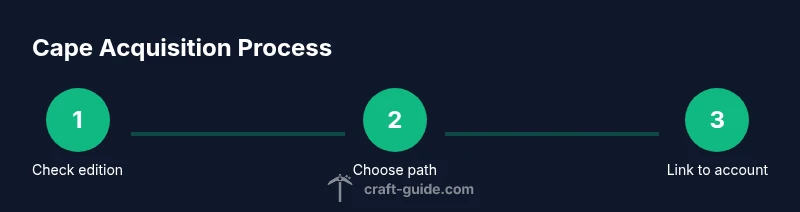
Check edition and eligibility
Confirm you are playing Minecraft Java Edition and review eligibility rules for official capes or OptiFine donor capes. This ensures you pursue a path that is supported by the game’s terms of service and community guidelines.
Tip: Verify edition compatibility and read the official terms before proceeding. - 2
Choose your cape path
Decide between an official Mojang event path and the OptiFine donor cape path. Each has different requirements, timelines, and verification steps. Pick the route that aligns with your goals and resources.
Tip: If you want faster results, OptiFine is often the quicker option; if you value official status, wait for a Mojang event. - 3
Set up OptiFine (if choosing OptiFine path)
Install OptiFine from the official site and confirm your Minecraft version is compatible. This step prepares your client for cape integration if you opt for a donor cape.
Tip: Keep a backup copy of your game before installing new mods or launchers. - 4
Claim cape code or donation
Complete the donation or purchase required for the cape, then obtain your cape code or confirmation. Secure this information and note any eligible linking steps.
Tip: Retain a digital copy of the donation receipt and cape code in a password-protected location. - 5
Link cape to your account
Use the official cape portal (OptiFine or Mojang) to link the cape to your Minecraft account. Follow the on-screen prompts precisely to avoid misattribution.
Tip: Do this on a trusted device and ensure you are logging into the correct account. - 6
Verify in-game and troubleshoot
Launch Minecraft, select your profile, and confirm that the cape appears. If it does not, recheck the linking steps, ensure you are on the right version, and consult official support if needed.
Tip: If the cape isn’t showing, clearing cache or relaunching the game can help, but avoid repeated failures—seek support if necessary.
People Also Ask
Are Minecraft capes free?
Official capes are not freely distributed to all players. They are typically tied to events or promotions. OptiFine capes require a donation or purchase and linking to your account.
Official capes aren’t free; you usually need to participate in an event or donate for an OptiFine cape.
Can I get a cape on Bedrock Edition?
Capes are generally not supported on Bedrock Edition; they’re primarily a Java Edition feature.
Capes are mainly for Java Edition and aren’t widely supported in Bedrock.
Is a cape from third-party mods allowed?
Most third-party cape mods or sites violate Mojang’s terms and can compromise account security. Always use official channels.
Third-party capes can violate rules—stick to official channels.
What happened to MineCon capes?
MineCon capes were distributed during specific events in the past. They aren’t guaranteed and depend on official event programs.
MineCon capes were event-based and not guaranteed.
Will a cape appear if I switch accounts?
Cape ownership is tied to the specific Mojang/Microsoft account; transfers between accounts aren’t supported.
Capes stay with the account you earned them on; you can’t transfer.
How can I tell if a cape is visible in-game?
Cape visibility depends on your edition, settings, and the cape provider. Check in the main menu and then in-game to confirm.
Open your profile and check in-game to confirm the cape shows up.
The Essentials
- Cape options are limited and primarily official or donor-based.
- OptiFine is the most common legitimate donor route for capes.
- Avoid scams by sticking to verified sources and official portals.
- Bedrock Edition generally does not support capes.
- There are safe personalization alternatives if obtaining a cape is impractical.