Minecraft Seed Search: Find Perfect Worlds for Builds
Discover practical Minecraft seed search strategies to find worlds with ideal biomes, structures, and terrain for builders and explorers. Step-by-step guidance from Craft Guide.


Seed search helps you identify Minecraft seeds that yield terrain and biome layouts aligned with your playstyle, whether you’re building grand bases or exploring rich cave systems. This guide shows practical steps, trusted resources, and testing workflows to compare seeds quickly. By following the process, you’ll save time and unlock worlds that support your early-game and long-term goals.
Understanding Minecraft seeds and seed search
A seed in Minecraft is the starting point that the game uses to generate a world. Seed search is the practice of evaluating and selecting seeds that yield terrain, biomes, and structures aligned with your goals—whether that's cozy plains, sprawling caves, or stable river valleys. According to Craft Guide, most players benefit from thinking of seeds as a recipe: the numbers matter, but how you interpret the resulting world matters more. Start by clarifying what you want: do you prefer diverse biomes near spawn, large oceans, or abundant villages? This clarity helps you filter seeds quickly rather than scrolling aimlessly. Quick tests with small test worlds can reveal whether a seed meets your criteria, saving time in longer survival play. Remember that patch changes and edition differences can alter seed outcomes, so focus on seeds that suit your specific version and playstyle. This section lays the groundwork for purposeful seed searching, not random seed hunting.
How seed search shapes your gameplay goals
Seed search isn't just about finding a pretty map; it's about aligning terrain with your objectives. A builder may want flat plains and accessible mountains for bases, while a scavenger might seek cavern-rich landscapes with abundant surface loot. Craft Guide analysis shows that seeds emphasizing biome variety near spawn often lead to richer early exploration and faster resource collection. Your goals determine your evaluation metrics: spawn safety, biomes in proximity, access to structures like temples or villages, and terrain variety. Use a scoring rubric to compare seeds against your priorities, and keep notes on what each seed offers. This approach keeps seed searching deliberate and repeatable, rather than a one-off luck-based sprint. In short, seed choice sets a foundation for survival, creativity, and long-term projects.
Biome distribution, structures, and seed features to prioritize
Biome distribution near spawn affects survival strategy and building options. Favor seeds with a mix of forests for timber, plains for building space, and water bodies for irrigation or transport. Structures such as temples, villages, and strongholds can dramatically influence early game. Seed features like cave networks, ravines, and surface lava pools save time on resource collection. If you aim for a compact, adventure-friendly world, prioritize seeds with accessible strongholds or ancient cities within reasonable travel distance. Always verify that your preferred features aren't just theoretical, but visible within a few hundred blocks of spawn in a test world. Craft Guide's experience shows that little design details—like river meanders and hill clusters—often make the difference between a world that feels lively and one that grows stale quickly.
Seed databases and testing seeds efficiently
Seed databases are starting points; they aggregate candidate seeds and summarize notable terrain traits. When you test seeds, use a controlled environment to minimize variation, then compare the outcomes against your criteria. Build a small testing world with consistent generation settings to verify features such as biome proximity, dungeon spawns, and river networks. This practice reduces the risk of investing time into seeds that won’t meet your needs. Document each seed with a concise score and screenshots, so you can revisit later if your goals shift. Craft Guide recommends rotating through several seeds to benchmark performance across versions and patches, ensuring your chosen seed remains viable over time.
Practical seed search workflow: from concept to world
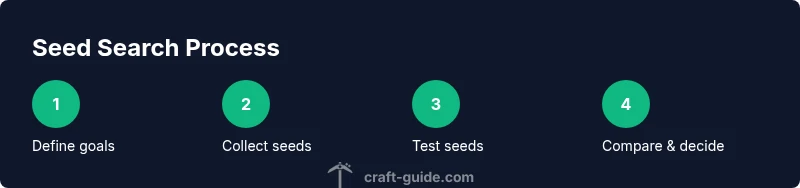
Begin with a clear concept, then gather several candidate seeds that match your concept. Load each seed into a testing world to observe spawn location, biome mix, and nearby structures. Note differences between Java and Bedrock editions and adjust your seed pool accordingly. Run light exploration tests for a few in-game days to gauge resource availability and risk factors. After testing, compare seeds using a simple rubric, select the strongest contender, and archive supporting notes. By following a repeatable workflow, seed search becomes a repeatable skill rather than a one-off guess.
Common pitfalls and how to avoid them
Avoid seeds based solely on eye-catching terrain; verify practical playability by testing spawn safety and immediate access to resources. Don’t assume a seed that looks great on a map will perform well in survival mode. Beware edition-specific differences; a seed that shines in Java may behave differently in Bedrock. Keep a seed log with version numbers, test results, and decision rationales to prevent forgetting why you chose one seed over another. Finally, be mindful of updates and world generation changes; seeds can lose value after patches, so re-test seeds after major releases. The Craft Guide team emphasizes iterative testing and documentation to build confidence in your seed choices.
Advanced seed evaluation techniques
Beyond basic checks, use biome heat maps and coordinate scouting to map out long-term projects. Generate several test worlds with varied seed ranges to inspect structural layout and resource distribution over larger regions. Compare seeds not just by spawn, but by mid-game and late-game terrain access, such as nether hubs and strongholds. Use save-science style logging: record spawn coordinates, biome types, and notable landmarks for each seed. This deeper analysis helps you pick seeds that scale with your ambitions and play sessions.
Seed sharing and community resources
Community seed sharing can accelerate your search, but approach it critically. Look for seeds that match your stated goals and verify features in your own test worlds. Share your findings with notes and screenshots to contribute to the Craft Guide community and help others learn from your process. When you borrow seeds from others, confirm the edition compatibility and version alignment to avoid misleading results. The Craft Guide team encourages you to experiment, document, and build upon community knowledge to refine your seed-search skills.
Tools & Materials
- Minecraft edition (Java or Bedrock)(Test seeds in the edition you play most.)
- Seed databases or seed catalogs(Use reputable sources and verify features in-game.)
- Test world or dedicated seed testing world(Keep generation settings consistent.)
- Notebook or digital log/spreadsheet(Record seed IDs, coordinates, and observed features.)
- Coordinate maps or biomes reference(Helpful for quick verification of terrain patterns.)
- Version tracking sheet(Note edition and patch when seeds were tested.)
Steps
Estimated time: 20-35 minutes
- 1
Define seed goals
Articulate what you want from a seed: biome mix, spawn safety, access to structures, and resource variety. Write these goals down to guide your seed search.
Tip: A clear goal saves time by narrowing the seed pool. - 2
Gather candidate seeds
Collect several seeds from databases that match your goals. Record the seed numbers and any noteworthy terrain notes.
Tip: Keep 4-6 seeds per goal to compare effectively. - 3
Test seeds in a controlled world
Load each seed in a testing world with identical settings to verify spawn and nearby features. Observe biome proximity and structures within a reasonable radius.
Tip: Use a small world for quick validation before full testing. - 4
Evaluate and compare
Score seeds against your rubric (spawn safety, resource access, biome variety). Create side-by-side notes for easy comparison.
Tip: A simple rubric keeps comparisons objective. - 5
Deep-dive on top candidates
Do more extended testing on the leading seeds, including longer exploration and minor builds. Confirm durability across small version differences.
Tip: Test across patches when possible. - 6
Finalize and document
Choose the best seed, save the seed ID, and store supporting observations. Start your project with confidence and reference the seed log later.
Tip: Document why this seed fits your long-term goals.
People Also Ask
What is a Minecraft seed?
A seed is a number used by the world generator to create terrain, biomes, and structures. Different seeds produce different worlds, so seed search helps you find layouts that fit your goals.
A seed is a number that starts the world generator. Different seeds create different worlds with unique biomes and structures, so seed search helps you pick the best fit for your goals.
How do I evaluate a seed's biome distribution?
Look at the spawn and nearby biomes, noting how far you must travel for variety. Prioritize seeds with diverse biomes in reach and check for essential resources near spawn.
Check the initial biomes near spawn and how quickly you can reach different biomes. Diversity near the start helps early-game options.
Are seeds different between editions?
Yes. Seeds can behave differently between Java, Bedrock, and console editions. Always test seeds in your version to confirm terrain and structure outcomes.
Seeds can act differently depending on the edition, so test the seed in your version to verify the world.
How long does seed testing take?
Time varies with goals, but start with quick tests in a small world to verify core features, then expand testing on top candidates.
Seed testing can be quick for basic checks, but deeper testing takes more time. Start small, then expand.
Can I rely on seed databases?
Seed databases are helpful starting points, but always verify by testing in your version. Don’t assume a seed will perform exactly the same for everyone.
Seed databases help, but verify seeds in your version before relying on them.
What coordinates should I look for whenSeed searching?
Look for spawn points that place you near desired biomes and structures. Note the distance to important landmarks and keep a map of seed coordinates for quick reference.
Identify where your seed spawns you relative to key biomes and landmarks, and log those coordinates.
Watch Video
The Essentials
- Define seed criteria before starting.
- Test seeds in your specific version.
- Log results for easy comparison.
- Balance aesthetics with practical playability.