Which Minecraft to Buy in 2026: Java, Bedrock, or Education Edition
A rigorous, objective comparison of Minecraft editions—Java, Bedrock, and Education—to help you decide which to buy, with platform, performance, and content considerations.


TL;DR: If you want the widest modding and server customization, Java Edition is usually the best fit. Bedrock Edition excels in cross‑platform play and smoother performance on consoles and mobile. Education Edition serves classrooms with licensed content and structured lessons. For a single purchase with broad flexibility, start with Java Edition, then consider Bedrock for cross‑play on multiple devices.
Why choosing the right Minecraft edition matters
The question "which minecraft to buy" is not merely about platform preference; it determines mod support, server options, cross‑play capabilities, and access to marketplace content. According to Craft Guide, your choice should be guided by how you game with friends, what devices you own, and whether you value customization over convenience. In this guide, we compare Java Edition, Bedrock Edition, and Education Edition to help you pick the edition that aligns with your playstyle and hardware.
Editions at a glance: Java Edition, Bedrock Edition, Education Edition
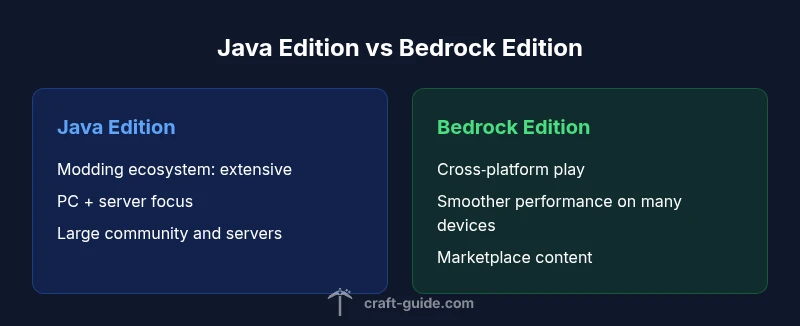
Java Edition is the native PC experience with deep modding support, vast community servers, and frequent world‑gen updates. Bedrock Edition brings cross‑platform play across Windows, consoles, and mobile, with a unified marketplace and optimized performance on many devices. Education Edition adds classroom‑oriented features, lesson content, and licensing controls designed for schools. Each edition has distinct strengths, and the best buy depends on your goals: modding and servers vs. cross‑device play vs. classroom use.
Platform and cross‑play realities
Cross‑play is a central differentiator. Bedrock Edition enables players on Windows 10/11, Xbox, PlayStation, Nintendo Switch, iOS, and Android to join the same worlds, connectors, and marketplace content. Java Edition, by contrast, remains a highly modded, PC‑centric ecosystem with rich server networks but limited cross‑edition play. For families or groups spanning laptops, consoles, and phones, Bedrock offers the strongest real‑world cross‑play benefits; Java shines for players chasing mods, custom maps, and large Java‑native servers.
Modding, performance, and hardware considerations
Modding is where Java Edition truly shines. The vast ecosystem of mods, launchers, and resource packs lets you tailor almost every aspect of the experience. Bedrock Edition is more controlled, with add‑ons and official content from the Marketplace, but it does offer smoother performance on lower‑spec devices and predictable updates across platforms. If you own a modest PC or prefer console play, consider Bedrock for stable frame rates; if you crave unrestricted customization and servers, prioritize Java.
Content ecosystems: marketplace, mods, maps
Java Edition centers on community mods, curated maps, and player‑generated worlds. Bedrock Edition relies on the official Marketplace for skins, texture packs, and add‑ons, with a monetized content model that keeps a reliable release cadence. Education Edition emphasizes curriculum packs and teacher tools, with content aligned to learning objectives. Your preference for creative worlds versus learning‑oriented materials will influence which marketplace or content ecosystem matters most to you.
Purchasing and ownership: price ranges and licenses
Prices vary by platform and edition, and sales are common. In general, you should expect a mid‑range price for standard editions, with Bedrock occasionally bundled with platform bundles or devices, and Education Edition licensed to schools or organizations. Since pricing can shift with bundles, regional restrictions, and promotions, treat cost as a factor to weigh against features rather than a sole driver of the decision.
Choosing for different playstyles: survival, creative, servers
If you live for mega‑builds, complex redstone, and massive public servers, Java Edition is typically the better pick thanks to its expansive modding and server options. If you want reliable cross‑play with friends on consoles or mobile, Bedrock Edition is usually the practical choice. For classroom guidance, collaborative projects, and teacher‑led activities, Education Edition offers built‑in lesson plans and licensing controls that map to curricula.
How to verify compatibility with devices and friends
Before buying, list all devices you own and confirm which edition they support. Check whether your friends are on Bedrock or Java, and whether you need to join a server that requires a specific edition. For schools or clubs, verify licensing requirements for Education Edition and ensure you have the correct management tools in place. A quick device and group check can save you from later rebuys or awkward cross‑play issues.
Common misconceptions and myths debunked
A prevalent myth is that Bedrock equals better performance on every device; while Bedrock can run well on many platforms, Java can perform very well on capable hardware and, with the right optimizations, may beat Bedrock in some scenarios. Another myth is that you must choose one edition for all time; in practice, many players own multiple editions for different playgroups, though that involves separate purchases. The truth is: choose the edition that best matches your primary use case, and consider how often you’ll need cross‑play and mods.
Making the final call: a decision framework
Adopt a structured decision framework: (1) define your primary use case (mods and servers vs cross‑play vs education); (2) list devices you own; (3) assess the importance of content ecosystems (Marketplace vs community‑driven mods); (4) check licensing requirements for Education Edition if applicable; (5) review your budget and potential future needs. This framework keeps the process objective and repeatable.
Advanced steps: hosting, switching editions, and managing accounts
If you plan to host servers, consider the edition’s server options and community support. Switching from Java to Bedrock or vice versa is not a direct upgrade—the worlds, worlds seeds, and data do not transfer across editions; you’ll typically start fresh and migrate content via backups or external moves. Always back up worlds before any edition switch, and ensure you have the necessary accounts (Mojang for Java, Microsoft account for Bedrock) ready to go.
Feature Comparison
| Feature | Java Edition | Bedrock Edition | Education Edition |
|---|---|---|---|
| Cross-Play | Limited to no cross‑play with other editions; mainly PC multiplayer and Java servers | Excellent cross‑play across Windows, consoles, and mobile on a common Bedrock framework | No cross‑play with Java; classroom licensing and controlled access |
| Modding/Customization | Vast modding ecosystem; launcher options; deep customization | Moderate customization via add‑ons and Marketplace content; fewer mods | Minimal/moderated content focused on teaching tools; no traditional mods |
| Content Ecosystem | Community maps, mods, and tutorials; user‑generated content | Official Marketplace with skins, texture packs, and add‑ons; curated content | Educational packs and teacher resources; licensing‑based content |
| Performance/ hardware | Performance varies with mods; can demand strong hardware for large mod packs | Generally optimized; good performance on mid‑range hardware | License restrictions; hardware impact secondary to licensing |
| Platform Availability | Windows, macOS, Linux (multi‑OS for PC); no console support | Windows 10/11, Xbox, PlayStation, Switch, iOS, Android | Windows 10/11 with Education Edition licensing; limited to school ecosystems |
| Best For | Modders, server admins, players who love custom maps | Families and players seeking cross‑device play and solid performance | Schools and clubs needing curriculum aligned content |
Benefits
- Strong modding and community support for Java Edition
- Cross‑platform play and consistent updates on Bedrock Edition
- Content marketplace provides curated add‑ons for Bedrock
- Education Edition offers classroom‑targeted resources and licensing
Negatives
- Java Edition does not natively support cross‑play with Bedrock
- Education Edition licenses are institution‑specific and not purchase‑as‑a‑consumer
- Bedrock content is monetized via the Marketplace, which may add costs
- Switching between editions requires separate purchases and world migrations
Java Edition for modders and servers; Bedrock for cross‑play and performance; Education Edition for schools
Choose Java if mods and large communities matter most. Pick Bedrock for broad device support and cross‑play. Education Edition is best when formal curricula and school licensing are needed.
People Also Ask
If I have friends on console, which edition should I buy?
Bedrock Edition supports cross‑play across Windows, consoles, and mobile, making it the practical choice for mixed groups. If your friends primarily use consoles, Bedrock will provide the easiest shared experience.
Bedrock Edition is the go‑to for playing with friends on different devices like consoles and phones.
Can I mod Bedrock like Java?
Bedrock does not support traditional Java mods. It uses add‑ons and content from the Marketplace. This offers reliability and cross‑platform features but with a narrower modding landscape.
Bedrock lacks Java‑style mods; you’ll use add‑ons from the Marketplace instead.
Is Education Edition suitable for homeschooling?
Education Edition is designed for classrooms with teacher tools and licensed content. It’s not typically sold to consumers and relies on school licensing, though some homeschool groups use it under specific programs.
Education Edition is built for schools, not typical home use, but some homeschool setups may explore licensing options.
Can I switch editions without losing worlds?
Switching editions usually means separate purchases and separate worlds. Worlds are not transferable between Java and Bedrock, so plan migrations and backups carefully.
Beware: you can’t transfer worlds between Java and Bedrock; back up and plan a fresh start if you switch.
Do I need a Microsoft/Mojang account for all editions?
Java Edition uses a Mojang account, while Bedrock Edition relies on a Microsoft account. Planning access across devices requires managing both account ecosystems if you use both editions.
Yes—Minecraft on Bedrock uses Microsoft accounts, while Java uses Mojang accounts.
Are there parental controls or safety features by edition?
Bedrock and Education include account and content controls, with marketplace restrictions and school licensing considerations. Java relies on platform controls and community moderation in servers.
Bedrock and Education offer built‑in controls; Java relies on server and platform moderation.
The Essentials
- Prioritize Java for customization and community servers
- Choose Bedrock for cross‑device play and smoother performance
- Education Edition suits classrooms with licensing and curricula
- Back up worlds before any edition switch
- Check device compatibility and friend editions before buying