Where Is Minecraft Streaming? Platforms, Tips, and Discovery
Explore where Minecraft streams happen across platforms like Twitch and YouTube Live, plus regional factors, discoverability tips, and setup basics for creators aiming to grow their audience.


Where is Minecraft streaming? The answer depends on platform and region. The majority of live Minecraft content happens on Twitch and YouTube Live, with growing activity on Facebook Gaming and platform-specific apps. A stream’s location—geographic origin, language, and viewer regions—directly affects latency, discovery, moderation needs, and monetization opportunities. Plan ahead by testing cross-region viewing and tuning titles for local audiences.
Understanding where Minecraft streaming happens
According to Craft Guide, the landscape of Minecraft streaming isn’t restricted to a single site. The dominant hubs are Twitch and YouTube Live, favored for their robust chat ecosystems and discoverability features. However, audience demand has spurred activity on Facebook Gaming and various platform-specific streaming apps, especially among niche communities and regional audiences. The important takeaway is that where you stream matters less than how you tailor content for that platform and region. Audience habits vary by language, time zones, and local internet infrastructure, so your choice should align with your target viewers and your content style.
Popular platforms and why creators choose them
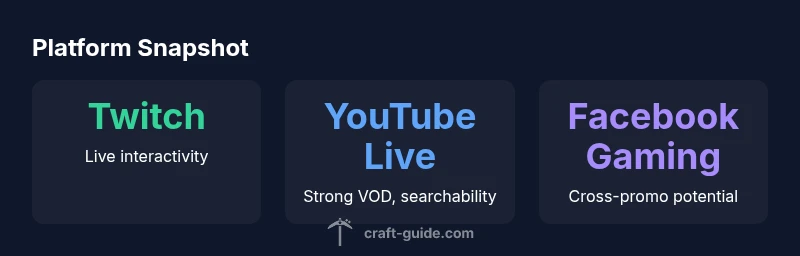
Twitch remains the go-to for real-time interaction. The live chat experience, emote culture, and integration with streaming tools make it ideal for long-form Minecraft builds, survival challenges, and modded playthroughs. YouTube Live offers powerful VOD reuse, searchable content, and robust archival features, which is helpful for viewers who discover streams after the event or binge-series playthroughs. Facebook Gaming provides easy cross-promotion with existing social circles and groups, though its Minecraft audience is smaller than Twitch or YouTube. When deciding where to stream, consider your goals: immediate live engagement vs. long-tail discovery and monetization.
Regional considerations and latency
Geography heavily influences streaming success. Latency between streamer and viewer affects gameplay transparency, responsive chat, and what you can realistically do in-game without lag. Regions with strong CDN coverage tend to deliver smoother streams and faster chat updates. If your audience is global, you might adopt a multi-platform strategy or schedule at peak times for key regions. Language alignment also helps: streaming in your native language might grow a loyal core audience, while bilingual streams can expand reach but require careful moderation and content planning.
Content strategy for Minecraft streams
Your content strategy should reflect both the platform and audience expectations. On Twitch, you can lean into live collaboration, viewer-driven challenges, and community events that benefit from real-time feedback. YouTube Live rewards consistent VOD moments that viewers can revisit—consider defining a publish cadence for highlight reels and tutorials. Across platforms, consistency, clear titles, descriptive tags, and time stamps in descriptions boost discoverability. Cross-promotion is essential: tease upcoming streams on social media, share clips in relevant Minecraft communities, and collaborate with other creators to expand your reach.
Setup basics for a new streamer
Starting strong doesn’t require top-tier gear, but a reliable setup helps. A mid-range PC or console with a solid capture card, a decent microphone, and a 1080p stream at 60fps is a common baseline. Ensure your internet connection has enough upload bandwidth to support stable streaming, ideally 6–12 Mbps for 1080p60. Use scenes and sources effectively: a clean overlay, a dedicated Minecraft world scene, and a chat activity panel. Don’t overlook audio balance—muted in-game sound with a clear commentary track is easier to follow, and consider adding subtitles or captions for accessibility.
Monetization and moderation realities
Monetization depends on platform policies, audience size, and engagement quality. Twitch subscriptions and Bits, YouTube memberships, and brand sponsorships are common revenue streams for Minecraft streamers. Moderation is a constant task; establish a clear chat policy, consider auto-moderation tools, and appoint trusted moderators early. Accessibility and inclusivity also boost retention. Crafting a welcoming community takes time, but steady growth comes from consistent content, responsive communication, and authentic engagement.
Cross-platform growth: co-streaming and collaboration
Co-streaming and collaborations can accelerate growth by exposing your content to another creator’s audience. Plan co-streams with creators who share a similar style or audience, prepare joint challenges, and coordinate on streaming times to maximize cross-promotion. Always verify each platform’s collaboration rules and ensure fair representation of content ownership and revenue sharing. This approach can help you test new formats, such as build battles or cooperative adventures, while maintaining your core identity.
How to measure success and adjust
Analytics will shape what you do next. Track viewership trends over time, engagement metrics like chat activity per minute, and retention rates for your most-watched streams. Experiment with titles, thumbnails, and tags, then compare results using a consistent baseline. Use community feedback to adjust schedule, content mix, and collaboration plans. Remember, growth often comes from incremental improvements rather than a single viral hit, so maintain a steady cadence and continuously refine your approach.
analysisNote3__deprecated_forced_keep
Minecraft streaming platform comparison
| Platform | Strengths | Limitations |
|---|---|---|
| Twitch | Live interactivity, large creator ecosystem | Discovery can be crowded; monetization paths vary by region |
| YouTube Live | Strong VOD potential and search discoverability | Monetization rules and live-chat moderation can be complex |
| Facebook Gaming | Cross-promotion with Facebook audiences | Minecraft-specific reach is smaller compared to Twitch/YouTube |
People Also Ask
Which platform is best for Minecraft streaming for beginners?
There isn’t a single best platform. Beginners should start on the platform that matches their audience and content style. If you value immediate chat interaction, Twitch is a strong start; if you want strong VOD discoverability, YouTube Live is advantageous. Consider a plan to test both over a few weeks and compare growth.
There isn’t a single best platform. Start with the one that matches your audience and content, then test others.
How does streaming location affect viewer reach?
Streaming location affects latency, language alignment, and regional discovery. Choosing a regional focus, or streaming at times that match key regions, can improve chat responsiveness and audience growth. Global audiences are possible, but require strategic scheduling and moderation.
Location affects latency and reach; plan around key regions and time zones to grow your audience.
Do I need a VPN to stream from restricted regions?
VPN use for streaming isn’t typically required or recommended. Most platforms restrict content or impose regional rules, but streaming over a VPN can introduce latency and policy violations. Always follow platform terms and regional laws. If you’re unsure, consult official platform guidelines.
VPNs are usually unnecessary and can cause issues; follow platform rules and regional laws.
What equipment do I need to start Minecraft streaming?
A basic setup includes a computer or console capable of running Minecraft and streaming software, a decent microphone, a webcam (optional), and a stable internet connection. Start with 1080p at 60fps if possible and scale up as your audience grows. Focus on clear audio and stable performance.
A good mic and reliable internet are more important than fancy gear at first.
How can I improve discoverability for Minecraft streams?
Use clear, descriptive titles; relevant tags; and consistent streaming times. Create appealing thumbnails and consider creating short clips or highlights to post on social media. Engage with your community through chat, polls, and viewer challenges to boost retention and recommendations.
Make your titles clear, use good tags, and post clips to social media to boost discovery.
Is cross-platform streaming worth it for Minecraft content?
Cross-platform streaming can broaden your reach but requires careful coordination. Consider simulating cross-platform events, plan content formats that translate across platforms, and ensure you respect each platform’s monetization and moderation rules. Start with one cross-platform test and measure results before expanding.
Cross-platform can help grow audiences if planned and measured well.
“Streaming Minecraft effectively requires understanding your audience and platform nuances. Consistent schedule and community engagement drive growth.”
The Essentials
- Start with a primary platform aligned to your audience and content style
- Invest in titles, tags, and schedule to improve discovery
- Plan region-aware streaming times to maximize cross-region reach
- Balance live interaction with high-quality VOD content for long-tail discovery
- Collaborate with other creators to reach new audiences