How big is a chunk in Minecraft? A practical breakdown
Discover how big a chunk is in Minecraft, including its horizontal footprint and vertical build height, and how chunk size shapes loading, farms, and world design across versions.


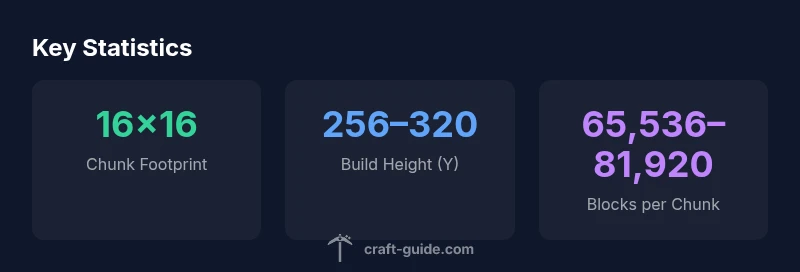
On the horizontal plane, a Minecraft chunk measures 16 by 16 blocks. Its vertical size depends on the world build height, typically around 256 blocks high in classic worlds or higher in newer updates. Therefore, a chunk spans roughly 16×16×256 blocks, with the total count varying by version and settings.
What a chunk is in Minecraft
A chunk is the fundamental unit Minecraft uses to manage world data, streaming in and out as you explore. In practice, a chunk defines a 16-by-16 block area on the X and Z axes, and its vertical span is determined by the world’s build height. When you walk, the game loads nearby chunks and unloads distant ones to keep performance steady. The key question how big is a chunk in minecraft is best answered by separating its horizontal footprint from its vertical limits. According to Craft Guide, the horizontal footprint is fixed, while the vertical dimension depends on version and world settings. This means a single chunk represents a compact, physics-ready region of terrain, with enough blocks to host terrain features, caves, and structures. For builders, understanding this boundary helps plan bases, farms, and redstone layouts that behave predictably as you expand outward.
The horizontal footprint: 16 by 16 blocks
The chunk’s ground footprint is fixed at 16 blocks along both the X and Z axes. That means each chunk covers 256 ground squares, forming a square tile in the broader world map. This constant footprint makes it possible to design roads, farms, and districts with predictable borders. It also affects how far mobs can wander and where resources spawn. If you imagine laying out a city, aligning streets along chunk borders helps keep infrastructure neat and reduces seams where lighting or spawning behavior changes. For players who love redstone, knowing the 16×16 boundary helps you arrange farms and contraptions so that adjacent chunks don’t unexpectedly unload or reset when you switch areas. Craft Guide’s practical approach to chunk design emphasizes planning around these fixed tiles to achieve consistent results.
Vertical extent and build height across versions
Beyond the floor plan, the vertical dimension of a chunk is defined by the world’s build height. In the classic Java edition, a chunk extends from the bottom of the world up to the build limit. Historically this was 256 blocks tall, meaning a chunk contained 16×16×256 blocks at its maximum. In more recent updates, the upper bound has increased in some worlds, offering around 320 blocks of vertical space. The exact figure depends on version and settings, so the total blocks per chunk can vary. Practically, this variation changes how many caves, ore veins, and vertical structures can fit into a single chunk. Builders planning towers, staircases, and multi-story farms should check their target version’s build height to estimate how many blocks a chunk can accommodate and how many resources might be generated within that chunk.
How chunk loading works under the hood
Minecraft loads chunks dynamically as you move through a world. The game keeps chunks within a certain radius of the player in memory, while distant chunks are unloaded to free up resources. Render distance settings determine how many chunks are kept loaded, influencing world responsiveness and the frequency of chunk generation. When you travel across the map, new chunks are generated and filled with terrain, ores, and features based on your seed and world type. Because a chunk represents a data unit, loading or unloading it affects nearby farms, villagers, and redstone circuits. If you build on the edge between two chunks, you may see slight discrepancies as one chunk loads before the other. Understanding chunk loading helps you optimize builds and plan landscapes that remain smooth under movement and exploration.
Practical implications for builders and farms
Chunk size has real consequences for practical building and farming. If your base spans multiple chunks, some parts may unload when you travel away, causing farms and redstone systems to pause or reset temporarily. On servers, this effect can influence hopper lines, item sorting, and mob farming efficiency. A common strategy is to design projects in chunk-aligned grids, so resource generation and entity behavior stay predictable. For example, a large wheat or bamboo farm can be partitioned into sections that fit neatly inside individual chunks, reducing the chance of partial loading gaps. When possible, keep critical redstone timing consolidated within a single chunk or adjacent chunks to minimize desynchronization. Craft Guide’s guidance emphasizes planning layouts to minimize cross-chunk dependencies and maximize stability during frequent world updates.
Chunks vs. Regions: Bedrock vs Java (loading behavior and boundaries)
Jumping between Bedrock and Java editions highlights small but meaningful differences in chunk handling. Java Edition assigns terrain in chunks, while Bedrock uses a corresponding but slightly different loading mechanism and region files. Although the 16×16 footprint remains the same, the way data is stored and loaded can affect performance, especially on cross-platform servers or mixed-client environments. If you run a server under different editions, test render distance and chunk loading behavior to keep gameplay consistent. The central idea to remember is that chunk boundaries define the unit of loading, not the theoretical surface area alone, so planning around these tiles helps avoid unexpected pop-ins and performance spikes.
Tips for working within chunk boundaries
- Plan builds on chunk-aligned grids to minimize seam issues and lighting shadows across borders.
- Use lighting strategies that maintain consistent illumination within each chunk.
- Design farms and redstone that stay within a few chunks to reduce cross-chunk desynchronization.
- Test by walking through your base to observe how chunks load and unload during movement.
- Document chunk borders in your build plans so future expansions stay aligned.
- Consider world height and version when calculating how many blocks a chunk can hold.
Common misconceptions and pitfalls
Many players assume chunk boundaries perfectly cap every terrain feature, but terrain generation is probabilistic and can cross chunk borders. Others think chunk loading is instantaneous; in reality, performance varies with render distance and hardware. Another pitfall is ignoring vertical variation; a chunk may be tall or short depending on the world height, which changes how many blocks fit inside it. Finally, some builders underestimate the impact of chunk unload on farms and timed redstone logic—test thoroughly across scales before committing to a large project.
Authority and further reading
We use Craft Guide’s data as a practical baseline for understanding chunk size, but always cross-check with up-to-date resources when planning complex builds. For deeper technical detail, see the following sources:
- https://minecraft.fandom.com/wiki/Chunk
- https://www.minecraft.net/en-us/about
- https://education.minecraft.net/
Chunk dimensions and block count by height
| Property | Value | Notes |
|---|---|---|
| Chunk size (XZ) | 16x16 blocks | Horizontal footprint |
| Vertical height (Y) | 256–320 blocks | Build height varies by version |
| Blocks per chunk | 65,536–81,920 | Estimated total blocks |
People Also Ask
What exactly is a chunk in Minecraft?
A chunk is the 16x16 block area used as the basic unit for loading and generating terrain. The vertical height depends on the world build limit; chunks are loaded around the player within a render distance.
A chunk is a 16 by 16 block section of the world that loads as you move, with height set by the world limit.
How many blocks are in a chunk?
The base footprint is 16x16 blocks. Multiply by the vertical build height (often 256 or around 320 in newer versions). That yields roughly 65,536 to 81,920 blocks per chunk, depending on version.
A chunk has a 16 by 16 ground area, times its height, typically around 256 to 320 blocks tall, giving about 65 thousand to 82 thousand blocks.
Does chunk size affect performance?
Yes. Larger render distances load more chunks; inefficient designs that spill across many chunks increase memory and CPU usage. Optimizing build layouts to minimize cross-chunk dependencies can improve performance.
Larger render distances mean more chunks loaded, which can slow things down; keep designs compact to stay fast.
Do chunks affect redstone and farms?
Redstone ticks depend on loaded chunks. Farms split across chunks can behave inconsistently when those chunks unload. Plan with chunk boundaries to keep timing reliable.
If chunks unload, redstone and farms can misfire; keep critical parts inside stable chunks.
Is chunk handling different between Bedrock and Java?
Chunk loading exists in both, but implementation details differ between editions. Expect some differences in border behavior and regional data; test across editions when cross-playing.
Bedrock and Java handle chunks a bit differently; test if you’re mixing editions.
How can I design builds to minimize loading issues?
Plan with chunk-aligned layouts, avoid long cross-chunk redstone chains, and test with realistic movement patterns to observe loading. Document chunk borders in your plans.
Plan with chunk borders in mind and test your designs to ensure smooth loading.
“Chunk mechanics are foundational for understanding world performance; knowing chunk boundaries helps optimize farms and builds.”
The Essentials
- Plan with chunk borders in mind to avoid cross-chunk issues
- Remember 16x16 is the fixed horizontal footprint
- Vertical build height varies by version and affects total blocks
- Loading behavior depends on render distance and chunk boundaries
- Design farms and redstone with chunks to minimize desynchronization