How to Legitimately Get Minecoins: Safe, Official Ways
A comprehensive, step-by-step guide to obtaining Minecoins through official channels, with scam awareness and practical tips for Minecraft players seeking legitimate options.


This guide explains legitimate, safe methods to obtain Minecoins for Minecraft and how to avoid scams that promise free Minecoins. You’ll learn official purchasing options, gift card redemption, and prudent account-protection practices. By sticking to official channels, you access Minecoins while staying within Mojang’s terms and protecting your account from phishing and fraud.
Understanding the phrase: what 'free minecoins' means
Minecoins are the currency you use to purchase skins, texture packs, and DLC in the Minecraft Marketplace. The lure of free minecoins pops up frequently in ads, social posts, and suspicious websites. The reality is simple: Mojang assigns Minecoins to your Microsoft account, and they are not shipped for free by third parties. If a source asks you to download software, reveal credentials, or enter a code from an unknown site, you should stop and reassess. This block is about teaching you to recognise legitimate routes and to avoid scams that prey on enthusiastic players.
According to Craft Guide analysis, most scams that promise free Minecoins rely on phishing pages, fake “gift card” sites, or social engineering. Scammers want your credentials, your purchase history, and sometimes even your session token. They may promise generous referral bonuses or “exclusive” codes, but those promises rarely hold up. A safe rule of thumb is: never enter your Microsoft account password on a site you don’t trust, never share codes received by email with unknown senders, and always verify the source through official channels.
In short, while it is possible to obtain Minecoins through official channels, there is no legitimate shortcut that bypasses those routes. Being skeptical and checking official sources saves you time, money, and frustration.
Official ways to obtain Minecoins
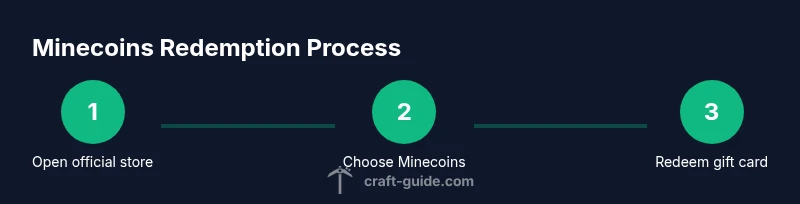
Minecoins are sold through official channels tied to your Microsoft account. The simplest path is to purchase Minecoins directly from the Minecraft Marketplace or the Microsoft Store on your device. Gift cards from authorized retailers can also be redeemed to add Minecoins to your account, provided you are using a supported platform and region. Promotions occasionally offer bundles or bonus Minecoins from official partners, but these are communicated through Mojang or Microsoft’s official channels and never require dubious websites. To start, open Minecraft, go to the Store or Marketplace, select the Minecoins option, and choose your amount. Complete the purchase using the platform’s supported payment method, and your Minecoins will appear in your account immediately or within minutes. If you have a gift card, redeem the code in the same place you would redeem other store credits—again, only on official pages. Keep a receipt as proof of purchase. Remember to keep your Microsoft account secure and to disable any third-party access you don’t recognize.
noteClearancesNeededForUsersOnlyNullsOrNullsAllowedK
statefulNoteOldCodeToBeRemoved
Tools & Materials
- Official Minecraft/Microsoft account(Used to access the Marketplace and redeem Minecoins.)
- Internet-enabled device(PC, console, or mobile with Minecraft installed.)
- Gift card from an authorized retailer(Redeem only through official channels to add Minecoins safely.)
- Strong, unique password and 2FA(Protects your account from phishing and unauthorized access.)
- Receipts and purchase confirmations(Keep for proof of purchase and troubleshooting)
Steps
Estimated time: Total time: 15-30 minutes
- 1
Open official sources
Navigate to the official Minecraft Marketplace or Microsoft Store from your device. This ensures you’re accessing legitimate Minecoins options and avoids scams. If you’re unsure, start from the game’s own Store menu and follow the link to the official store.
Tip: Bookmark the official sites to avoid phishing links in the future. - 2
Choose Minecoins option
Select the Minecoins section and pick the amount you want. Official stores present fixed packs or bundles; choose the one that fits your budget.
Tip: Understand the exact amount you’re paying for to avoid surprises at checkout. - 3
Use a trusted payment method
Proceed with a payment method provided by the platform (credit card, PayPal, or store credit). This keeps your transaction secure and traceable.
Tip: Avoid third-party payment services that aren’t officially supported by the store. - 4
Redeem a gift card if available
If you have a Minecoins gift card, enter the code on the official redemption page and confirm. The balance is added to your account instantly or within minutes.
Tip: Double-check the code for mistakes before submitting. - 5
Verify Minecoins in-game
Open Minecraft and confirm that the Minecoins balance shows in your wallet. If not, refresh the game or sign out/in and try again.
Tip: If the balance doesn’t appear, contact official support through the store’s help center. - 6
Secure your account
After adding Minecoins, review account security: enable two-factor authentication and update your password if needed.
Tip: Regularly review connected devices and recent activity for unauthorized access.
People Also Ask
Is there a legitimate way to get free Minecoins?
No official program provides Minecoins for free. Some promotions might offer bonus Minecoins or bundles, but these come through official channels and have clear terms. Always verify through Mojang’s official channels.
There isn’t a legitimate free Minecoins program; look for official bundles or promotions instead.
Can I earn Minecoins by playing Minecraft?
Minecoins are primarily purchased with real money or obtained via official gift cards. Gameplay alone does not grant Minecoins. Look for official promotions that might offer deals as part of events.
Minecoins aren’t earned by playing; check official promotions for deals.
What should I do if I see a site promising free Minecoins?
Do not enter credentials or payment details. Leave the site, report it to official support if possible, and use only official bundles or codes from trusted retailers.
Don’t enter any details—stick to official sources and report suspicious sites.
Are Minecoins safe to redeem if I buy them from the official store?
Yes, as long as you’re using the official Microsoft/Minecraft Store, your Minecoins will be tied to your verified account and protected by platform security.
Yes, official stores are safe when you follow standard security steps.
Do gift cards expire or have usage limits?
Gift cards usually have expiration policies set by the retailer or platform. Check the card’s terms and redeem before any deadline to avoid losing value.
Gift cards may have expiration terms—check the card details and redeem in time.
Watch Video
The Essentials
- Follow official channels for Minecoins purchases
- Avoid offers claiming free Minecoins
- Protect your Microsoft account with 2FA
- Redeem gift cards only on trusted platforms
- Craft Guide urges caution with scams and promotes safe practices