How to Use Name Tags in Minecraft
Learn how to use name tags in Minecraft, from finding name tags to renaming them and attaching them to mobs. This step-by-step guide covers tips, tricks, and common pitfalls for players of all levels.


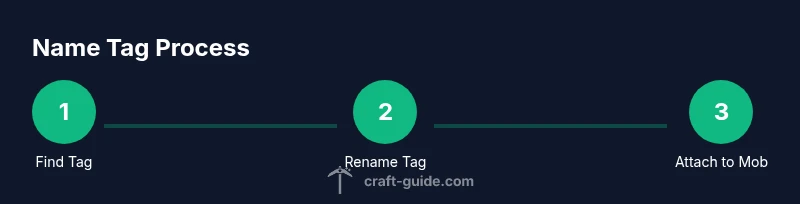
Name tags are renamed on an anvil and then applied to a mob by right-clicking. To do this, gather a name tag, craft or locate an anvil, and ensure you have XP levels to rename and apply. Once renamed, simply right-click the target mob with the tag to attach the name and make it permanent. This quick process saves you from losing track of animals, villagers, and pets.
What is a Name Tag and why it matters in Minecraft
Name tags are rare, durable items that let you attach a permanent name to any mob in the game. Unlike standard labels you craft from items, a name tag preserves its identity when the mob is renamed and will display the name above its head in-game. This simple tool unlocks a surprising degree of personalization and gameplay clarity. Craft Guide's team emphasizes that using name tags well can boost your camp's organization, your villager trading coherence, and your aesthetic builds. In survival mode, a named horse or dog is easier to identify in a crowded battlefield. In creative builds, naming animals helps with storytelling and farm management. The core idea is straightforward: name tags are the most reliable way to attach a lasting label to a creature, while avoiding the risk of accidental renaming by other players or world events.
What is a Name Tag and why it matters in Minecraft
Name tags are rare, durable items that let you attach a permanent name to any mob in the game. Unlike standard labels you craft from items, a name tag preserves its identity when the mob is renamed and will display the name above its head in-game. This simple tool unlocks a surprising degree of personalization and gameplay clarity. Craft Guide's team emphasizes that using name tags well can boost your camp's organization, your villager trading coherence, and your aesthetic builds. In survival mode, a named horse or dog is easier to identify in a crowded battlefield. In creative builds, naming animals helps with storytelling and farm management. The core idea is straightforward: name tags are the most reliable way to attach a lasting label to a creature, while avoiding the risk of accidental renaming by other players or world events.
What is a Name Tag and why it matters in Minecraft
Name tags are rare, durable items that let you attach a permanent name to any mob in the game. Unlike standard labels you craft from items, a name tag preserves its identity when the mob is renamed and will display the name above its head in-game. This simple tool unlocks a surprising degree of personalization and gameplay clarity. Craft Guide's team emphasizes that using name tags well can boost your camp's organization, your villager trading coherence, and your aesthetic builds. In survival mode, a named horse or dog is easier to identify in a crowded battlefield. In creative builds, naming animals helps with storytelling and farm management. The core idea is straightforward: name tags are the most reliable way to attach a lasting label to a creature, while avoiding the risk of accidental renaming by other players or world events.
Tools & Materials
- Name Tag(Essential item you rename and apply to a mob)
- Anvil(Used to rename the name tag (and apply it to the mob))
- XP Levels(Required to rename the tag and complete the transfer)
Steps
Estimated time: Total time: 5-15 minutes, depending on XP access and loot
- 1
Find or craft a name tag
Search dungeons, mineshafts, or shipwrecks for name tag loot, or trade with wandering traders. This item is relatively rare, so plan several expeditions or trades if you want multiple tags.
Tip: Carry extra torches and a sword to clear loot areas safely. - 2
Set up your work area
Place an anvil on a solid surface and gather a few XP levels. You’ll use the anvil to rename the tag before applying it to a mob.
Tip: Keep your anvil accessible to avoid back-and-forth trips; durability matters in long sessions. - 3
Rename the name tag
Open the anvil interface, place the name tag in the left slot, and type your desired name in the text box. The cost in XP will be shown; confirm if you have enough levels to complete the rename.
Tip: Choose a concise, readable name to avoid overflow or truncation. - 4
Prepare the tag for use
Remove the renamed name tag from the anvil and hold it in your hand. This tag is now ready to be attached to a mob.
Tip: If you’re planning multiple renames, consider renaming a copy first to avoid accidental loss. - 5
Apply the name tag to a mob
Right-click (or use the action button) on the intended mob with the renamed name tag in hand. The name will appear above the mob’s head and persist across world sessions.
Tip: Target a mob you can easily access in a safe area to avoid interruptions during combat or farming. - 6
Rename or reuse
If you want to change the name later, rename the tag again (costs XP) and reapply it. You can also create a second tag for a different mob.
Tip: Be mindful of XP costs; repeated renames can be expensive over long play sessions.
People Also Ask
Can I name villagers with a name tag?
Yes. You can name villagers with a name tag; the chosen name will display above the villager's head and can help identify trades and roles.
Yes, you can name villagers with a name tag, and the name will appear above their head.
Do name tags expire or despawn?
Name tags do not expire, but they are consumed when applied. If you rename and apply again, you will need additional name tags and XP.
Name tags don't expire, but you need to rename and apply new tags with XP for changes.
Where can I find name tags in World gen?
Name tags appear in various loot chests and can be traded from wandering traders. They are relatively rare, so expect to encounter them occasionally.
Name tags come from loot chests and wandering traders; they're fairly rare.
Can I rename a name tag multiple times?
Yes, you can rename a name tag multiple times, but each rename requires XP and the final name is what appears on the mob.
You can rename a tag multiple times, costing XP each time.
The Essentials
- Rename before you apply to ensure the name is exactly as desired
- Keep XP levels handy; renaming and applying cost levels
- Use name tags for easy mob identification and storytelling
- Anvils can wear out; plan to minimize renaming steps