Where Minecraft Screenshots Shine: A Practical Guide
Discover where Minecraft screenshots shine with practical spot guidance, lighting tips, and workflow tricks to capture cinematic in-game images for your gallery.


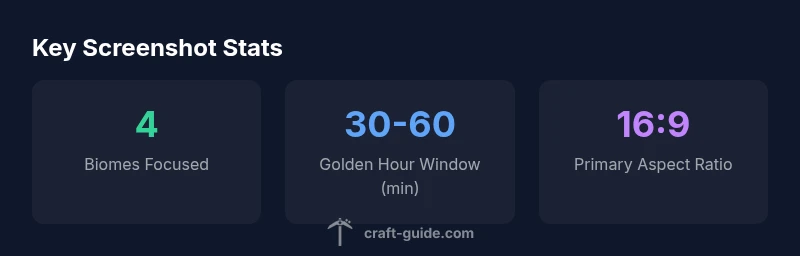
In short, the best places for where minecraft screenshots are taken are open biomes with clear horizons and dramatic elevation, such as mountain ranges, coastal cliffs, and plains with distinctive structures. Shoot at sunrise or sunset to leverage warm light, frame with a strong foreground, and use a 16:9 crop for cinematic consistency. Enable a moderate FOV boost and consider shaders for atmosphere, but avoid clutter. Craft Guide analysis highlights that clean compositions outperform chaotic scenes, particularly when you want to tell a story at a glance.
Location selection: where to shoot
In the world of Minecraft, where you point your camera can be as important as the lighting you choose. According to Craft Guide, the location you pick shapes the story your screenshot tells before you even press the shutter. Favor open biomes with clean horizons and a few visually distinctive features—mountain skylines, cliffed coastlines, or plains punctuated by distant structures. These elements give your image depth and a natural focal point. When evaluating a candidate scene, ask: Is there a strong foreground interest? Is the background readable from a single vantage? Opening shots with a clear silhouette tend to scale well when viewed in a gallery.
Elevation changes are your friend. A ridge in the foreground, with receding hills or water in the distance, creates parallax and a sense of scale that makes your shot feel cinematic. If your current world lacks dramatic landmarks, experiment with multiple angles: shoot from a high overlook for expansive vistas, and then drop to ground level to frame a strong foreground subject. Craft Guide testing also shows that consistent horizon alignment across shots improves gallery cohesion, while avoiding cluttered trees or dense undergrowth keeps your subject crisp. When you must shoot in a busy biome, tighten your crop to isolate the subject and tell a clearer story.
Lighting and weather: capturing mood
Lighting is the backbone of a striking Minecraft screenshot. The most evocative frames occur during golden hours—sunrise or sunset—when warm light casts long, soft shadows across terrain. This glow enriches color, enhances texture, and lends a narrative quality to your scene. If you can’t time your shot to dawn or dusk, aim for a bright, clear day to maximize color saturation and reduce shadow noise. In a pinch, slightly overcast skies can create even, diffused lighting that helps preserve detail in both foreground and background.
In-game presets matter. Enable brightness or gamma settings to avoid blown-out highlights in sunlit areas, and consider shaders that emphasize light rays, volumetric shadows, and bloom—but test carefully to avoid washing out distant textures or creating inconsistent lighting across a set of images. Craft Guide analysis notes that when you introduce weather effects—fog, rain, or snow—the mood can shift dramatically, so plan a sequence to tell a story across multiple frames.
Always balance mood with readability. If a scene looks aesthetically beautiful but the subject blends into the background, you’ll lose impact. A simple tip is to increase contrast around the subject and choose compositions where the light naturally leads the eye to the focal point.
Composition and framing: guiding the viewer
Composition is the invisible hand guiding viewers through your shot. Apply the rule of thirds to place key elements off-center, which creates tension and interest without sacrificing balance. Look for leading lines—river banks, road traces, fence lines, or the edge of a cliff—that draw the eye toward your subject. Foreground interest adds depth; a plant, a block pattern, or a fall of snow can give your viewer something to explore before their gaze lands on the main focal point.
Depth is king in Minecraft photography. Stack layers: a crisp foreground, a middle ground with a village, and a distant silhouette of mountains or a castle. Be mindful of clutter; too many competing textures can overwhelm the scene. When possible, shoot from slightly elevated positions to exaggerate depth and create a sense of scale. If you include characters, position them off-center and ensure their silhouettes contrast with the background so they remain legible at smaller sizes.
Finally, coordinate your shots for consistency. Maintain a shared horizon line, similar framing, and a cohesive color palette across images to support a unified gallery narrative.
Biome snapshots: quick tips by biome
Mountain biomes reward dramatic silhouettes. Shoot at golden hour from a high vantage to capture long shadows, sharp peaks, and a wide sky. Desert mesas offer clean geometry; position a temple or pyramid as a focal point against flat sand and a bright horizon. Ocean coastlines shine with reflective water—frame the shore with a clear line where water meets land, and watch lighting to avoid glare. Forests can be atmospheric with beams of light filtering through leaves; keep a clear path of sight and avoid dense canopies that obscure your subject. Villages and man-made structures add scale and narrative; capture a distant street with torches or lanterns to create a cozy, lived-in mood. Craft Guide analysis suggests shooting in sequences across multiple biomes to build a storytelling arc while preserving visual variety.
Camera settings and in-game tweaks
Camera setup is the engine behind a sharp screenshot. Start with a comfortable field of view (FOV) around 70–90 degrees for human-like perspective, and stretch to 100–110 when you want exaggerated depth for dramatic landscapes. Render distance should balance detail with performance; 8–12 chunks is a common baseline for clean far-off silhouettes without heavy fog. Brightness and gamma tweaks can boost detail in shadowed areas without washing out highlights; aim for a tonal range that preserves texture in both light and dark regions. If you use shaders, pick ones that enhance light and shadow without introducing excessive bloom or halo effects. When capturing with resource packs, test textures against your chosen biome palette to ensure consistency across shots.
Remember to capture multiple passes: a wide shot for context, a mid-range for composition, and a tight close-up for texture and detail. This triad ensures you have options when selecting frames for a gallery, social posts, or thumbnails.
Post-processing and exports
Post-processing should enhance, not overpower, the Minecraft aesthetic. Start with mild sharpening to define blocks and edges, then apply color grading to unify the tonal range across your set. Use subtle contrast bumps to emphasize the terrain’s texture without creating halos around edges. When exporting, PNG is preferred for archiving due to lossless detail; save a JPEG version only for social sharing where file size matters. Color management matters—avoid exporting with wildly saturated colors that don’t reflect in-game tones. If you apply global LUTs or local adjustments, test on multiple frames to ensure consistency. Finally, maintain non-destructive edits by saving layered files or using adjustment presets that you can apply to future screenshots.
Workflow and archiving: a repeatable process
Establish a repeatable workflow to maximize efficiency and consistency. Start with a quick scouting pass: note potential vantage points and lighting windows. Then head out for a practical shoot, capturing 3–5 frames per location: one wide context shot, a mid-distance composition, and a close-up detail. Label files with a clear naming convention: biome_location_subject_date, so you can sort and reference later. After shooting, perform a lightweight review, select your best frames, and apply consistent post-processing presets. Finally, archive the originals and edited versions in separate folders by year and project, and maintain a short log of settings used for each shot. This structured approach reduces decision fatigue and helps you build a coherent body of work over time.
Common mistakes and fixes
Common pitfalls include over-saturation, cluttered backgrounds, and inconsistent horizons. Fix by dialing back color grading to preserve in-game realism, simplifying the foreground, and aligning all frames to the same horizon level. Another frequent issue is poor framing in busy biomes; when this happens, back up for a wider shot, then crop in post rather than attempting to reframe on-site. Ignore overused biomes that yield generic results; instead, seek contrast through elevation, water, or a distant structure. Finally, ensure your screenshots are well-labeled and organized for easy retrieval; a simple naming convention and folder structure saves time when building a gallery or thread.
Comparison of biome-specific settings for high-quality Minecraft screenshots
| Biome | Ideal Lighting | Common Pitfalls |
|---|---|---|
| Mountain | Soft sunrise/sunset | Harsh shadows; cluttered rock faces |
| Desert | Golden hour | Blown highlights; flat sands |
| Ocean | Blue hour or golden hour | Glare on water; reflections overpowering subject |
| Forest | Dawn/dusk with beams | Dense canopy; frame obstruction |
People Also Ask
What is the best time to shoot Minecraft screenshots?
Golden hours (sunrise and sunset) offer warm lighting and long shadows that enhance depth. Clear days preserve vibrant color, while overcast conditions are useful for even lighting. Plan a small sequence across several times to compare mood.
Golden hours give the best mood for Minecraft screenshots. If weather is clear, shots pop with color; overcast days are useful for even lighting.
Should I use shaders and texture packs?
Shaders can dramatically improve lighting, shadows, and atmosphere, but test for consistency across shots. Texture packs alter texture fidelity; ensure they don’t obscure important details. Use a balanced combination to achieve cinematic look without compromising readability.
Shaders can add mood, but they should enhance, not hide details. Pick texture packs that keep textures clear at your chosen distance.
What resolution and aspect ratio work best?
Start with a 1920x1080 (16:9) baseline for broad compatibility, then experiment with 2560x1440 or 3440x1440 for more immersive work. Keep a consistent aspect ratio across your shots to maintain gallery cohesion.
Use 16:9 as a baseline and vary resolution for different outputs, keeping the same aspect ratio for consistency.
How can I capture action shots effectively?
Freeze motion by framing key moments where action is readable, such as a jump, build, or combat moment, and pair with a wide context shot. Use a faster shutter feel implied by slight motion blur in shader-enabled setups to convey energy.
Capture a clear action moment with a supporting wide shot to show context.
How should I name and organize screenshots?
Use a consistent naming convention like biome_location_subject_date and organize by year/project. Keep originals separate from edits and maintain a short notes log with camera settings for future reference.
Name files consistently and keep originals separate from edits for easy retrieval.
What common mistakes should I avoid?
Avoid cluttered frames, over-saturation, and inconsistent horizons. Test across multiple shots, then pick the most legible composition to maintain clarity and storytelling.
Steer clear of clutter and over-saturation; pick the most readable composition.
How can I build a cohesive screenshot gallery?
Shoot a sequence in similar lighting and color tones, then curate frames around a narrative arc (location diversity, then close-ups). Apply consistent post-processing presets to maintain uniform mood.
Create a narrative across shots with consistent mood and processing.
Are there recommended tools for editing?
Use non-destructive editors and presets to build a repeatable workflow. Keep metadata intact, and back up your edits with versioning so you can revisit decisions later.
Use non-destructive editors and keep backups of edits.
“Great screenshots arise from deliberate composition, light, and context—the scene tells a story without words.”
The Essentials
- Plan focal points before shooting.
- Use golden hour to boost mood and depth.
- Frame with clean horizons and minimal clutter.
- Experiment with elevation for dramatic perspective.
- Standardize aspect ratios for gallery consistency.